Skip to content

General

Stuff that doesn’t fit in any other category

A visual guide to iPhone screen resolution over time

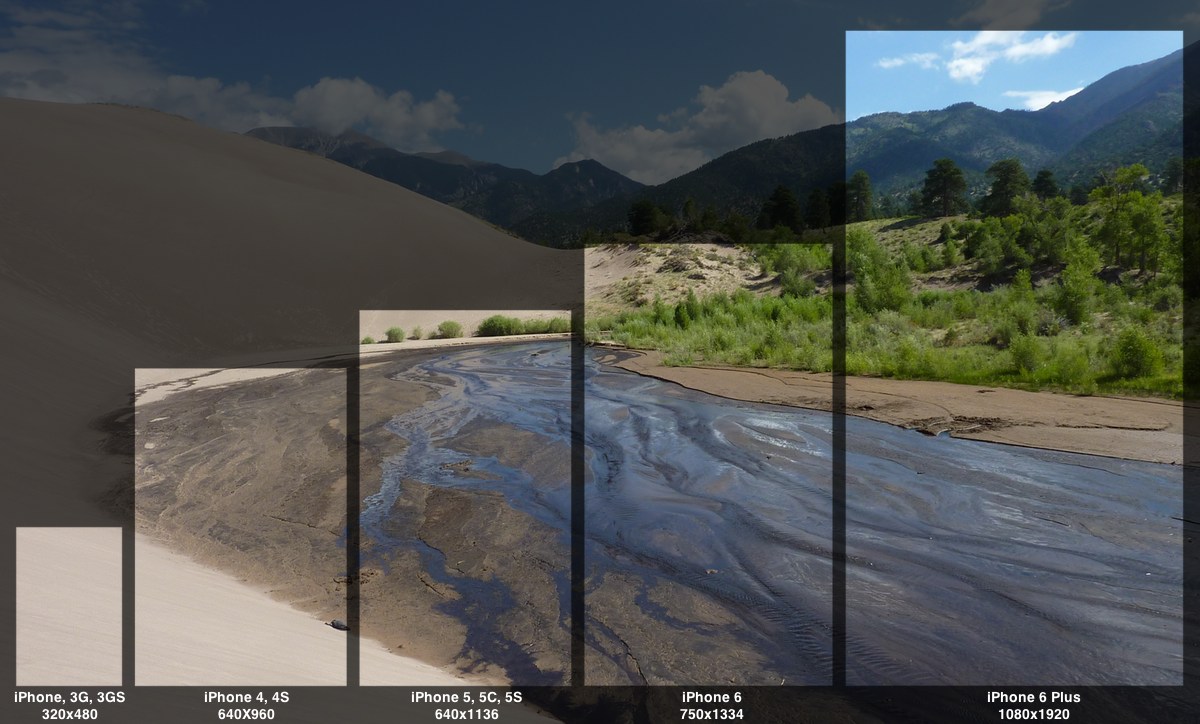
While I was working on some iPhone 6 lock and home screens, I paused for a few minutes to put together this visual guide to the iPhone's changing screen resolution over the years (click to zoom):

Both the inline and zoomed image above are smaller than 100% scale, of course. But if you'd prefer, you can check out the massive full-size version. Be forewarned, this is a 3628x2188 pixel photo, and it's 1.7MB in size.

For the curious, the original photo was taken at Great Sand Dunes National Park and Preserve, at roughly this spot, looking north-ish.

When viewed in this comparative manner, the iPhone Six Plus' resolution really stands out—there are a ton of pixels on that gorgeous screen!


Silently mute the mic input via AppleScript

Note: The scripts in this hint don't truly mute the mic input; they drop its volume to zero. That's because there's no way to mute an input source via AppleScript (while you can mute an output source). At zero level, the mic will still pick up sounds, but they're very quiet.

Thanks to John Welch, though, you can download an app that will mute the mic with a simple one-click HUD—he posted it in the first comment here, but that download link is broken. Instead, download it via this link, and you should be good to go.

While recording our weekly podcast, The Committed, I often want to mute the microphone input for one reason or another. (Yes, my microphone has a big Mute button on it, but pressing it results in an audible CLICK in the recording.)

There are any number of ways to do this quietly, including just sliding the level down in the Sound System Preferences panel (though it's hard to then get it back to exactly the right spot). There are also any number of App Store apps that will do this for you; some are free, some are paid. And doing it programmatically yourself is as easy as two one-line AppleScripts:

Save those separately, assign keyboard shortcuts (or more quietly, trackpad gestures) using your favorite third-party tool, and you're done.

But I wanted something more. I wanted one script to mute and unmute the volume. I also wanted a visual reminder when I was muted. After an afternoon of slogging around the internet, looking up obscure AppleScript command syntax, and diving into Sal Soghoian's AppleScript 1-2-3 book, I came up with something that seems to work. This short video shows one version of it in action:

Read on for the code and a how-to on putting it to use.

[continue reading…]


Behind OS X’s modern face lies an aging collection of Unix tools

Note: This article has been heavily modified, as I was a total knucklehead and completely forgot about GPL v3—thanks to Geordie Korper for pointing it out in the comments. Basically, the cause of the aging Unix tools in OS X is GPL v3. I've updated the following table to include the license information. In every case but one (nano), GPL v3 is the license on the non-updated apps. So that's that…I'll leave this up, though, in case anyone's curious about this stuff.

As I covered recently, the version of bash that ships with OS X is quite old, and as such, is vulnerable to the recently-revealed bash security hole.

At some point, Apple will release an OS X update containing a patched version of bash. (Update released.)

So while Apple has patched bash, this version of the shell is simply ancient. Just how old is it? bash 3.2.53(1) is roughly seven years behind the current version, 4.3.25. Seven years is like, well, forever, in Internet time!

With that bash age gap in mind, I took at look at a number of common Unix apps—in both Mavericks and Yosemite—to see which versions were in use. Then I checked the same apps in MacPorts, a tool that makes it simple to install many Unix apps.

(MacPorts doesn't necessarily have the absolute latest version of every Unix app, but they do stay relatively current. For instance, they already have a patched version of bash that fixes the above vulnerability.)

The results were interesting, to say the least—many of the core Unix utilities in OS X are years and multiple versions behind their open source, er, sources. You can thank GPL v3 for that, as noted above (and covered in more detail below). But that still leaves the big question:

Does it matter?

That is, should we care that these tools aren't keeping up with their latest and (presumably) greatest versions? Is it a problem, or merely a statement that what we have works well enough for the majority of users? (For those who don't want to bother reading, my general opinion is no, it doesn't matter.)

[continue reading…]


Cutting the land line (sort of)

Being old school—and just old in general—our family has always had a land line (i.e. Plain Old Telephone Service or POTS). We've also had the same POTS phone number for well over a decade, so it's the number that everyone uses to call us at home. Add in the fact that (at least until very recently) AT&T cell service at our home was marginal to poor, and there really wasn't much desire to cut our land line for all-cellular.
Until I looked at our bill, that is, and discovered that our POTS line was costing us over $30 a month. Even at that amount, we paid extra for caller ID, and still had to pay for long distance calls. So once AT&T upgraded the cell towers near our home, we started using our cell phones for all long distance calls. But still, our POTS number was well known to friends and family, so we didn't want to just kiss it goodbye. But that $30+ a month was basically a complete waste of money, so I started looking for other solutions.

Enter VOIP, or Voice Over IP. This technology has been around a long time, but I never really felt ready to make the move. Then I started looking into it, and found that I could save about 90% of the monthly cost of my POTS line, keep my phone number, and gain a number of useful features. That made the "go" decision quite easy to make; read on if you're curious about replacing a land line with a VOIP service.

[continue reading…]


Fixing a lawn mower, then and now…

On Sunday afternoon, I went to pull our mower from the garage to attack the jungle growing in our yard. Apparently while pulling a car into the garage at some point, I had managed to snag the mower's grass catcher between the car's wheel and a garage support post. The end result was a mangled piece of metal that more resembled avant-garde sculpture than it did a grass catcher. I borrowed the neighbor's mower for the day, which solved the problem in the short term. But long term, I was in need of a new frame and grass catching bag.

With the power of a time machine, here's how that task would have gone 30 years ago, and how it went on Sunday…

[continue reading…]


Ford delivers (via FedEx) excellent customer service

  • Auto

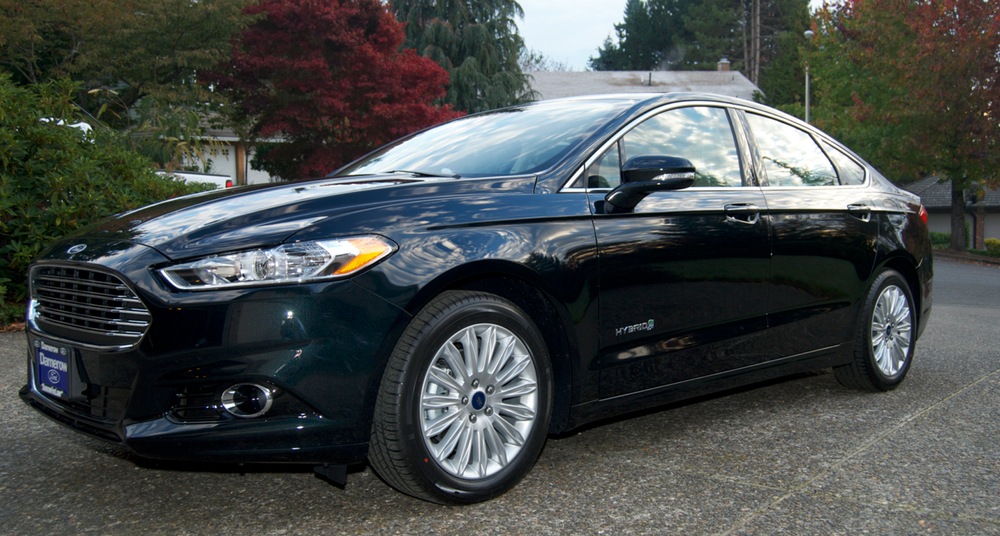
About a year ago, we were in the market for a new car. We wanted a roomy midsize car with good gas mileage, and lots of tech toys for me to play with. After much searching around, and too many test drives to count, we chose a new Ford Fusion Hybrid.

We don't drive so much that a hybrid makes economic sense, but I so despise Oregon's "can't pump your own gas" law that we went for the Fusion Hybrid's 47/47mpg rating (at the time we bought), and its expected 600ish mile range between fill-ups.

Our experience with the car has been nothing short of terrific—given I hadn't bought an American car in over 30 years, I've been very pleasantly surprised by the car's comfort, quietness, reliability and features. (More on our experiences with the car itself in a future post.)

Overall, our gas mileage has been great—we're usually around 40mpg in the city, and often over 47mpg on the highway. Our experience versus the EPA sticker didn't surprise us, as we've previously owned a hybrid (a Camry), and saw similar results. I also don't think I've ever hit the EPA numbers for any of my prior vehicles, hybrid or not. So while we weren't seeing 47/47, we weren't far off, and were quite happy with our mileage.

Which made the FedEx we received yesterday all that more surprising…

[continue reading…]


The (semi) hidden world of Dulles’ Z gates

I spent the last three-ish weeks on the east coast, visiting family along with various tourist sites. We flew in and out of Dulles International Airport, via a direct flight (oh wow, they still exist!) from/to Portland.

If you've never been through Dulles, it's an interesting airport—though a bit less interesting now than in the past.

In the past, you entered the main terminal, cleared security, and then boarded a bus (a two-headed elevating bus, similar to what's seen in the image at right, often with tails on top to help them be seen from the control tower) to one of the outlying buildings holding the actual gates.

Now most terminals are served by a train system, or via a walkway. But Concourse D is still accessed via the bus, and that's where we were set to fly out. It was just me and my kids for the flight home; my wife had returned a week earlier. We arrived at the main terminal about 90 minutes before departure. After clearing security, we were headed for the bus to Concourse D when I happened to check a departure sign…and discovered that our flight was delayed for 50 minutes. Ugh.

The Concourse D building at Dulles isn't one of the nicest places to wait, especially with kids (it can be noisy and hard to find space to relax). But I didn't really want to head back through security either. Standing there near the entrance to the shuttle busses, I spotted a sign for "Z gates," which I'd never heard of before. So we headed down that way, just to see if we could find somewhere quiet to pass the time before boarding the shuttle bus.

What we found was a wonderful, nearly deserted oasis of peace and quiet right in the heart of Dulles.

[continue reading…]


Watch It: Noises Off

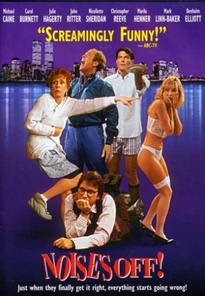
Noises Off coverNoises Off (1992) is a movie adaptation of a farcical stage play about the production of a stage play. The camera moves freely between front stage and back stage, so you get to see both what the audience sees, and the behind-the-scenes action the audience will usually never see. (The movie's name is taken from a theater term for sounds produced offstage, and there are plenty of those in the movie.)

Just watching the movie, it's fairly obvious that it would work better as a play (because of the layout of the set and the nature of the humor). But this movie is an entertaining and (according to those who've seen the play) faithful adaptation of the play.

The cast is loaded with recognizable names and faces, including Carol Burnette, Michael Caine, Marilu Henner, Julie Hagerty, Mark Linn-Baker, Nicollette Sheridan, and the too-early-gone John Ritter and Christopher Reeve. They're all quite funny to watch, and the timing amongst them is (and has to be) spot on for the movie to work. Thankfully, the timing is spot-on, leading to many humorous moments.

The movie follows the stage troupe working on their play, starting with rehearsals and opening in Iowa, traipsing through various other small towns, and finishing up with the big opening night on Broadway. Along the way, we get to watch as the group teeters on the brink of disaster, each night's show bringing a fresh crisis. Whether it's an alcoholic old-timer or relationship issues between some of the actors, there's always something going on to disrupt the play's normal flow. Many scenes stand out, but there's one involving bottles of alcohol, flowers, and hijinks among the actors that leaves me laughing every time.

Sadly, this oldie hasn't been remastered for Blu-Ray, nor is it available for legal streaming on any of the services I checked. That leaves just the Amazon DVD, or "alternative solutions" if you're interested in watching some great actors have a lot of fun with a unique concept. Well worth watching, and probably not a movie style you've seen done before.

iTunes Store
Not available
Amazon
DVD
The Movie DB
Details
Rotten Tomatoes
Reviews [57%]


Trip report: Touring the White House

Last winter, our family decided we'd head to Washington, DC for our summer vacation. With our kids being 11 and eight, we figured they'd be old enough to appreciate some of the history and sites in the area. One thing I remembered from my youth was a White House tour, and I thought it'd be fun to take our kids on the same tour.

Needless to say, things have changed quite a bit since I toured many decades ago. I don't recall the setup details from my youth (as my parents handled that), but I assume security was somewhat less stringent.

For those interested in possibly taking a tour themselves, here's how it worked for us…

[continue reading…]


Search the iTunes Store from anywhere

This morning, I wanted to send someone an iTunes App Store search URL, so that when they clicked it, they'd see the list of matching apps in the iTunes App Store. There's no apparent easy way to do this within iTunes, but after much futzing about, I figured out how to structure a URL that will open to to the search results screen in the iTunes App Store.

Because Apple has separated iPhone apps and iPod apps in the store, there are actually two separate URLs, one for each type of app. The iPad version of the URL is:

itms://search.itunes.apple.com/WebObjects/MZSearch.woa/wa/advancedSearch?entity=iPadSoftware&free=0&genreIndex=1&media=software&restrict=false&softwareTerm=TERMS+TO+SEARCH+FOR&submit=seeAllLockups

And for the iPhone, it's identical except for the entity bit:

itms://search.itunes.apple.com/WebObjects/MZSearch.woa/wa/advancedSearch?entity=software&free=0&genreIndex=1&media=software&restrict=false&softwareTerm=TERMS+TO+SEARCH+FOR&submit=seeAllLockups

Hopefully obviously, replace TERMS+TO+SEARCH+FOR with the keywords you want to use for the search, separating words with the plus sign. You can then use the URL for whatever you like: send it to someone, add it to your bookmarks bar, whatever. When clicked, the search will run and the results will open directly in the iTunes App Store for either iPad or iPhone apps.

For example, iPad Apps related to the word foobar, or iPhone apps about hopping frogs.

You can further customize the URL to find anything you want—not just apps, and using additional criteria—within any of the various areas of the App Store. Read on for the details on how to do that.

[continue reading…]