Skip to content

General

Stuff that doesn’t fit in any other category

The Queue helps track TV shows and movies to watch

As with Dramatis, The Queue is a Claude-developed web app. Its purpose is to help me track the TV shows and movies that I want to watch, am watching, or have watched. So as with Dramatis, the same disclaimer applies: While I managed the project, all of the code involved was written by Claude. There's no use of passwords, nor does it store or collect personal data (other than free API keys, which are store locally in your keychain). But still, use at your own risk.

Unlike Dramatis, though The Queue is completely free to use—no Anthropic API key is required. It uses the free TVmaze API to retrieve information about TV shows, and two free API keys (which you have to create) from TMDB and OMDB for movie information.

Here's how it looks on my Mac:

And here's a download link:

Download The Queue web app (591KB)

It works like Dramatis does, by running a mini web server on your local Mac.

[continue reading…]


Dramatis tracks characters in books, series, and movies

As shown in my post about Claude Code, Dramatis (from "dramatis personae," the list of characters in a story) is a tool Claude created to help me keep track of the relationships between major characters in books, TV series, and movies. Here's a look at the main screen, for season one of The West Wing:

When you retrieve data for a title, it's automatically grouped into buckets that make sense for the show's plot—by function in The West Wing, Friends gets "Main Six," "Romantic Interests," and "Supporting Cast," etc. Click on a bucket and you'll see just the characters within that bucket.

Each character can have a separate, lower level of organization—Jed Bartlett is in the Executive Branch bucket, but his info card also shows Oval Office. Click on any character for full details on their role, as well as links to other characters who interact with the selected character.

[continue reading…]


That post, you know the one…it’s back!

Prompted by both the 25th birthday of macOS (March 24th), and my buddy Kirk's prodding, my dormant A full history of macOS (OS X) release dates and rates post is coming back! After a long vacation, it's looking better than ever, and honestly, it's 10x more usable now.

Here's a behind-the-scenes look at what's changed during its 16 month vacation, and how it got there…

In addition to the cosmetic work done at Botox of Hollywood, here's what else has changed.
[continue reading…]


Some of my fave Lego sets are retiring soon

For way too many years, building Lego kits has been one of my favorite hobbies. I find the construction process fun, and I love seeing the engineering Lego came up with to model various systems in their models. Over the years, we've built a lot of kits—45 or so in 20+ years. I have a spreadsheet that tracks the kits we've built, and while updating it today, I noticed that a number of my favorite sets are retiring soon.

If you like building Lego sets, these four are highly recommended—the builds were interesting, the engineering in the models is amazing, and I really like the finished set.
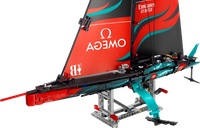
Emirates Team New Zealand AC75 Yacht: The engineering in this kit is pretty astonishing—there's a working pneumatic system that raises and lowers the hydrofoil arms, the mast turns, and the jib can swing from side to side. At $120, this is quite the bargain in the world of Lego.

Hogwarts Icons Collectors Edition: This wasn't the most fun build (a fair bit of repetition, especially in the owl's wings), but the end result is very cool. The sheer breadth of things in the set is also impressive.
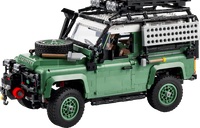
Land Rover Classic Defender 90: The original 1983 model, and this one has a working suspension and steering. Fun to build, and lots of accessories to complete the look. If you're a Lego Insider (free), it's on sale for $60 off right now.

X-Wing Starfighter™: Luke's X-Wing wasn't pretty in the original Star Wars, and this one's not pretty either. It's beat up, missing a panel or two, and has some mismatched colors. But it's a fun build, and the engineering behind the x-wing technology is very impressive to see as you build it.

Once Lego retires a set, they get very hard to find—you can sometimes find remaining stock in stores, but if that fails, you're off to eBay to hope someone's selling a clean, complete set in good condition. What you'll usually find, though, are scalpers with unopened sets they're trying to sell for twice or thrice the actual list price.

So if you want them, buy them before they retire. These four in particular are amongst my favorite builds.


The day my DSLR died (to me)

I like taking pictures, and some years back, I bought a starter-level DSLR—the Fuji X-E3. It's a well-reviewed APS-C camera, and I enjoy taking photos with it. I have four lenses for it, including a decent zoom lens.

It's a wonderful camera…but it basically died to me some time in mid July of 2025. Why then? Because that's when my wife and I were starting to put together our lists of stuff to pack in the car for our 7,000+ mile adventure.

[continue reading…]


We drove through 46% of the US states on one trip

My wife and I just completed a three-week journey around a chunk of the United States. What started as a plan to visit family and friends in Boulder, Colorado and Albuquerque, New Mexico, expanded to cover 23 states, two countries, and 19 separate attractions, spanning 7,200+ miles of travel.

We got incredibly lucky with weather (generally gorgeous, only really too hot in Cincinnati), health (no colds or COVID for either of us), crowds (minimal), and the car (no accidents and no issues). It was an excellent trip; here's a view of the overall route:

(When we entered Oklahoma and then Arkansas, I crossed off the last two states on my list—I have now visited all 50 states. I though I'd get this done years ago, but it just never worked out until now.)

After our family and friends visit ended in Albuquerque, we started the real tour, heading east to Memphis, then generally northeast to Niagara Falls, and then back due west to Portland. Along the way, we stopped at 18 separate attractions—monuments, museums, an amusement park, a zoo, tourist traps, and even a tennis match. I'll post separately on the logistics of this trip, as we learned a fair bit that might be useful to others planning something similar.

But if you're interested in what all we saw, here's a chronological list with links to the Flickr albums associated with each attraction:

[continue reading…]


It’s been quiet around here lately…

Since February, in fact. Sorry about that; life happened. Hopefully that starts changing soon, as in today.

The first update, though, is that I'm going to stop updating my macOS releases post—I think it's served its need, and it was becoming arduous to keep up with. I have added a link to Wikipedia's macOS history page at the top of the post, as you can find much of the information I provided there. I know it's not exactly the same, but for my needs, it's good enough.

I do plan to resume posting, starting very shortly with a post that somewhat explains my absence over the last few months.https://robservatory.com/wp-admin/profile.php


Undocumented find: A great Mac-compatible flightstick

The VelocityOne Flightsticktl;dr version: I highly recommend the Turtle Beach VelocityOne Flightstick (right) for use with X-Plane on the Mac. Despite not being advertised as Mac-compatible, it works incredibly well, and at only $129 on Amazon, is a very good deal.

There are tons of buttons, three separate analog axes, a mouse and display built into the top of the stick, LED lighting (which you can also disable), and much more. Keep reading for a lot more detail, but if you're looking for a good Mac-compatible Flightstick, I'm over a year into my VelocityOne, and haven't had any issues yet.


I recently built myself a new gaming PC—Frankenmac was nearly seven years old, and was incapable of running the games I wanted to play with any sort of decent framerates. I won't bore you with the details of the build, but the perforance jump from an Nvidia 1080 to Nvidia 4080 graphics card was very impressive!

My main gaming outlet—on both my Mac and my PC—is flight simulation. On the Mac (or PC), it's X-Plane, plus Microsoft's Flight Simulator on the PC. As I don't have a lot of spare desk space, or the desire to spend a ton of money on flight peripherals, I control the simulators with a flightstick1A joystick with features specific to flight sims, such as a yaw axis..

[continue reading…]


What a long strange trip it was…

I was in Washington, DC for the last week or so, visiting some relatives and acting like a tourist. I flew home last night, and before departure, the pilot announced the flight would take a bit longer than usual—five hours and 40 minutes—due to some routing for weather. In the end, it was almost another hour more than that, taking 6:27 from gate to gate.

After the announcement, I checked the weather map just before we departed, and indeed there were a couple storms in the midwest:

I figured the rerouting was to head a bit north of the ideal path, towards Minneapolis, to duck between the storms. Or maybe further north, into Canada. Oh how wrong I was!

[continue reading…]


Create a Time-Machine-like backup of Keyboard Maestro macros

I use Keyboard Maestro a lot—a quick search here reveals how often I write about it, and I use it much more than I write about it.

I back up my macros reliably, as part of my overall backup plan. I also sync them between my Macs. And a while back, that caused an issue: Between the regular backups (Time Machine and removable external drive), I had a sync issue and I lost a few hours' worth of work on a new macro, and some untold number of old macros vanished. I recovered the older macros, but the new work was just gone.

So I set out to find a better backup solution for my macros.

I wanted a tool that created something close to versioned backups that were browsable in Finder, that didn't take a ton of drive space, and that made it super-simple to restore any single macro or macro group*Time Machine backs up the entire macros file, not individual macros or groups from some point in history.

I also wanted it to be completely risk-free to use, never modifying my macros in any way (so no import tool in the macro). I wanted Keyboard Maestro Time Machine, basically. As I couldn't find an existing solution that worked in that manner, I wrote my own.

[continue reading…]