Skip to content

General

Stuff that doesn’t fit in any other category

Retina lollipops

A candy store at the local mall had the most amazing wall of colorful lollipops, and I thought it'd make a wild desktop image for a retina iMac. As I snapped the pic on my iPhone, it took a bit of upscaling to reach 5120x2880, but I think it still looks fine; here's a small-scale version:

I also thought a tunnelized version would be interesting; here's how that came out:

I have these in my normal "rotate random every 15 minutes" cycle, and still get a kick out of the lollipops when they get chosen.


Smart TVs know—and share—what you’re watching

If you own—or plan to own, or plan to give as a gift—a "smart TV" from LG, Samsung, or Vizio, are you aware that these sets share your viewing data with third parties? If not, you should be—even if you're a very 'open' person, the amount of data collected and shared by these sets is quite scary.

For example, Samsung Smart TVs collect the following data:

Information about content that you have watched, purchased, downloaded, or streamed through Samsung applications on your SmartTV or other devices; Information about applications you have accessed through the SmartTV panels; Information about your clicks on the “Like,” “Dislike,” “Watch Now,” and other buttons on your SmartTV; The query terms you enter into SmartTV search features, including when you search for particular video content; and Other SmartTV usage and device information, including, but not limited to, IP address, information stored in cookies and similar technologies, information that identifies your hardware or software configuration, browser information, and the page(s) you request.

Vizio isn't much better; here's what their sets collect:

For VIZIO televisions that have Smart Interactivity enabled, VIZIO will collect data related to publicly available content displayed on your television, such as the identity of your broadcast, cable, or satellite television provider, and the television programs and commercials viewed (including time, date, channel, and whether you view them live or at a later time).

And while I couldn't find LG's privacy policy, it's been caught spying on users.

All three manufacturers ship their sets with data sharing enabled, but it's relatively easy to disable on all three brands. Consumer Reports provides clear instructions for all three companies; unless you really enjoy sharing your viewing habits with unknown third parties, I suggest you disable these onerous data collection tools in your smart TV.


With Siri, it seems verb tense matters

My buddy Kirk McElhearn posted a blurb on his blog about Siri and 18th century painters: Siri and the History of Art. In a nutshell, he asked Siri who was the greatest French painter of the 18th century. She replied with "one eighteenth is approximately zero point five five five." Say what?

He asked me to try, but when I tried, here's what I got:

So Siri only knows art history in the USA, it seems? (Kirk lives in the UK.) Actually, no. On closer inspection, when I spoke, Siri heard "Who is the greatest…," versus Kirk's Siri hearing "Who was the greatest…."

So I tried agin, making sure Siri heard me say "was." Sure enough, when Siri hears "was," I get math results. When Siri hears "is," I get art results.

If you want Siri to help you with your history, it seems you should talk to her in the present tense!


A unique lava lamp time-lapse

We occasionally take our kids to a local place, Big Al's, which is one of those bowling/arcade places that give out tickets as rewards from the arcade games. Being good parents, we too sometimes play the games (you know, to spend time with the kids…yea, that's it). Over the years, we amassed quite a bunch of tickets, but weren't quite sure what to spend them on.

The last time we were there, I was smitten by a lava lamp, similar to this one, but ours has a black base and blue "lava." I don't know why (childhood flashback?), but I decided some of our points cache would go to this mesmerizing but otherwise useless device.

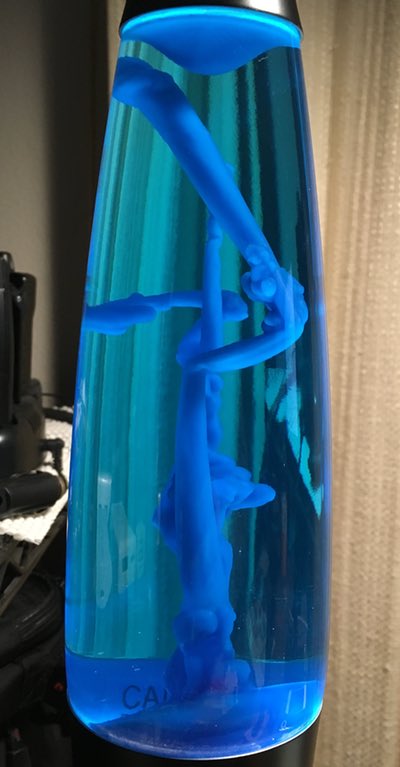
When I got it home, I was surprised at just how long it takes to warm up: It can take nearly an hour before any "lava" starts flowing, and about two hours before it really looks like a traditional lava lamp. During the first hour, though, the melting wax in the lamp makes some really cool abstract bits of art, as seen in the photo at right.

I thought this might make a neat time lapse, so I set out to record it with the iPhone. My first attempt failed, due to the iPhone's auto-adjusting time-lapse feature. Because the lamp takes so long to get going, the gap between frames winds up being quite long. Long enough that when stuff does start happening, the iPhone's time-lapse gaps are too wide to make for an interesting video.

I needed another solution, so I headed to the iOS App Store to see what was available…

[continue reading…]


The mysterious case of Mail’s vanishing Rules actions

I have used OS X's built-in Mail program for nearly 15 years. I use it for both personal and work emails, and as such, I rely on rules to sort my mail—I have 75 separate rules. (Note to Apple's Mail team: If you would allow boolean logic in rules, I could slash this number to about 10. Please?)

Recently we changed the Many Tricks store, and as a result, I needed to modify about 30 of my rules. As I was working on these changes, which requires editing and testing each modified rule, I noticed a most-frustrating Mail bug: The "Perform the following actions" section for all rules would slowly vanish as I edited my rules.

Needless to say, editing a rule when you can't see the Actions section is impossible.

[continue reading…]


The 15th club in my golf bag…

For those who don't know, the rules of golf only allow you to carry 14 clubs. But in my case, I do carry a 15th "club" in my bag: a ball retriever. If you don't, this little story might convince you that you should, too.

I don't know anyone who likes paying for golf balls. But most people do enjoy playing with nice, clean, new-looking balls. By carrying a 15th club that is a golf ball retriever, you can play with others people's nice new golf balls!

I carry JB's nine foot model, and its telescoping poles and simple head design have worked well for me. Expect to spend $15 to $50 for a retriever, depending on the length you desire, the design of the head unit, and the construction quality. Whatever you spend up front, with a dozen golf balls costing $20 to $60, your retriever will quickly pay for itself.

As an extreme example, I recently played at a course that features a creek that meanders between the last two holes. As I was playing alone, and way out in front of everyone, I took about 20 minutes to wander along this creek as I played the last two holes (see note below) I didn't walk the creek's entire length, nor did I retrieve every ball I saw. And my retriever is only nine feet long, so there were balls I could see but couldn't reach.

* Note: This is not something you could do during a normal round. During a normal round, I just walk near ponds and creeks, and if I see a ball, I'll quickly scoop it up while my partners are busy prepping for their shots. Using this technique, I can still collect up to 20 balls a round. If you're delaying the game due to ball collecting, you're doing it wrong.

So how many balls do you think I collected in that time, given those restrictions? Two holes, 20 minutes. 10? 20? 30? 50?

[continue reading…]


Cheap fireworks in slow-mo are oddly compelling

I'll be out of town on the Fourth of July, so the kids and I did our little fireworks celebration last night. This being Oregon, we stuck to what we could legally buy, which basically means nothing that can fly or explode. For grins, I set up my iPhone on a tripod, and shot some of the fireworks in slow-mo mode. The result was much better than I was anticipating…

That's about a minute's worth of one of the larger fireworks. You can download that one (1280x720, 96MB), or if you want, download the full seven-minute version. Be aware: If you're on a metered connection, the big version will set you back 671MB!


Trip Report: Chambers Bay for spectators

When I first heard—way back in 2011—that the US Open was coming to Chambers Bay golf course, located less than three hours from my home in Beaverton, Oregon, I knew I wanted to go. Having played the course (just once), I thought it'd be great fun to watch the pros play at the same place (though with a very different setup…and a very different skill set!)

After much planning and a year of waiting, we finally made the trek last Thursday. We arrived at the course at 7:00am, and didn't leave until after 8:00pm. Overall, it was an amazing experience—heck, I even got to hold the actual trophy during a backstage tour of the TV production facilities. (That was an amazing experience, and well worth the $10/year cost to belong to the USGA, even ignoring all the good stuff they do for the game.)

But having been there for Thursday, I was quite content to return home for the final rounds this weekend, watching on the big screen in high def. Why? Because as amazing as Chambers Bay is to both visit and play (if you're a golfer, it's well worth its outrageous cost), it's a terrible place to watch pro golfers play the game.

[continue reading…]


The bizarre world of digital movie pricing

Recently DirecTV had a free HBO preview weekend; as we're not subscribers, I set our DVR up to record a number of movies. One of those films was X-Men: Days of Future Past. I'd never seen any of the X-Men movies, and I really liked this one. So I decided to watch the other six films in the series, renting them on iTunes and Amazon Instant Video.

I was able to rent all movies except The Wolverine, which is only available as a purchase on either Amazon Video ($12.99) or Apple TV ($14.99). So I had to buy one movie, and rented the other five. In total, I paid $34.94—about $5.82 each—to watch six movies, including buying The Wolverine. That's not outrageously expensive. (I paid an extra $2 to buy the iTunes version, as it's a better viewing experience than Amazon Instant Video.)

But (excluding The Wolverine), that's my cost to watch them just once. If I or anyone in my family wants to watch them in the future, we'll have to pay again. If I want to own the movies, to make them free to watch any time, I could either buy them digitally or on Blu-Ray.

To buy all six movies on iTunes, I'd pay a whopping $89.94, as each is priced at $14.99. (You'd think the first three films, all being at least nine years old, would be cheaper…but you'd think wrong.) Over on Amazon Instant Video, it'd still cost $77.94 to buy the six movies on digital, as they're $12.99 each.

Clearly, if digital is that expensive, then the Blu-Rays will be even more, right? After all, they have to be mastered, duplicated, boxed, sealed, and shipped to retailers. There are physical returns to worry about, and management of all the stuff in all of those steps…so these Blu-Rays are going to be incredibly costly, right? No, not right at all.

A quick trip to amazon.com leads to X-Men and The Wolverine Collection, which contains all six of the movies on Blu-Ray. And the cost for all six movies? Only $34.96, or exactly two cents more than I paid to to rent five and buy one in digital form!

(I found the exact same collection on walmart.com for the same price, too, so this isn't some Amazon-only special pricing. And even at the full list price of $69.99, this collection is still cheaper than the digital versions.)

Even if I wanted to buy all six movies separately, the total cost for all six would be $73.78—still cheaper than either iTunes or Amazon Instant Video! (Most of this cost savings is because the older movies are indeed cheaper than the newer movies. And the newer movies are, in some cases, more than their digital counterparts.)

In a nutshell, I should have simply bought the six-disc collection and been done with it. (It's also not too much work to rip them myself if there's not a bundled digital copy, so I can watch on Apple TV, iPad, etc.)

I'd have spent all of two pennies more than what I did, and I'd own the actual movies, free to use when I like and how I like. Sometimes I really hate Hollywood.


Improve the performance of your audio/video system

I take my audio and video very seriously; my audio/video room is built on a separate foundation from the rest of the house, the sub-floor is acoustically isolated from the foundation, and the walls and floor have been tuned for perfect response regardless of listening position. In short, I don't mess around with my audio/video stuff.

But I always think there's room for improvement, which is why I was so excited by the arrival of my long-backordered Chromatic Response Augmentation Panels, pictured at right.

These panels (a steal at only $229.95 per set of 25; I ordered an eight-pack) are simply incredible. How do they work, you may ask? You apply them to your audio and video cables, and the chemically-coated colors in the panels act on the electrons in the wiring, aligning them for fewer collisions and better flow rate.

Why should you want to reduce collisions and increase flow rate? After installation and 100 hours of continuous testing in my audio/video room, here's why: They're amazing! My audio playback was impressively better than before I installed the augmentation panels. The sound stage was broader yet more nuanced, stereo separation improved by 87%, and I noted a subtle but discernible reduction in noise below the 20Hz level. Incredible!

My 1977 master recording of Steve Fullerton and the Vienna Beach Orchestra performing Riccardo's monumental 1771 symphony "En Periodico De Nada Fulleste" sounds better than I've ever heard it before.

My video playback was similarly improved: The blacks were blacker, the color palette was stunning in its breadth, and interlacing was basically gone. Watching the director's cut of the seminal 1968 film "The Peacekeepers," I was drawn into the movie like never before. It was almost like I was right there, demonstrating with everyone. Intense!

They may look like Sticky notes, but these augmentation panels have demonstrable real-world benefits in both the audio and video realms. Frankly, I'm blown away by these little panels of color!

When installing the panels, make sure you follow the instructions precisely—each type of cable requires a different repeating color sequence. Why? Because the types of electrons vary depending on source and destination, and the panels must be ordered properly to reflect these differences. For instance, here's my RCA cable wrapped with the panels:
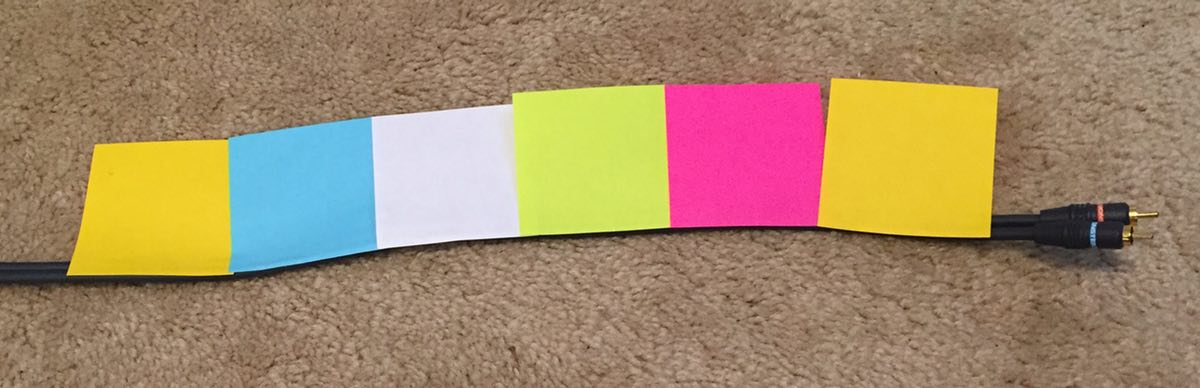
While RCA uses a YPGWB—Yellow Pink Green White Blue—repeating pattern (see note below), Toslink cables use BBWGPPY, HDMI cables are GGWBPYBG, speaker wire is GPWWBYYP, etc. It's all explained in the 200-page installation instructions, which can be easily followed by anyone with a dual degree in physics and chemistry.

(Note: Because of their country of origin, the augmentation panels' patterns go from right to left, not left to right. Make sure you get the directionality correct, or you'll lose all the benefits of the panels.)

Note, too, that the panels must end 1/2" from the end of the cable, so as to let the electrons slow a bit before reaching the termination point. Otherwise you'll risk blowing out your equipment due to the high-speed electron collisions.

Anyway, if you're the type that wants the best out of your audio/video system, I highly recommend the Chromatic Response Augmentation Panels; at only about $2,000 to do all my cable runs, it's an amazing bargain. I've heard that the factory is making the stuff as fast as they can, but quantities are currently quite limited—so order your CRAP now before it's all gone!