Skip to content

General

Stuff that doesn’t fit in any other category

Book: “As You Wish: Inconceivable Tales…” by Cary Elwes

Like 95% of the audience and 97% of the critics, I'm a big fan of The Princess Bride. The movie turns 30 this year (special anniversary super-duper Blu-ray extended mega cut, please?), and it stands up well to the test of time. If you haven't seen it yet, well, see it. It's not only full of quotable quotes ("Inconceivable!"), the story is enjoyable, the acting campy and perfect, and certain characters are just incredibly memorable. Well worth the time.

But this post isn't about the movie. It's about a book about the making of the movie, written by Cary Elwes, who starred as Westley, aka The Man in Black. And in the interest of thoroughness, the book's full title isn't As You Wish, it's As You Wish: Inconceivable Tales from the Making of The Princess Bride.

The book is well written (with some credit to Joe Layden, noted as the "with" on the cover), and details Carey's experiences with the film starting with the original casting call (actually a note under his hotel room door) up through the release and some detail on the inept marketing behind the movie. It's a great read, and very interesting on its own.

But what really made the book for me were all the quotes that Cary secured from others involved in the production. These are present throughout the book, and you seldom need read more than a page before encountering one.

They aren't shown inline, which would interrupt the story flow. Instead, they're presented as asides, like this one:

Each appears near relevant content, so they're applicable to what you're reading. But by separating them, you can read them when you like. These snippets have some real gems, such as the one above, which explains how The Princess Bride book came to be. Since finishing the book, I've gone back through it, just to read all these asides again; they really are wonderful.

If you're a fan of The Princess Bride, Cary's book is well worth your time.



787 takeoffs and landings

This one's only for the aviation geeks, and it goes along with my writeup on the 787. I recorded the takeoffs and landings in both Calgary and London during my 787 trip; if you enjoy such things, here they are (in glorious 4K). Watch for the cameo by the retired Concorde, around the 6:15 mark.

I'm not sure when it will happen, but I'm definitely looking forward to my next flight on a 787!


From the passenger seat: Boeing’s 787 Dreamliner

The Many Tricks company is somewhat unique, as we're a two-person multi-national organization: I'm based in Portland, Oregon, and Peter Maurer, my business partner, lives in Germany. We've met in person a few times—a couple of times at WWDC in San Francisco, and once in Portland (just after we relaunched the company in 2010).

So this time, it was my turn to travel, and in April of 2016, I set out for Germany for a couple weeks. Being something of an aviation freak, though, I couldn't book just any flight to Germany: I wanted to fly on Boeing's newest jet, the 787.
I started with the Airport Spotting site's 787 routes page, which tries to list all 787 flights. I then searched for flights that would get me close to my destination, on my schedule, and meeting my budget.

With those key variables taken into account, and certain flights being sold out, there was literally only one choice that met my needs: An Air Canada flight out of Calgary to London. From there, I'd transfer to another airline for the trip to Basel, Switzerland. (Basel is the closest major airport to Freiburg, Germany, where Peter lives.)

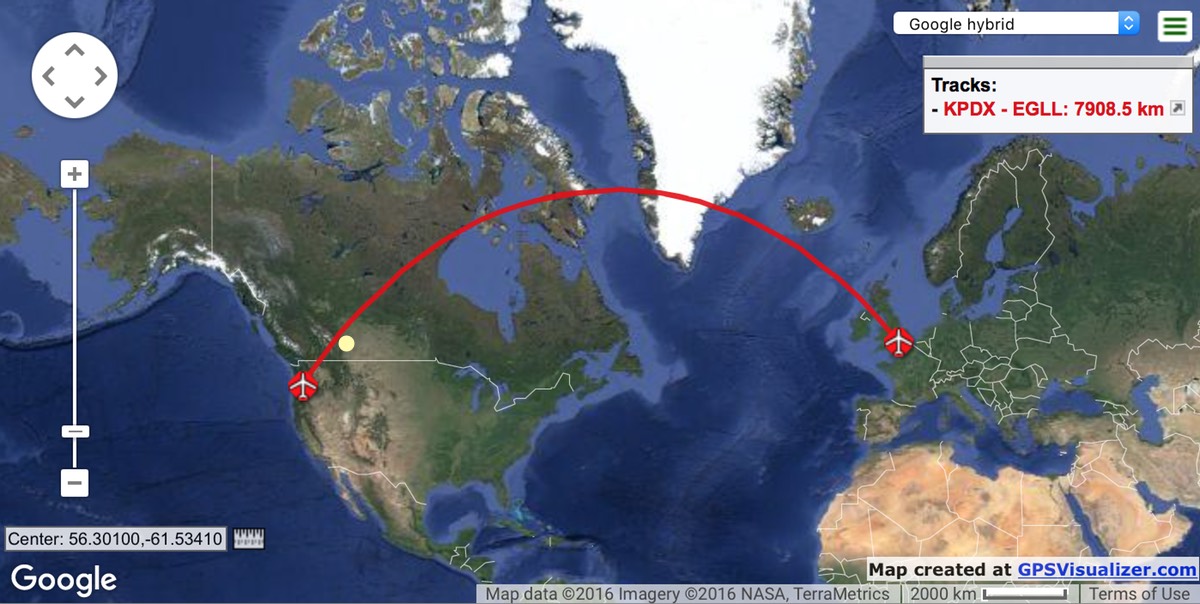
Calgary might appear somewhat out of the way for flying from Portland to London, but it's really not—it's pretty close to being right on the great circle route between the two cities:

And as it's not possible to fly direct from Portland to Europe (at least, not on a 787!), I'd be flying somewhere else first anyway, so why not Calgary?

Things were complicated a bit by the difficulty of getting to Calgary—I had to fly through Seattle first (welcome to the hub-and-spoke system). So my travel day was going to be Portland > Seattle > Calgary > London > Basel > Freiburg. Total travel time from my door to Peter's door would be about 22 hours, which makes for a very long travel day.

On the upside, however, I had this amazing scenery during the flight from Seattle to Calgary…

But this post isn't about the journey—my first with Air Canada, and I have to say I was quite impressed with the service and amenties—it's about the 17 hours (round trip) that I've now spent in the 787…

[continue reading…]


Useful site: iTunes Artwork Finder finds more than artwork

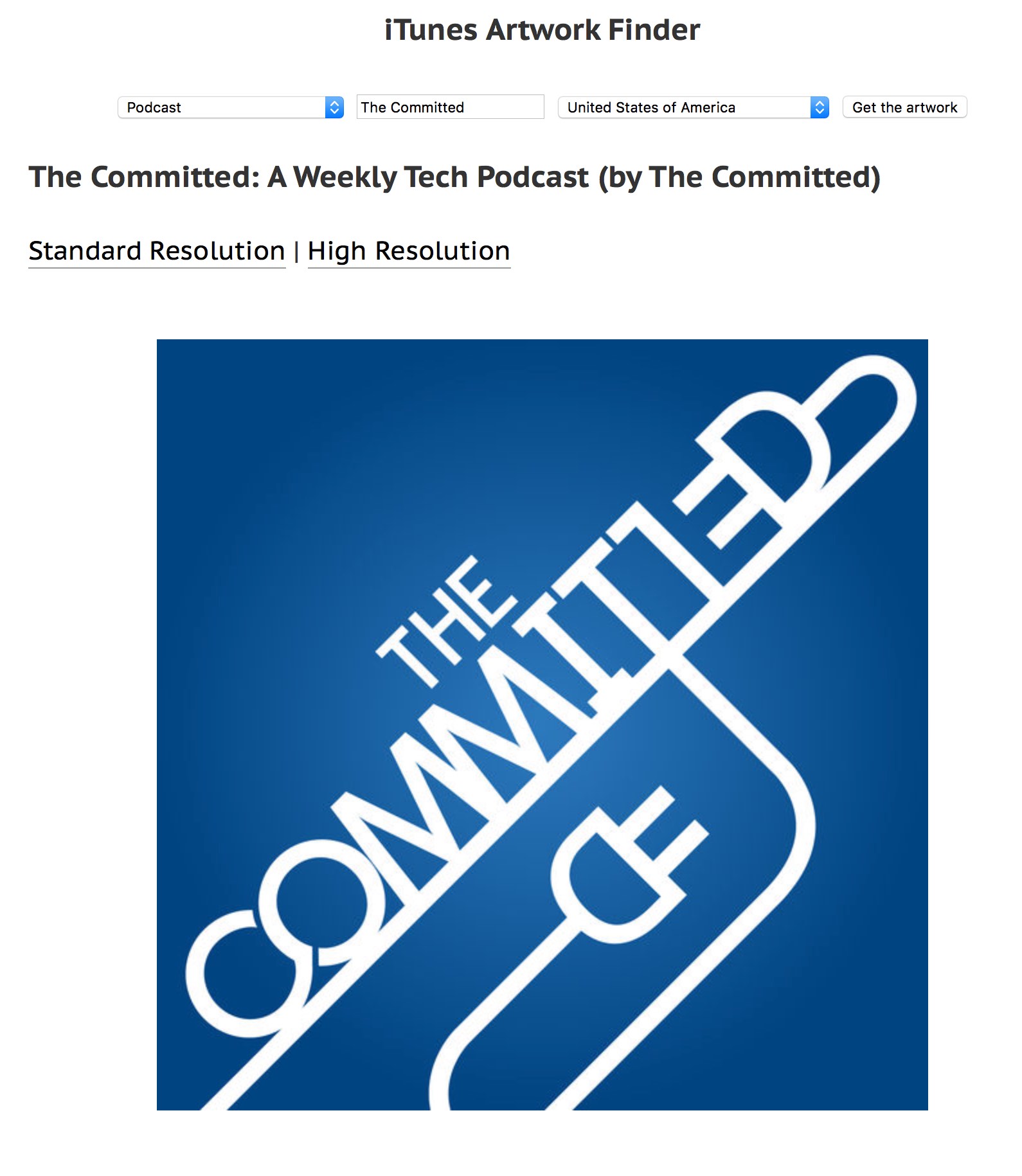
Ever want to grab the cover art for some album? Or have you ever wanted the full-size icon from an iOS app? Or the cover image from a movie or TV show? A podcast's icon? Ben Dodson hosts an excellent web-based tool that lets you do all that and more: The iTunes Artwork Finder.

Usage is about as simple as it gets: Pick a category, enter your search term, set the geographical region, and click Get the artwork.

Note that this only works for things available from the iTunes Store in the specified region, so you can't use it to find cover art for that digitized copy of some obscure record you found at an underground music store in New York City back in 1973.

Also note that if you have your own web site, you can host your own artwork finder, as Ben has made the code available for all. I wouldn't recommend making it publicly available, though, unless you have bandwidth to spare—a single search for "Friends," for instance, returned about 25 high-resolution images.

Here's how I set it up on our family's web site; it's really easy to do, and it works great:

  1. Download the zipped archive from GitHub.
  2. Create a new folder on your server. I called mine getart.
  3. Upload the two files (php, js) from the archive into the folder.
  4. Add basic HTML tags (html, head, body) to the stub of HTML shown on the GitHub page, and save it as index.html in the same folder. If you like fancy and have time to spend, go ahead and pretty it up with CSS and layout. I just left it bare.

That's all there is to it; you can now look up artwork by loading http://yourdomain/getart (or whatever you called it) in your fave browser.


Useful site: iStockNow finds Apple products

During today's recording of our The Committed podcast, Ian mentioned a site he uses to check for sometimes hard-to-acquire Apple products. The site, iStockNow, is very nicely designed and makes it really simple to check availability not only at your local stores, but also globally.

Start by clicking the left-side filters section for the products you'd like to check on, then view the map on the right to see where they're in stock. For example, a search for the 15" MacBook Pro Touch Bar in Space Gray shows that it's available throughout North America, except in Mexico City:

But if you search for a 42mm Apple Watch in Stainless Steel in retail stores, you'll see that most of North America is a sea of red. Zoom in on the map, though, and there are some stores with stock:

When you find a store with inventory—the green pushpin—click on it to get the details of that store's inventory:

If you're looking for something particularly hard to find—cough AirPods cough—iStockNow may just help you secure your item. According to Ian, at least, that's exactly how he got his AirPods!


A spreadsheet to track full-year running miles

2020 update: Everything here is out of date now, and has been replaced with my post on the 2020 version of the worksheet. In there you'll find a download link and full instructions. I'm leaving this article up only because it may be linked to from other places.

 
Update: I've created a much nicer run tracking workbook. Please use that version, as this one is out of date and is no longer maintained. I'm leaving it here because some of the "how to" bits are still applicable to the new version (and it's linked from that post), but I've removed the download link.

To help with my 2,016 miles in 2016 running project, I created an Excel workbook to track my progress. A couple people have asked for the workbook, so here it is…with some caveats and instructions.

First off, this was written for Excel 365, though it should work fine in recent versions of Excel. There is no Numbers version, there is no Google Sheets version…this is it. Start by downloading the worksheet and opening it in Excel.

The first thing you'll notice is that this is a really ugly workbook. The only thing I spent any time "prettifying" at all was the actual vs. goal chart, as that's the thing I tended to look at most often. The second thing you'll notice, depending on when you open the workbook, is that it appears nothing is working. The formulas will not work properly until January 1st, 2017.

[continue reading…]


A year on the run…literally

As I discussed in my first—and last—marathon completed post, I set a fairly outrageous goal way back in January: I decided I’d walk or run 2,016 miles in 2016. If you do the math on that, it means averaging 5.5 miles a day—for all 366 days in the year. I set this goal despite running probably no more than five miles in all of 2015. In my old "real world" job, my boss would call that a BHAG.

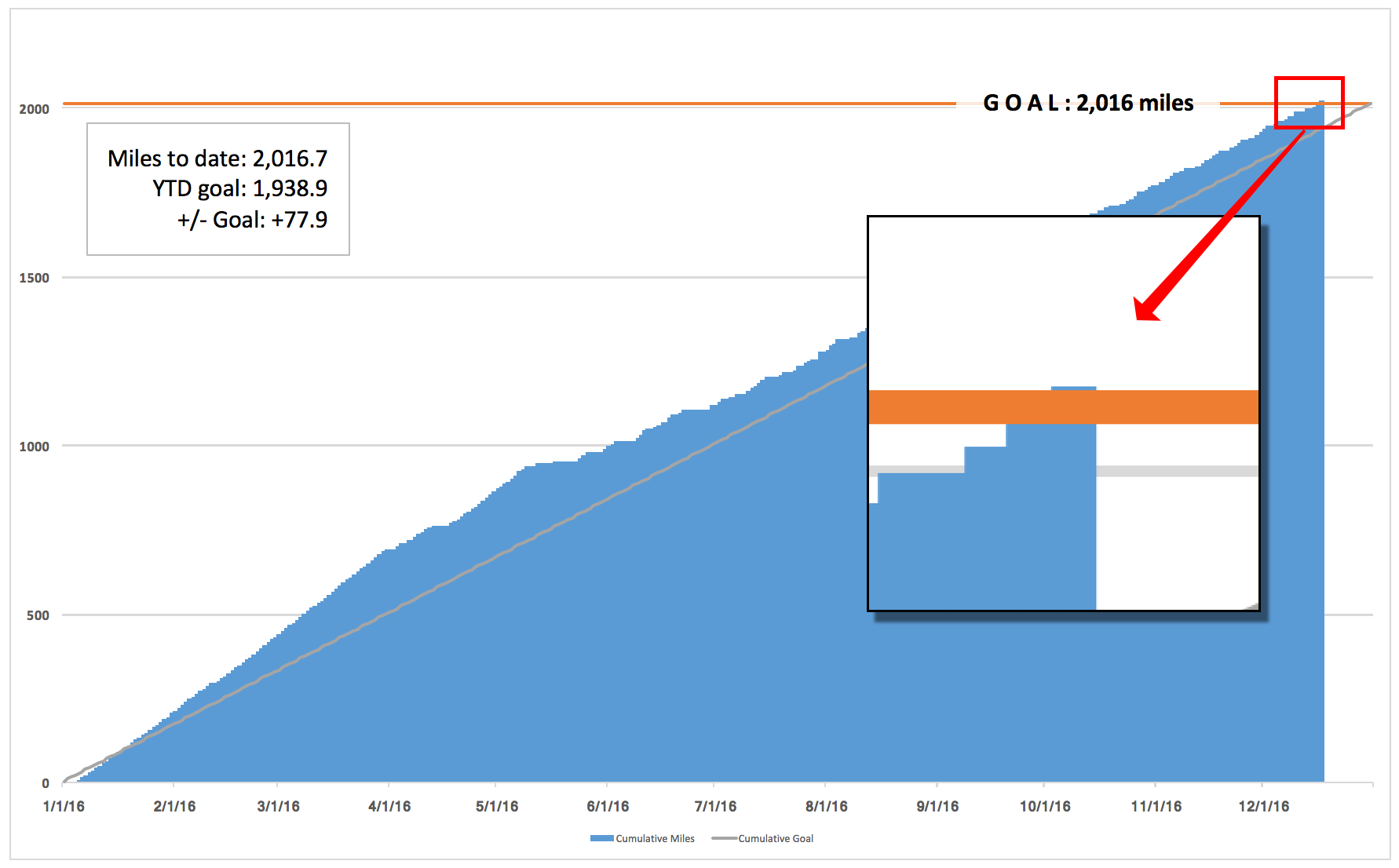
But as of yesterday, I have—amazingly to me—reached my goal, a full two weeks before year end. 2,016.74 miles in 352 days, or an average of 5.73 miles per day. (That'd be if I ran every day, which I didn't. More on that later.) After looking at this graph all year, it was incredibly satisfying to see it cross the goal line, even if by just a smidge—though there are two weeks left in the year.

I honestly can't believe I did it; it seems like a ridiculous amount of running to do in one year, unless you're a world-class marathoner, which I am definitely not.

If you'd like to see all sorts of geeky stats about a year's worth of running, as well as some of my thoughts on the experience, keep reading…

[continue reading…]


Revisiting ripping Blu-ray discs

A couple years back, I explained how I rip Blu-ray discs. A lot of time has passed, and I now use a slightly different procedure that results in much faster rips—with the caveat that the resulting file will be larger than the "slow" method, and is technically of slightly lower quality, though I can't visually distinguish the two.

The new method uses Don Melton's amazing video transcoding tools, a set of Unix programs that optimize video conversion in ways you cannot do (or easily do) in the Handbrake GUI. If you're new to Unix, but would still like to try these tools, I wrote a detailed set of instructions that should help get you up and running.

Using these Unix programs, you can rip a disc with various parameters, including one to optimize for speed (with good image quality) and another that tries to minimize the file size.

Here's a quick comparison of all three methods, as tested with the three-hour Hamlet Blu-ray. The 'Handbrake GUI' rip was done using, well, the Handbrake GUI as described in my original article. The second and third rows use Don's tools set to quick and veryquick modes, and the final row uses Don's tools set to optimize the file size.

MethodData CopiedConvert (hrs:mins)File Size
Handbrake GUI47.5GB3:526.8GB
transcode - quick40.1GB2:209.2GB
transcode - small40.1GB3:126.5GB

Tested on a late 2014 27" iMac with a 4GHz Core i7 and 24GB of RAM.

Using Don's tools in "quick" mode, you save time two ways: 7GB (15%) less data is copied to the hard drive, and the conversion process is over 90 minutes (38%) faster. The downside is that the final file size is 2.4GB (35%) larger. And that's what they call a tradeoff.

Using the "small" mode in Don's tools, you still save the 7GB (15%) of data copy, and still save 40 minutes (17%) over the original method. In addition, the file size is smaller than the Handbrake GUI version.

To summarize, regardless of whether you care more about file size or ripping speed, Don's tools provide an advantage over the Handbrake GUI: Either method is notably faster, and the small option generates smaller (or probably at worst, very similar) file sizes. (There's also a "big" option, if you don't mind somewhat larger files at a higher quality level.)

Keep reading to see some examples of the image quality of each method, and information on how to install and use Don's video transcoding tools.

[continue reading…]


I have completed my first—and last—marathon

Last weekend, I ran (along with about 7,000 other entrants) the Portland Marathon. This was my first ever marathon, and also my last-ever marathon. I finished, in 4:12:53 (1,365th place, of 4,295 finishers), which is about how long I thought it'd take me. What follows is a brief look back at how I got to the point where I willingly chose to run 26.2 miles; you may find the information useful if you're contemplating running a marathon yourself someday.

About the race

The Portland Marathon is a great race, now in its 45th year. It's actually two races in one, as there's a half-marathon with the same start and finish points. As seen on the course map (caution: 2.8MB PDF), the two races share the same course until the 11 mile mark. At that point, the half marathon returns downtown for the finish, while the marathon heads into Northwest Portland, then loops up and over the St. John's Bridge, which would typically provide some amazing views. Of course, it was pouring rain and cloudy all day, so the views weren't quite so good for us.

The course then follows along a bluff (again, typically scenic) overlooking Portland before descending down into the east side industrial area (running right along the rail yard), then returning to downtown (over the much less scenic Broadway Bridge) and on to the finish.

Why did I decide to run a marathon?

When this year started, I had no thought of running a marathon. I have thought about it in years past, when I was running regularly—and my dad had run them when I was younger, so they intrigued me. (My dad was quite fast; his best was a 2:40, which is an insane 6:08 a mile for 26.2 miles!) But as of the start of the year, it'd been roughly four years since I was running on a regular basis, so running even one mile seemed ludicrous.

To force myself to get in shape this year, I set a pretty ridiculous goal: I decided I'd walk or run 2,016 miles in 2016. This meant averaging 5.5 miles a day, every day, for the entire year. From someone who had probably ran a total of five miles in 2015. Yea, it's a pretty insane goal.

[continue reading…]


Plex and I do not get along

After hearing my The Committed podcast cohosts rave about Plex (a free media server), I thought I'd give it another shot: I'd tried a few months back, but because of the way I store my personal videos (using our own Usher app), it was going to be a big migration project, and I just never got into it. So today, I resolved to try again.

And today, I'm giving up again. I've spent the last few hours fighting Plex, and despite the awesomeness of the streaming (it *is* awesome), it's just not worth the aggravation in configuration and setup—to me, of course. Plenty of others find it works just fine.

But for me, it doesn't work at all, basically. Here's a short list of some of the things that bother me about Plex…

[continue reading…]