Skip to content

macOS

An iPhone 6, (no) movies, and me

On Friday, I received my new iPhone 6, which I really like—a lot, in fact. Over the weekend, however, I discovered that my new iPhone does not like iTunes—at least not syncing my movies via iTunes.

Things started great, with the arrival of the new iPhone 6 on Friday afternoon:

From there, though, things didn't go exactly according to plan…and I documented my progress (or lack thereof) via Twitter over the weekend. Read on for the full story, as told in 140 character increments.

[continue reading…]


I asked Tim Cook for tech support…and you should, too!

Those following me on Twitter this weekend will have noticed that my (lovely, stunning, amazing, I am keeping it) iPhone 6 is not playing nicely with iTunes. I've invested over 10 hours—in one day—just trying to get music and movies onto my iPhone.

Frustrated as hell, I decided ask Tim Cook for some tech help, not that I have much hope of any sort of reply. Emails to his address, however, are apparently all read by someone. For those having similar issues, I think it may be useful to also send your feedback in Tim's direction; his email address (not a secret, published in many places) is tcook at Apple's domain. Perhaps if there are enough voices providing feedback in high places (not that Tim reads these himself), we might see some action.

Further update: I have now done two full system restores. I did the second just before bed last night, and let the iPhone sync overnight. On wake, everything worked! So then I added in a few more movies, and—of course—they failed to sync. So now I'm back where I started, oh so many hours ago.

Anyway, For the curious, here's the tech support request I sent to Tim yesterday.

[continue reading…]


Behind OS X’s modern face lies an aging collection of Unix tools

Note: This article has been heavily modified, as I was a total knucklehead and completely forgot about GPL v3—thanks to Geordie Korper for pointing it out in the comments. Basically, the cause of the aging Unix tools in OS X is GPL v3. I've updated the following table to include the license information. In every case but one (nano), GPL v3 is the license on the non-updated apps. So that's that…I'll leave this up, though, in case anyone's curious about this stuff.

As I covered recently, the version of bash that ships with OS X is quite old, and as such, is vulnerable to the recently-revealed bash security hole.

At some point, Apple will release an OS X update containing a patched version of bash. (Update released.)

So while Apple has patched bash, this version of the shell is simply ancient. Just how old is it? bash 3.2.53(1) is roughly seven years behind the current version, 4.3.25. Seven years is like, well, forever, in Internet time!

With that bash age gap in mind, I took at look at a number of common Unix apps—in both Mavericks and Yosemite—to see which versions were in use. Then I checked the same apps in MacPorts, a tool that makes it simple to install many Unix apps.

(MacPorts doesn't necessarily have the absolute latest version of every Unix app, but they do stay relatively current. For instance, they already have a patched version of bash that fixes the above vulnerability.)

The results were interesting, to say the least—many of the core Unix utilities in OS X are years and multiple versions behind their open source, er, sources. You can thank GPL v3 for that, as noted above (and covered in more detail below). But that still leaves the big question:

Does it matter?

That is, should we care that these tools aren't keeping up with their latest and (presumably) greatest versions? Is it a problem, or merely a statement that what we have works well enough for the majority of users? (For those who don't want to bother reading, my general opinion is no, it doesn't matter.)

[continue reading…]


Dropbox shows iPhoto what simple really means

Note: Dropbox—sadly—removed this feature in July of 2017, so don't even bother reading any further.

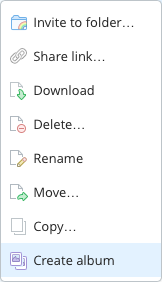
Did you know that Dropbox lets you create photo albums? No? Me neither, until this morning, that is. And it turns out, it's incredibly easy to do:

  1. Copy or move a folder of images into your Dropbox folder. Choose any location within the Dropbox folder that you wish; I set up a Photos folder to hold slideshows.
  2. Open the Dropbox web site, and sign in to your account.
  3. Navigate to the folder you just uploaded, right click, and choose Create album.
  4. Click Share album, then copy the link or directly invite those you'd like to see the album.

That's it, your'e done. The only time-consuming portion of the process is uploading the images; creating and sharing the album takes almost no time at all. That's about as simple as it gets.

Now assume you want to do the same thing using iPhoto: create a web-based slideshow of images for anyone to see via a shared URL. Sure, you could use iCloud's Photo Stream, but that's not a web-based solution. Instead, you'll need to use File > Export in iPhoto, and either create a Web Page or a Slideshow. Slideshow is really misnamed, though, as what it really creates is a movie of your images. So Web Page it is.

[continue reading…]


One possible solution for ripping stubborn discs

While writing up this week's Watch It selection (The Stunt Man), I was rewatching the movie on my TV, and wanted to switch over to the computer. I own a many-years-old DVD version, so I popped it into my iMac, fired up HandBrake and set to ripping it. But I got nothing—HandBrake ripped a 4KB file, then claimed it was done. Not a good start.

A glance at HandBrake's activity window showed this error:

libdvdread: CHECK_VALUE failed in ifo_read -- error message

Searching on that error message pointed to an error in dvdnav, and some suggested ways of working around it, including installing a patched version. There were also other errors, and searching on those indicated something about the copy protection was causing a read error with the disc.

I also tried RipIt's built-in rip-and-compress, but it also failed. After mucking about with those two apps, and nearly every other video-related app I own, here's how I finally managed to rip my legally-purchased version of The Stunt Man:

  1. Used RipIt to copy the DVD to my hard drive. (No settings to worry about here at all.)
  2. Used MakeMKV to make an MKV from the ripped file. I pointed it at the folder from step one, and clicked the Make MVK button. The end result was a number of files, with the longest one being the movie itself.
  3. Used HandBrake to convert the longest MKV file to an m4v file. I just left the settings at the default (high quality), and the end result was a nice quality 1.9GB movie (down from a 7GB MKV file) that plays on all my devices.

I'm posting this here mainly so I remember what I did, but perhaps it'll help with your stubborn discs as well.


How I create digital versions of Blu-ray discs

As I recently wrote about, I'm weird in that I prefer to buy my movies on physical media, versus electronic only. But I also enjoy the benefits that come from having an electronic version of the movie. The recent Frozen Blu-ray release, for example, was perfect: In the box was a Blu-ray, a DVD, and an easy-to-use redemption code for the iTunes digital version.

Other studios, though, want to force me outside the Apple ecosystem, and into the hell that is Ultraviolet. More and more, in fact, this is the norm. Which means I need to make my own digital versions.

For DVDs, this isn't too troublesome (and well documented), but I'm only buying Blu-ray discs now, and that makes things a bit tougher. (Kirk McElhearn discussed Blu-ray viewing/ripping for Macworld last year. Kirk focused on playback; I'm ignoring playback, and expanding on the ripping tutorial.)
If you're interested in creating your own digital copies of your Blu-ray discs, read on to see how I do it.

[continue reading…]


A look at the first eight years of macosxhints.com

I was cleaning out some old images from the site, and found over 150 apparently unused images. Whoops, that's what nine years of bad housekeeping will get you.

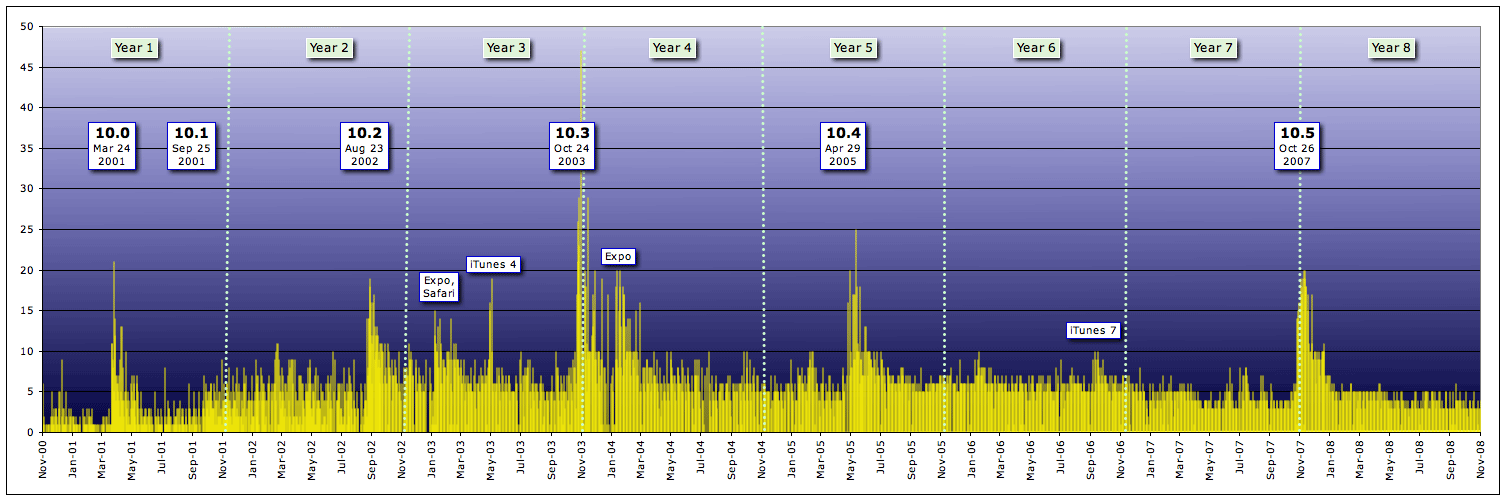
One of the leftovers, though, was kind of interesting. At some point in time, I graphed the number of hints published each day on macosxhints.com, from launch through 2008—a total of 12,051 hints.

Even if unlabeled, it'd be pretty easy to figure out where the major OS X releases occurred (except for 10.1, not sure what's up with that?). And you can see a general downward trend in hints per day, as the OS became more established (and more locked down) over time.

In any event, I thought it was an interesting chart, and figured I'd toss it into a quick post instead of just sending it to the dustbin.


iCloudy with a 100% chance of stupidity

I use a lot of cloud services for file storage, primarily Dropbox, but also Box and (begrudgingly, for certain shared projects) Google Drive.

I also use iCloud, but not in any way that would be considered a true cloud file storage service. I use it strictly as a sync service for contacts, calendars, reminders, notes, Safari; I also use Back to My Mac.

But that's it; I don't use iCloud for cloud-based file management at all. Why not? Because iCloud in its current implementation is chock full of the stupid, at least for those of us who still use and rely on OS X.

Stupid #1: Not enough free space, and too costly for more

A quick comparison chart shows just how far out of line iCloud is with other cloud-based services:

ProviderFreeTier 1Tier 2Tier 3
GBGB$/Yr$/GB/yrGB$/Yr$/GB/yrGB$/Yr$/GB/yr
Box10100$60$0.6001000$180$0.180------
Dropbox2100$100$1.000200$199$0.995500$499$0.998
Google Drive15100$24$0.2401,000$120$0.12010,000$1,200$0.120
iCloud515$20$1.33325$40$1.60055$100$1.818
Pricing sources: Box • Dropbox • Google DriveiCloud
Note that you can get additional free space on Dropbox through referrals and uploading images; Box occasionally offers a promo with 50GB of free space.

Kirk McElhearn covers this price and space issue in more detail in his blog post, Why Does Apple Only Offer 5 GB Storage with iCloud?.

I agree with him; if iCloud wants to attract more users, it needs more free space, and more competitively priced upgrade plans.

Read on for more of the stupid…

[continue reading…]


How to: Simplify value pasting in Excel

I tweeted this over the weekend, but thought it might be worth a bit more explanation here. By default, when you copy and paste something in Excel, Excel defaults to pasting everything from the copied cell: the formula, shading, borders, font, style, etc.

Excel dialogSometimes this is OK, but often I just want the values from a cell or range—either because I'm using them in another table with different formatting, or to convert a formula into fixed values.

Out of the box, if you want to paste just the cell values in Excel, you have to select Edit > Paste Special, then navigate the world's busiest dialog box (as seen at right), click on the tiny Values radio button, then hit Return.

If you're doing a lot of value pasting, this is a royal pain. Thankfully, it's pretty easy to fix this design stupidity.

How you fix this depends—for the first step—on whether you're running Excel 2008 or Excel 2011.

[continue reading…]