Skip to content

Count pages in all PDFs within a folder structure

Please see this newer post, with a new script that provides subtotals by subfolder, which is what I really wanted when I wrote this one.

Recently I've been trying to go paperless (well, mostly paperless) via a Fujitsu ScanSanp ix500. (I'll have more to say about the scanner in a future post).

One way to go paperless is to just go from now forward—start scanning stuff and don't worry about history. I decided that I'd go the other route, and work through our old paper files: some would be scanned and kept, much would just be recycled. The process went really quickly, compared to what I had expected. It helps that the Fujitsu is a wicked-fast document scanner!

But I was curious about how much I was scanning, in terms of total PDF pages—not files, but counting the pages in the files. Spotlight to the rescue; the field kMDItemNumberOfPages returns the number of pages in a document, and it seemed accurate in testing via mdls:

$ mdls /path/to/somefile.pdf | grep kMDItemNumberOfPages
kMDItemNumberOfPages = 4

So I set out to write a script to traverse my "Scans" folder, and return the total number of PDF pages.
[continue reading…]


The mysterious case of Mail’s vanishing Rules actions

I have used OS X's built-in Mail program for nearly 15 years. I use it for both personal and work emails, and as such, I rely on rules to sort my mail—I have 75 separate rules. (Note to Apple's Mail team: If you would allow boolean logic in rules, I could slash this number to about 10. Please?)

Recently we changed the Many Tricks store, and as a result, I needed to modify about 30 of my rules. As I was working on these changes, which requires editing and testing each modified rule, I noticed a most-frustrating Mail bug: The "Perform the following actions" section for all rules would slowly vanish as I edited my rules.

Needless to say, editing a rule when you can't see the Actions section is impossible.

[continue reading…]


Presenting the Apple TV (4th Generation) Password Tester

Earlier, I sent out this hopefully-humorous tweet about the difficulty involved in clicking one's passwords into the new Apple TV password input screen:

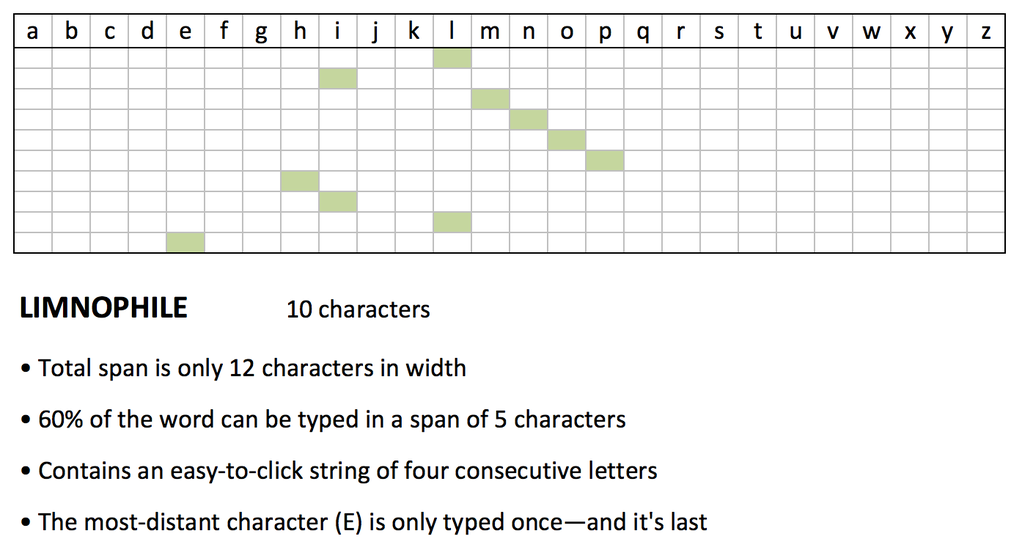
Presenting LIMNOPHILE, a 10-character yet easy-to-type Apple TV password.

The chart is just an Excel file, with absolutely no logic—I just colored the squares and counted to fill in the data. But then I got this reply…

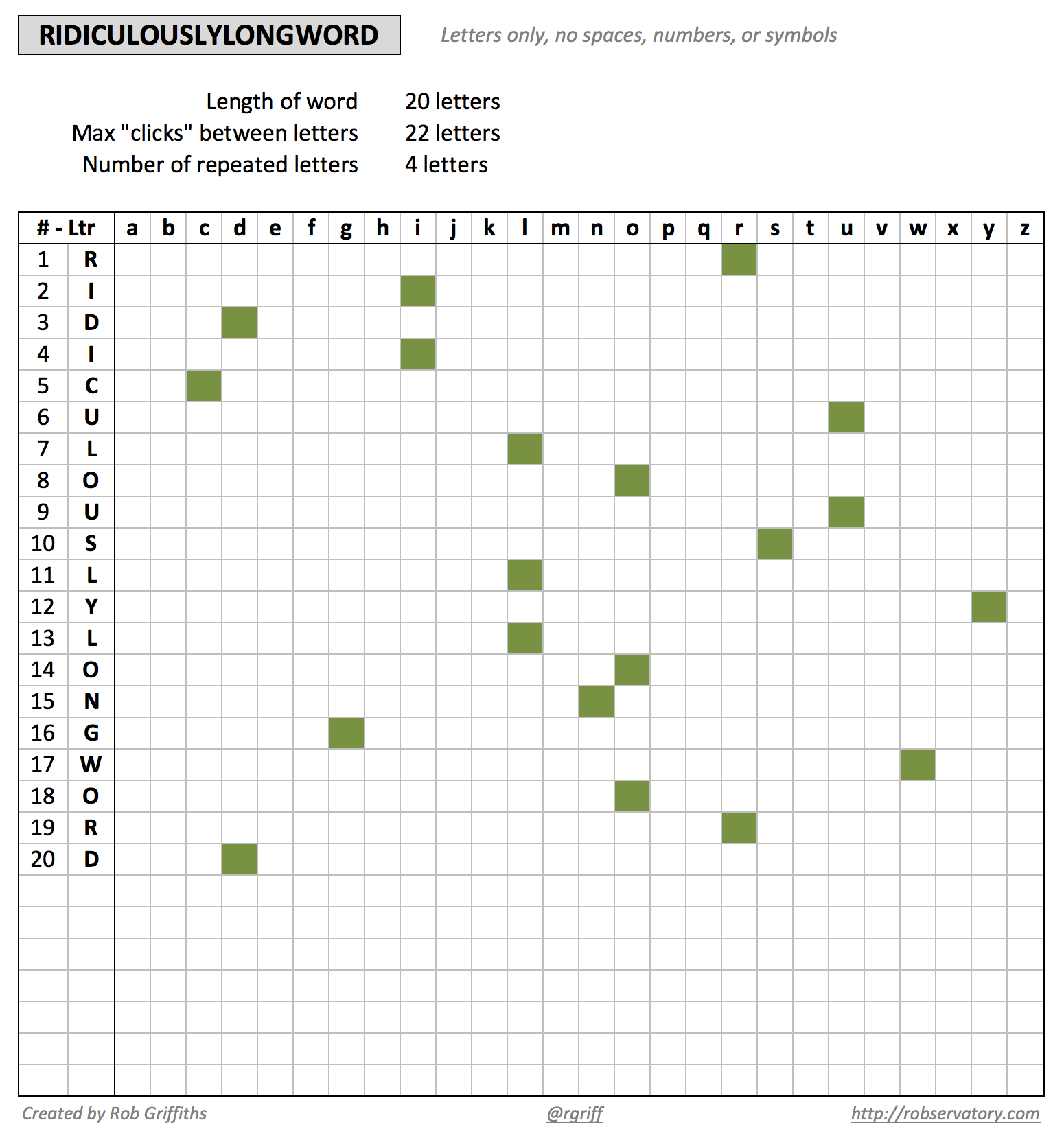
So I thought "Why not?," and created an actual spreadsheet that will "click check" any all-letter password you feed it. Here's what it looks like in action:

Just replace RIDICULOUSLYLONGWORD with whatever you like, and see how it'll "click out" on your Apple TV. Obviously, this tool is totally tongue-in-cheek!. Any password built with this tool will be weak as heck. It's just for fun, so don't take it seriously.

Feel free to share and modify, but I'd appreciate a credit back if you do so.

Download Apple TV Password Tester (44KB)

Please note that this is an Excel file, and it relies on conditional formatting, so it may not work in Numbers.


New technology at the auto service center

I took our truck in for service at the local Toyota dealer yesterday. When I drove in, I had to drive over one of these big black things:

I figured it was just a speed bump to get drivers to slow down as they entered the service bays. But when I inquired as to their purpose, the answer was more technologically interesting: It's a tire tread depth scanner. As you drive over, lasers shine on each tire, measuring the remaining depth in each tire's tread. Quoting the immortal Dr. Evil … "lasers!"

Of course, when I parked, the technician went around to each tire, sticking his finger in the tread to check the depth. I said, "What about the fancy machines?" 'Oh, they're not quite ready yet; still have to do it the old fashioned way for another few days.' Oh well. Next time.


On the vagaries of saving from Mail

As I suspect is true of many of you, I buy a fair bit of stuff from Apple, whether in a physical Apple Store or in the various online stores. I receive electronic receipts for all these purchases, which look something like this (but with all the personal info filled in, obviously):

Until yesterday, I have just filed all these receipts in their own folder in Mail (in the On My Mac section, so they're stored locally). But in the process of going paperless, I wanted to move them directly to my hard drive, so I could store them in a more-organized manner, and keep them alongside my other receipts. That meant saving the messages from Mail to the disk.

I had only two objectives when saving:

  1. Maintain the formatting and images in the original receipt
  2. Have the message content indexed by Spotlight

You'd think this would be a simple proposition, but you'd think wrong…the above two criteria are basically mutually exclusive with Mail's Save As feature. Read on for the details, and my eventually-discovered workaround (and labor-saving shortcut).

[continue reading…]


Cutting the (headphone) cord

Until very recently, I wasn't a user of Bluetooth stereo heaphones. I don't necessarily have a good answer as to "why not?," other than I recall trying a pair early on, and not being impressed by sound quality and battery life. That was, of course, years ago, but I hold grudges for a long time, it seems.

Recently I thought I'd try cutting the cord again; there are any number of Bluetooth headphones available—including some very expensive models. Needless to say, these are not in my budget as a casual music listener. I was more interested in something in the $100 or less price range, and in an over-the-ear (versus on-the-ear or in-the-ear) model.

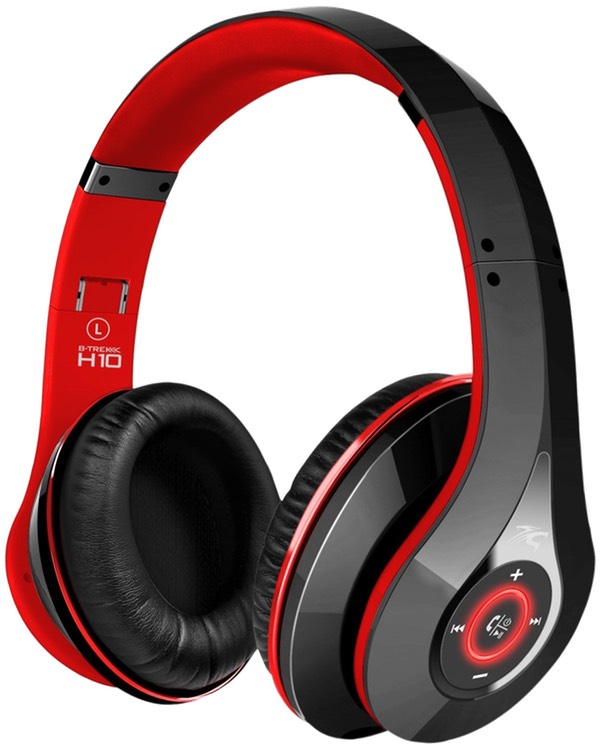
While browsing Amazon one day, I stumbled onto these headphones, with possibly the longest product name I've ever seen in Amazon: Sentey Bluetooth Headphones v4.0 with Microphone B-trek H10 Wireless Headphones Headset Foldable with Mic for Running Sport or Travel, 40mm Audiophile Drivers - Also Comes with 3.5mm Cable -Up to 15 Hours Battery - Comes with Free Transport / Protection Carrying Case Ls-4570.

Rolls right off the tongue, doesn't it? I'll just call them Sentey Bluetooth Headphones. Although they list for $100, every time I've looked, they've been listed for sale at $50. And with over 100 very positive reviews—and Amazon's easy return policy—this felt like a safe bet. So I ordered a pair, and have had them for a few days now.

So were they worth $50? Absolutely; keep reading for my review.

[continue reading…]


Use a mouse and keyboard…and a trackpad

When Apple released its new accessories, I thought it might be time to revisit my input setup. For a few years, I've been using the original Magic Trackpad and the Logitech Wireless Solar Keyboard.

While this setup has worked well for me, I missed the precision of a mouse (so much so that I kept a corded one nearby, and plugged it in when I needed to do such work). So I thought I'd check out Apple's new gear, with the thought of either upgrading to the new Magic Trackpad, or perhaps moving to the new Magic Mouse as my pointing device, and maybe replacing the Logitech with the new Apple keyboard.

Unfortunately, the local Apple Store only had the mouse in stock, not the keyboard or trackpad. Unable to compare the pointing devices, I just bought the mouse. After setting it up, I loved the added precision it provided over the trackpad. But if I was going to be using a mouse regularly, I wanted to narrow the reach from keyboard to mouse, so I pulled out my old Apple wireless keyboard, which is about six inches narrower than the Logitech.

This setup seemed really good, except that I'd be giving up a lot of features by removing the trackpad: I use it with BetterTouchTool and our own Butler (as well as Keymo and Moom) to execute all sorts of gesture-related actions.

[continue reading…]


Resolve an iOS FaceTime/Messages activation error

After reinstalling iOS 8.4.1 on my iPad Air (due to some issues with the 9.0 developer betas), I was unable to use either FaceTime or Messages. When I'd enter my iCloud credentials in the setup box for either service, I'd be greeted by a long delay, followed by this error message:

FaceTime Activation
An error occurred during activation. Try again.

When I searched on this message, I got lots of hits, including the first one, which points to this article:

The advice in this article matches what I was told by Apple Support: back up the iPad, erase it, set it up as new, make sure Messages/FaceTime works, then restore from backup. And for me, it seemed to work at first: Everything worked fine until I did the restore, and that would then break Messages/FaceTime. Ugh.

Apple Support told me the backup must be corrupted, and I'd just need to start fresh. But with over 200 apps, and who knows how many that don't sync data via iCloud or other service, I did not want to do this.

But then I noticed something. Something completely self-induced. And that something turned out to be both the problem and the solution. So just what was that something? Nothing more than a bit of time travel…

[continue reading…]


How far we’ve come…

Happy 34th birthday, IBM PC!

While I didn't own the original, our family did get one of the follow-on models. But that tweet really got me thinking about just how far we've come in 34 years. And while the original PC did start at $1,565, that price didn't get you much of a usable machine, as noted by oldcomputers.net:

A basic system for home use attaches to an audio tape cassette player and a television set (that means no floppy drives or video monitor) sold for approximately $1,565. PC-DOS, the operating system, was not available on cassette, so this basic system is only capable of running the Microsoft BASIC programming language, which is built-in and included with every PC.

If you really wanted a usable IBM PC, you were looking at a much higher cost (from the same site):

A more typical system for home or school with a memory of 64K bytes, a single diskette drive and its own display, was priced around $3,000. An expanded system for business with color graphics, two diskette drives, and a printer cost about $4,500.

Keep in mind this is 1981 money. Adjusted for inflation, those costs are dramatically different in 2015 dollars:

  • $1,565 (Basic IBM PC) --> $4,109
  • $3,000 (Home IBM PC) --> $7,876
  • $4,500 (Business IBM PC) --> $11,814

Doesn't seem quite so cheap now, does it? But what's really amazing is what you can do with that same amount of money today. I'll use the Home IBM PC as a comparison, so I've got $7,876 to spend. Here's what you can get for that in 2015…

[continue reading…]


The 15th club in my golf bag…

For those who don't know, the rules of golf only allow you to carry 14 clubs. But in my case, I do carry a 15th "club" in my bag: a ball retriever. If you don't, this little story might convince you that you should, too.

I don't know anyone who likes paying for golf balls. But most people do enjoy playing with nice, clean, new-looking balls. By carrying a 15th club that is a golf ball retriever, you can play with others people's nice new golf balls!

I carry JB's nine foot model, and its telescoping poles and simple head design have worked well for me. Expect to spend $15 to $50 for a retriever, depending on the length you desire, the design of the head unit, and the construction quality. Whatever you spend up front, with a dozen golf balls costing $20 to $60, your retriever will quickly pay for itself.

As an extreme example, I recently played at a course that features a creek that meanders between the last two holes. As I was playing alone, and way out in front of everyone, I took about 20 minutes to wander along this creek as I played the last two holes (see note below) I didn't walk the creek's entire length, nor did I retrieve every ball I saw. And my retriever is only nine feet long, so there were balls I could see but couldn't reach.

* Note: This is not something you could do during a normal round. During a normal round, I just walk near ponds and creeks, and if I see a ball, I'll quickly scoop it up while my partners are busy prepping for their shots. Using this technique, I can still collect up to 20 balls a round. If you're delaying the game due to ball collecting, you're doing it wrong.

So how many balls do you think I collected in that time, given those restrictions? Two holes, 20 minutes. 10? 20? 30? 50?

[continue reading…]