Skip to content

Replace the departed free iTunes Radio with free iTunes radio
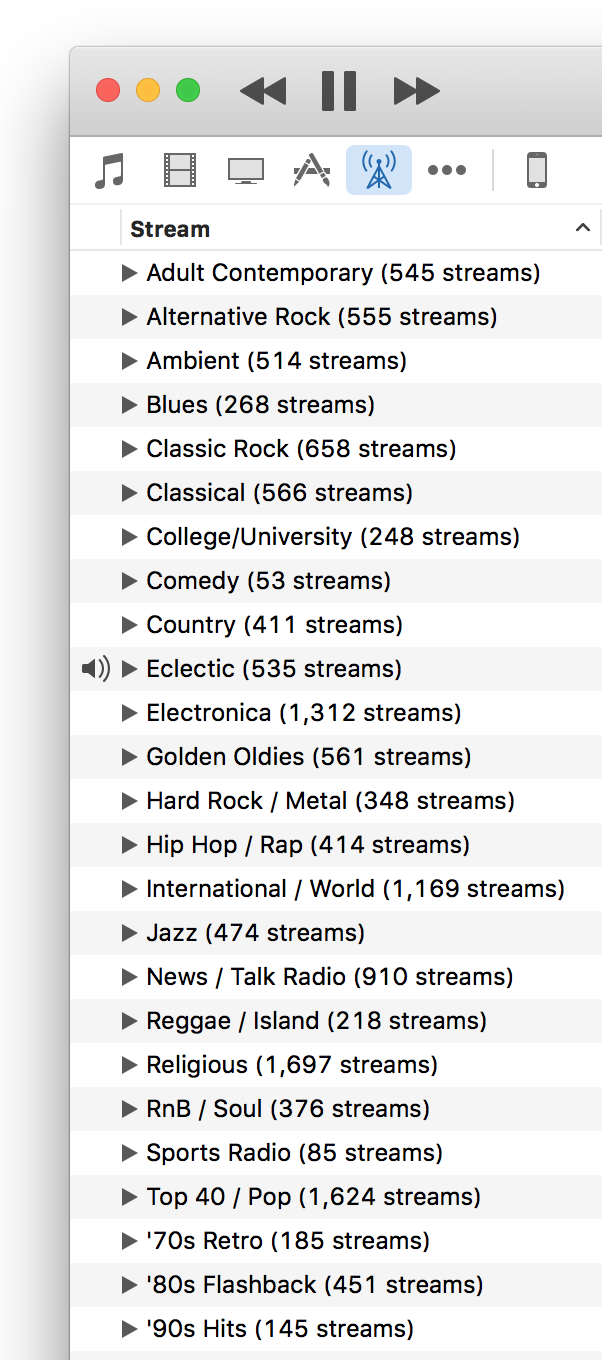
In case you missed the news, Apple has now officially ended the free streaming of iTunes Radio. To listen to these stations now, you have to subscribe to Apple Music, which isn't something I want to use. (If they offered a "use but don't integrate into library," I'd subscribe in a heartbeat…but they don't.)

There are any number of other radio services out there - Pandora, Spotify, etc. But I wanted something that existed in iTunes, as I didn't want to have to run another app, nor (shudder) use my browser as a radio station front end. Then I remembered that iTunes has a huge—as in tens of thousands—assortment of Internet Radio stations.

I hadn't looked at internet radio in a long time, as I'd been quite happy with my selection of iTunes Radio stations. But Apple's move inspired me to take another look, and so far, I like what I've found. If you'd like to explore the world of Internet Radio in iTunes, here are a few tips to ease the exploration.

[continue reading…]


Force Awakens Day, based on the greatest movie speech ever given*

* No, not really. Not even close. But the President's speech in Independence Day is perhaps corniest, most over-the-top movie speech ever given. And as such, it's a good basis for this bit of Star Wars: The Force Awakens corny, over-the-top speechmaking…

Good morning. In less than four hours, people from this household will join others from around the world. And you will be launching the largest opening weekend for a movie in the history of cinema. You, Star Wars Fans, will be doing it.

Star Wars Fans—those words should have new meaning for all of us today. We can't be consumed by our dislike of Episodes One through Three. We will be united in our love of the one Original Trilogy.

Perhaps it's fate that today is a Saturday, and you will once again be having an amazing weekend, not being subject to the tyranny of one man's horribly wrong vision of the prequels. You will have freedom from the annihilation of the Original Trilogy through misguided editing.

We're watching for our right to be entertained, to believe in The Force.

And should we all enjoy the movie, this Saturday will no longer be known as a simple weekend day, but as the day when the world declared in one voice:

"We will not be forced to watch the prequels! We will not endure any more Jar Jar Binks! We're going to live on; we're going to survive the prequel era!"

Today, we celebrate our Force Awakens day!

And with that, I'm off to see a little movie this morning.


Retina lollipops

A candy store at the local mall had the most amazing wall of colorful lollipops, and I thought it'd make a wild desktop image for a retina iMac. As I snapped the pic on my iPhone, it took a bit of upscaling to reach 5120x2880, but I think it still looks fine; here's a small-scale version:

I also thought a tunnelized version would be interesting; here's how that came out:

I have these in my normal "rotate random every 15 minutes" cycle, and still get a kick out of the lollipops when they get chosen.


Smart TVs know—and share—what you’re watching

If you own—or plan to own, or plan to give as a gift—a "smart TV" from LG, Samsung, or Vizio, are you aware that these sets share your viewing data with third parties? If not, you should be—even if you're a very 'open' person, the amount of data collected and shared by these sets is quite scary.

For example, Samsung Smart TVs collect the following data:

Information about content that you have watched, purchased, downloaded, or streamed through Samsung applications on your SmartTV or other devices; Information about applications you have accessed through the SmartTV panels; Information about your clicks on the “Like,” “Dislike,” “Watch Now,” and other buttons on your SmartTV; The query terms you enter into SmartTV search features, including when you search for particular video content; and Other SmartTV usage and device information, including, but not limited to, IP address, information stored in cookies and similar technologies, information that identifies your hardware or software configuration, browser information, and the page(s) you request.

Vizio isn't much better; here's what their sets collect:

For VIZIO televisions that have Smart Interactivity enabled, VIZIO will collect data related to publicly available content displayed on your television, such as the identity of your broadcast, cable, or satellite television provider, and the television programs and commercials viewed (including time, date, channel, and whether you view them live or at a later time).

And while I couldn't find LG's privacy policy, it's been caught spying on users.

All three manufacturers ship their sets with data sharing enabled, but it's relatively easy to disable on all three brands. Consumer Reports provides clear instructions for all three companies; unless you really enjoy sharing your viewing habits with unknown third parties, I suggest you disable these onerous data collection tools in your smart TV.


A look at password entry on the new Apple TV

When I discovered that I could use the grid-style password entry on the new Apple TV, I thought I'd hold a little password entry shootout of sorts. I wanted to compare the three ways I've discovered of entering passwords on the fourth-generation Apple TV. Just for fun, I threw my iMac into the mix, too.

First, some background: I use passwords of the correct horse battery staple variety. For sake of this post, let's assume my password was:

jinxed 187 Golf Bogies

There are 22 characters in total, with two capital letters and three numbers. My actual password consists of the same distribution, though that's all it shares with the demo password above. I then timed how long it took to enter on my iMac, and using the various input methods on the Apple TV. The results aren't all that surprising:

DeviceRemoteMethodTimeTries
Retina iMac--Typed0:021
Apple TV 4th GenSilverLine0:491
Apple TV 4th GenSilverGrid0:411
Apple TV 4th GenBlackLine2:593
Apple TV 4th GenBlackLine1:411

Obviously, typing your password on a physical keyboard is incredibly fast and (assuming you're a decent typist) basically error free. On the Apple TV, what I found is that regardless of method used (i.e. grid or line), the silver remote is both faster and more accurate than the Siri (black) remote. After discarding the Siri remote, I was notably faster using the silver remote with the grid layout than with the line layout.

The other thing to notice is that I only had accuracy issues with the Siri remote. The first time I tried to enter my password for this test, it took me three tries to get my password correct. The 2:59 time shown for the "grid" line is the total of all three times (0:47, 0:57, and 1:15). I then tried again, going very slowly to make sure I didn't make a mistake, which is the 1:41 time shown on the last row. I had no accuracy issues with the silver remote, regardless of line or grid data entry style.

My fastest entry (0:47) with the Siri remote wasn't that far behind the silver remote, but the accuracy was obviously not good. I had to work at half the pace of the silver remote to insure I didn't make any errors with the Siri remote.

Clearly password entry on the Apple TV is a hassle: Even with the silver remote, taking 41 seconds to enter a 22 character password is quite a waste of time. Apple really needs to address this, either by letting us pair a keyboard, or by updating the iOS Remote app to support the new Apple TV. For now, though, I'm sticking to the silver remote for password entry—even on the new line layout—because it's both faster and more accurate than the Siri remote.


Use grid-style password entry on new Apple TV

This morning, after waking my fourth-generation Apple TV, I was prompted for a password, and was very surprised when I saw the password entry screen, because it was not the two-row layout I've grown to hate. Instead, I saw this:

Yes, that's the third-gen Apple TV's password entry screen, on my fourth-gen Apple TV. Just how did I get it to appear? Very easily, though it took me a bit to figure out exactly how I did it. Here's how:

To use the old-style password entry screen on the new Apple TV, wake the Apple TV using the old silver remote, and don't touch the new Siri remote.

And that's it. If you wake the Apple TV with the silver remote, and don't touch the Siri remote until after you get to a password entry screen, you'll get the grid. If the Apple TV pairs with the Siri remote, though, you'll get the new-style line entry screen.

I haven't extensively tested this, but I did try on two different fourth-gen Apple TVs, and got the same results on both. So if you want to use the old password entry grid on your new Apple TV, get yourself a silver remote (if you don't have one already).


With Siri, it seems verb tense matters

My buddy Kirk McElhearn posted a blurb on his blog about Siri and 18th century painters: Siri and the History of Art. In a nutshell, he asked Siri who was the greatest French painter of the 18th century. She replied with "one eighteenth is approximately zero point five five five." Say what?

He asked me to try, but when I tried, here's what I got:

So Siri only knows art history in the USA, it seems? (Kirk lives in the UK.) Actually, no. On closer inspection, when I spoke, Siri heard "Who is the greatest…," versus Kirk's Siri hearing "Who was the greatest…."

So I tried agin, making sure Siri heard me say "was." Sure enough, when Siri hears "was," I get math results. When Siri hears "is," I get art results.

If you want Siri to help you with your history, it seems you should talk to her in the present tense!


A unique lava lamp time-lapse

We occasionally take our kids to a local place, Big Al's, which is one of those bowling/arcade places that give out tickets as rewards from the arcade games. Being good parents, we too sometimes play the games (you know, to spend time with the kids…yea, that's it). Over the years, we amassed quite a bunch of tickets, but weren't quite sure what to spend them on.

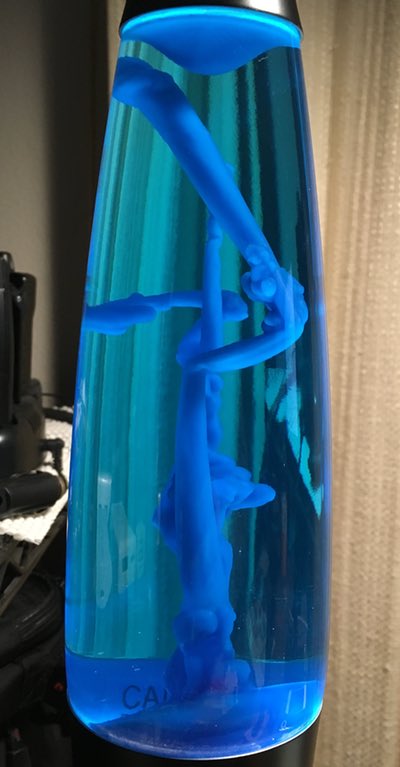
The last time we were there, I was smitten by a lava lamp, similar to this one, but ours has a black base and blue "lava." I don't know why (childhood flashback?), but I decided some of our points cache would go to this mesmerizing but otherwise useless device.

When I got it home, I was surprised at just how long it takes to warm up: It can take nearly an hour before any "lava" starts flowing, and about two hours before it really looks like a traditional lava lamp. During the first hour, though, the melting wax in the lamp makes some really cool abstract bits of art, as seen in the photo at right.

I thought this might make a neat time lapse, so I set out to record it with the iPhone. My first attempt failed, due to the iPhone's auto-adjusting time-lapse feature. Because the lamp takes so long to get going, the gap between frames winds up being quite long. Long enough that when stuff does start happening, the iPhone's time-lapse gaps are too wide to make for an interesting video.

I needed another solution, so I headed to the iOS App Store to see what was available…

[continue reading…]


Total PDF pages in subfolders across folder structure

Last week, I wrote a script that ran through a folder structure and output the page count of every PDF in all folders and sub-folders, and also spit out a grand total.

While this worked well, what I really wanted was a script that just totaled PDF pages by sub-folder, without seeing all the file-by-file detail. After trying to retrofit the first script, I realized that was a waste of time, and started over from scratch.

The resulting script works just as I'd like it to, traversing a folder structure and showing PDF page counts by folder:

$ countpdfbydir
    47: ./_Legal
     2: ./_Medical-Dental
    15: ./_Medical-Dental/Kids
    11: ./_Medical-Dental/Marian
     2: ./_Medical-Dental/Rob
    35: ./_Personal Documents/Kids
    87: ./_Personal Documents/Marian
    28: ./_Personal Documents/Rob
    10: ./_Personal Documents/Rob/Golf
    12: ./_Personal Documents/Rob/Travel
-------------------------------------------------------------------
   249: Total PDF Pages

It took a few revisions, but I like this version; it even does some simplistic padding to keep the figures lined up in the output.

[continue reading…]


Why Apple hasn’t responded to your bug report

I know Apple gets a lot of bug reports (i.e. RADARs, for Apple's internal name for the system). But I didn't realize just how many until I filed a minor flurry of reports over the last day and a half. OK, a minor flurry is four. For me, though, that's a lot. The time gap between the first and the last was 36.87 hours. The gap in RADAR numbers across those hours was 31,222—and that struck me as a huge number of bug reports.

That got me wondering if the numbers were actually sequential, so I asked Twitter. I received a single reply, but that reply confirmed that yes, they are sequential. Based on that, I could do math on my RADARs and find an average, then try to extrapolate. But there's a much better data source: Open Radar.

Open Radar is a site where users can republish the RADARs they've filed with Apple. Not everyone does so, of course, but that doesn't matter, because each one includes the original RADAR number. So I went back and found RADAR 19363080 from January 1st, 2015, and RADAR 23519997 from November 12th, 2015.

Do the math on those RADAR numbers ... 23,519,997 - 19,363,080 ...

4,156,917 bug reports so far in 2015

Wow. If that run rate continues for the remainder of the year, they'll finish with 4,811,865 bug reports! That number is so big as to be unimaginable, so here it is in some smaller units:

  • 551 per hour
  • 13,219 per day
  • 92,536 per week
  • 400,989 per month
  • 4,811,865 per year

That's an insane volume of actual submitted bug reports. How insane? If each bug report can be handled in just five minutes (very unrealistic), you'd need over 200 full-time bug report workers just to handle all the bug reports for one year! (I know: automated systems, duplicates, etc. But still...)

So if you're wondering why Apple hasn't replied to your bug report, it's probably because there are a few hundred thousand—or more—bug reports ahead of yours in the queue.