Dropbox shows iPhoto what simple really means
Note: Dropbox—sadly—removed this feature in July of 2017, so don't even bother reading any further.
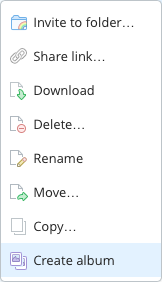 Did you know that Dropbox lets you create photo albums? No? Me neither, until this morning, that is. And it turns out, it's incredibly easy to do:
- Copy or move a folder of images into your Dropbox folder. Choose any location within the Dropbox folder that you wish; I set up a Photos folder to hold slideshows.
- Open the Dropbox web site, and sign in to your account.
- Navigate to the folder you just uploaded, right click, and choose Create album.
- Click Share album, then copy the link or directly invite those you'd like to see the album.
That's it, your'e done. The only time-consuming portion of the process is uploading the images; creating and sharing the album takes almost no time at all. That's about as simple as it gets.
Now assume you want to do the same thing using iPhoto: create a web-based slideshow of images for anyone to see via a shared URL. Sure, you could use iCloud's Photo Stream, but that's not a web-based solution. Instead, you'll need to use File > Export in iPhoto, and either create a Web Page or a Slideshow. Slideshow is really misnamed, though, as what it really creates is a movie of your images. So Web Page it is.
 For DVDs, this isn't too troublesome (and


 You may need (or want) to run Windows, or other operating systems, alongside Mac OS X, and Parallels Desktop (4 mice) is the best-known of several programs on the market for that purpose. (Full native Windows support, of course, is also available via Apple's Boot Camp, but it requires you to reboot out of OS X and into Windows.) A new-to-the-Mac player now brings a formidable challenger to the arena, however. VMware, an expert in x86 virtualization—that is, the ability to run one or more x86 operating systems as 'guest' under a 'host' x86 operating system—has released Fusion 1.0, its first OS X offering. Like Parallels, Fusion allows you to run many versions of Windows and other operating systems from within OS X. And unlike Boot Camp, you don't have to log out and restart in order to use it.