Skip to content

macOS Apps

Articles about OS X applications.

First Look: Numbers

Macworld logoIn January 2003, Apple introduced Keynote, a fairly groundbreaking presentation application. Two years later, along came Pages, a mixed page layout/word processing tool.

Together, Keynote and Pages were sold as the $79 iWork'05 "suite." Compared to the venerable AppleWorks, though, iWork was missing both spreadsheet and database applications. With the release of the still-$79 iWork '08 (Best Current Price: $67.41), Apple has plugged the spreadsheet hole with Numbers.

Read my Macworld article, First Look: Numbers, for the rest of the story...


An Office 2008 VBA to AppleScript helper

Macworld logoA while back, I wrote about what I thought of Microsoft's decision to drop Visual Basic for Applications (VBA) from the next version of Office. In short, I think it's a short-sighted and stupid decision. Apparently my thoughts had no influence on the folks in Redmond (shocking, I know!), as Office 2008 is set to ship without any form of VBA support.

But it will have AppleScript support, and the fine folks at MacTECH were kind enough to send me a preview copy of their upcoming 150+ page guide to switching from VBA to AppleScript. I wrote a brief preview of this guide for Macworld last week. If you're a serious VBA scripter looking to make the move to AppleScripts, this looks to be a must-have guide. And thanks to some Microsoft support, you can buy it and six-month subscription to MacTECH for all of $10 or so. More info can be found in the link in the Macworld article.


My opinion on the next version of Office for the Mac

Macworld logoIn case you haven't heard, the next release of Microsoft's Office for the Mac will lack one major feature: support for Visual Basic (VB). This core technology is what allows one to record macros, and it works basically the same on both Windows and Mac. But the Mac Business Unit at Microsoft has discovered that porting the code to Intel would be very hard...so they decided to just drop it completely.

I think this is a really bad mistake, and wrote about why in this opinion piece for Macworld.


This is going to take not quite as long…

Back in February, I wrote about the incredibly lengthy time estimate that Stuffit gave me for an expansion. Well, it happened again today, but with QuickTime:

estimate

I was thinking about including a 1920x1200 movie capture of Redline Racing in my Pick of the Week writeup, so I had captured a couple minutes of the high-res stuff--the raw movie file was 8.6GB in size, in fact! After it opened, I had trimmed it down and then wanted to convert the format. When the export dialog appeared, the above was the initial estimate. It should be noted that at "only" 1,491,308 days, this is about 84 times faster than the Stuffit expansion!

What I also found humorous was the "7 minutes" bit -- it's not enough that I wait over 1.4 million days, but don't forget about those extra seven minutes! And yes, the dialog cleared itself up (unlike the Stuffit dialog, which never changed), and the actual export took only five minutes or so. In the end, I chose not to use the movie, but the funny dialog was worth seeing.


And the answer is…

For those who didn't quite see it in the comments, the mystery object is a printout of an entire walkthrough of the original game of Zork, one of the earliest interactive fiction games. Adventure was the first widely-known entry in the genre, but Zork really made huge strides in both the breadth of the virtual world as well as the character's interaction with that world. The printout pictured in the prior story was created on February 18th, 1980, by myself and a good friend who was in his first or second year at MIT.

Zork date

At the time, I was 15 and my buddy Patrick was 19. These were the early days of computing, just over two years into the Apple ]['s existence. So while graphical games existed (Mystery House was released in 1980, for example), the capabilities of the machine made for very limited graphics--check the screenshot on the Wikipedia page for proof. As such, interactive fiction offered a more complete escape into the gaming world, as your mind did the work of creating whatever "graphics" the game required, based on the descriptions provided by the developers.

It was also the very early days of the internet, meaning it basically didn't exist. Its predecessor, ARPANET, was just getting going. Somehow, probably through a computer club at high school, I was introduced to ARPANET and the MDL machine at MIT. This machine allowed free guest account signups, and they had Zork installed for anyone to play. That's about all it took for me to get hooked, even over a 300 baud modem working on a dumb terminal with thermal paper!

Read on for a bit more about Zork, online gaming in the very early 1980s, and that monster printout...
[continue reading…]


MacBook gaming: A graphics concern?

Macworld logoI wrote up my perspective on playing games on the just-introduced (and video-card-lacking) MacBook. There were some encouraging results, and a lot of not so encouraging results. Overall, I thought the MacBook did a passable job with older titles, a better-than-expected job with some games in Rosetta, and an abysmal job with the few current 3D games I tried.


Music Store search struggles

Macworld logoAfter a particularly infuriating search effort for the Curious George soundtrack at the iTunes Music Store, I wrote this editorial about the store's messed up search functions. Oddly enough, the very day we ran the editorial, Apple updated the store's search functions, and the new functionality addressed every single issue I had raised. Talk about bad timing!


Hide iDVD? I think not!

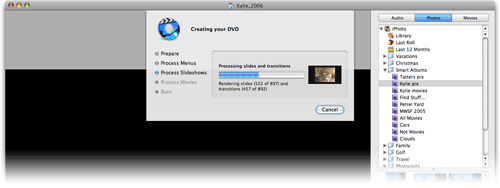
Last week, for the first time since installing iLife '06, I had an excuse to use the newest version of iDVD. In general, I love it. But someone at Apple made one seemingly insanely poor decision involving the "burn progress" screen:

DVD burn image

That's the screen that appears when you start the encode (if not yet done) and burn of a final DVD. In prior versions of iDVD, this area was a separate tab within the main iDVD interface. Now it's been attached to a drop-down sheet, as seen above. Within that sheet is a progress bar and a ticker that counts off how many items have been processed.

So far so good, though a progress dialog in a sheet is a somewhat unique concept. But the other change that came with this new sheet is incredibly unwelcomed--you can no longer hide iDVD in any traditional manner. If you try Comamnd-H with iDVD in the foreground, it just beeps at you. If you switch it to the background and then do "Hide Others" from some other app, everything except iDVD hides, and you'll hear the beep again. I even tried AppleScripting it, with no success.

OK, fine, I thought, I'll just minimize it to the Dock. Nope. That doesn't work either. Argh!

Since the sheet is dynamic, my screensaver won't kick in if it's visible. So it seems you're just plain stuck with the iDVD box onscreen, which is an amazingly poor decision on Apple's part. I finally managed to at least make it non-visible by using Backdrop, a utility that lets you drop a desktop picture (or solid color) down as a layer. So I ran Backdrop, set it to display a nice picture, then switched Backdrop in front of iDVD. iDVD was now hiding behind Backdrop, and since Backdrop takes up the whole screen, I couldn't accidentally activate iDVD by clicking its window. I could still switch to it with Command-Tab, or by clicking its icon in the Dock, of course. But at least it was out of sight, allowing me to more easily work on other things while it rendered away in the background.

Why oh why can't we just have Command-H work again, as it did before?!