Skip to content

Technology

Entries related to techology in general…

Watch the Star Wars Trilogy movies in their original form

As a child of the 1970s, the original Star Wars trilogy1Star Wars, The Empire Strikes Back, and Return of the Jedi was—and remains—one of my favorite movie series of all time.

Unfortunately, George Lucas has made it virtually impossible to watch the original unedited versions of the films.2Unedited versions exist on LaserDisc and DVD, but they are low quality transfers. From 1997 onwards, only modified versions have been available—with newly-added CGI effects, deleted scenes that add nothing to the story, changes to sound effects, and even replacement of characters, such as some of those in the cantina in the original Star Wars. He called these releases Special Editions…but to fans of the originals, they weren't so special.

Enter one Petr Harmy and an army of volunteers. Using multiple sources, Harmy and the others pieced together all three original films, doing away with the edits, correcting colors, upscaling imagery, and replacing sound effects. This 20-minute video explains the process, and contains a number of before-and-after comparison shots.

The end result is something called Harmy’s Star Wars Trilogy Despecialized3Because these versions remove the Special Editions' changes—get it? Editions: Amazingly high quality versions of the theatrical releases of all three original movies. As a very brief example, here's one still (click for a much larger version) from Star Wars:

The movies are not at Blu-Ray (1920x1080) resolution, but they're very well done 720p (1280x720) versions which look amazingly nice even when scaled to fill the screen of my 27" iMac. And most importantly, all the cruft added on through the years is gone. No bogus CGI. No replaced characters. No weird sound effects. Oh, and (spoiler alert!) Han shoots first.

So how can you get these Despecialized versions for yourself? That's a bit tricky…

[continue reading…]


Add metadata to ripped movies and TV shows

Somewhat regularly, I write about ripping DVDs and Blu-Rays. I tend to prefer physical media and sometimes—especially when buying an older TV series or classic movie—the disc won't include a digital copy. So I rip the disc—this way for Blu-Rays, or just via HandBrake for DVDs—to create my own digital copy.

Once ripped, the problem is that I have a video file that will play, but that has no useful information about what the video is—no metadata about the cast, production year, or (for TV series) season and episode. If I try to add the movie to the TV app (or iTunes, as on my iMac), it will require some hand editing to wind up in the right category, and it still won't have any show information.

Enter Subler, a free app to help you "tag" (add metadata to) movies and TV shows. There are probably other apps out there that do this, but Subler works quite well for me, especially for TV shows.

When I rip a TV series, I'll give the files a filename based on its title and (for TV series) season and episode, like Wings S01E01, or Sports Night S02E04. I then drag and drop the ripped file onto Subler's dock icon, and it opens a window, showing all the metadata associated with the file; here's how the window looked after I ripped the first episode of Sports Night:

[continue reading…]


Our family’s robotic vacuum overlords are Deebots

If you're interested in technology (me!), and dislike cleaning (also me!), you've probably investigated robot vacuum cleaners. There are tons of models out there, covering a wide range of costs from under $100 to over $1,500. I'm not here to try to tell you which is the best, or even which particular one to buy, but to point out a time-limited sale on the one we chose to buy.

Back in May, we bought an Ecovacs Deebot N79S (Amazon)1This is a referral link; I make a modest commission if you use it. to clean our downstairs hardwood floors. I bought it mainly because it was on sale for a relatively inexpensive (for a robot vacuum) $150, and it received decent reviews on Amazon and on various review sites such as Wirecutter.

It's not the smartest robot—there's no ability to save a map or mark off "do not enter" areas. But I've found it cleans well, it's quiet, and the app does what it needs to do to make managing the vacuum about as easy as it can be. It's got a stated 110 minute battery life, and ours usually runs for at least 90 minutes, going over mainly hardwood with a couple of area rugs.

I noticed today that it's on sale again on Amazon for about $150—it shows as $170 in the store, but once in the cart, a $17 discount is applied, bringing it down to $153. We've been so happy with the first that I just ordered a second one to use upstairs (with two cats in the house, one cannot have enough vacuums).

I'm not sure how long this special price will last, nor if it's some sort of targeted thing where only certain shoppers get the deal, but if you're in the market for a decent yet not too costly robot vacuum, we've been very happy with ours.


De-distractionate the Touch Bar

Shocking even myself, I'm now the owner of a Touch Bar equipped MacBook Pro—I purchased the entry-level 16" model last weekend. Why? I'll save the detailed explanation for an upcoming look at the machine and its performance, but the main goal was to replace two laptops with one.

But just because I now have a Touch Bar-equipped Mac doesn't mean I suddenly like the Touch Bar. In fact, my feelings about it haven't changed since I wrote about it two years ago:

The Touch Bar, despite its name, is actually an Eye Bar: It forces your eyes off the screen, down to the Touch Bar, back up to the screen, repeat ad infinitum.

After some hours working with my new MBP, this is definitely a problem—and it's a problem even when I'm not using the Touch Bar, which is pretty much all the time: I've found that the changing images and colors on the Touch Bar grab my eye every time I switch apps…

The camera was focused on the Touch Bar, but when I'm looking at the screen, I see all that activity just below the screen, and it's really distracting. Thankfully, there's an easy fix, and one I'd not heard of prior to buying this machine…

[continue reading…]


When products play hide-and-seek with serial numbers

I recently bought a set of PowerBeats Pro, which I generally love (more on the headphones in a future post), but today, while trying to register my product with Beats, I ran into a clear example of form trumping function.

To register your Beats, you need the serial number; Beats provides a graphic that shows you where to find it…

Seems simple enough, so I flip open the case…

Umm, where is that serial number?

[continue reading…]


Add inelegance to remove heat

At home, our network routing and firewall is handled by an open-source software package called pfSense®; it has a ton of features, and is relatively easy to configure. I built a mini PC (a box roughly 9" per side) for pfSense, and it's been running smoothly for over five years1I'll be writing more about pfSense and my routing PCs in a future post..

While it's not the world's loveliest box…ok, so it may be the world's ugliest box…

…it's been rock solid since day one. However, it's aging and its CPU won't be supported in an upcoming pfSense release, so I decided to replace it. (That way, I'll have a spare if the new one breaks…at least until that unsupported version of pfSense is released.) Here's the new box…

That's a Protectli fanless Firewall Appliance with a quad-core Celeron J3160 CPU, 4GB of RAM, and 32GB of storage. And yes, it's just a bit smaller and more elegant than my old box—the entire thing is roughly the size of my old box's external cooling fan.

[continue reading…]


The high cost of software in the 1980s…

A friend recently sent me a link to a large collection of 1980s computing magazines—there's some great stuff there, well worth browsing. Perusing the list, I noticed Softline, which I remember reading in our home while growing up. (I was in high school in the early 1980s.)

We were fortunate enough to have an Apple ][ in our home, and I remember reading Softline for their game reviews and ads for currently-released games.

It was those ads that caught my eye as I browsed a few issues. Consider Missile Defense, a fun semi-clone of the arcade game Missile Command. To give you a sense of what games were like at the time, here are a few screenshots from the game (All game images in this article are courtesy of MobyGames, who graciously allow use of up to 20 images without prior permission.)

Stunning graphics, aren't they?

[continue reading…]


A new set of Hubble deep space iMac retina desktops

Back in 2015, I created a set of 5120x2880 deep space desktop images for my then-newish Retina iMac, using images from the Hubble space telescope.

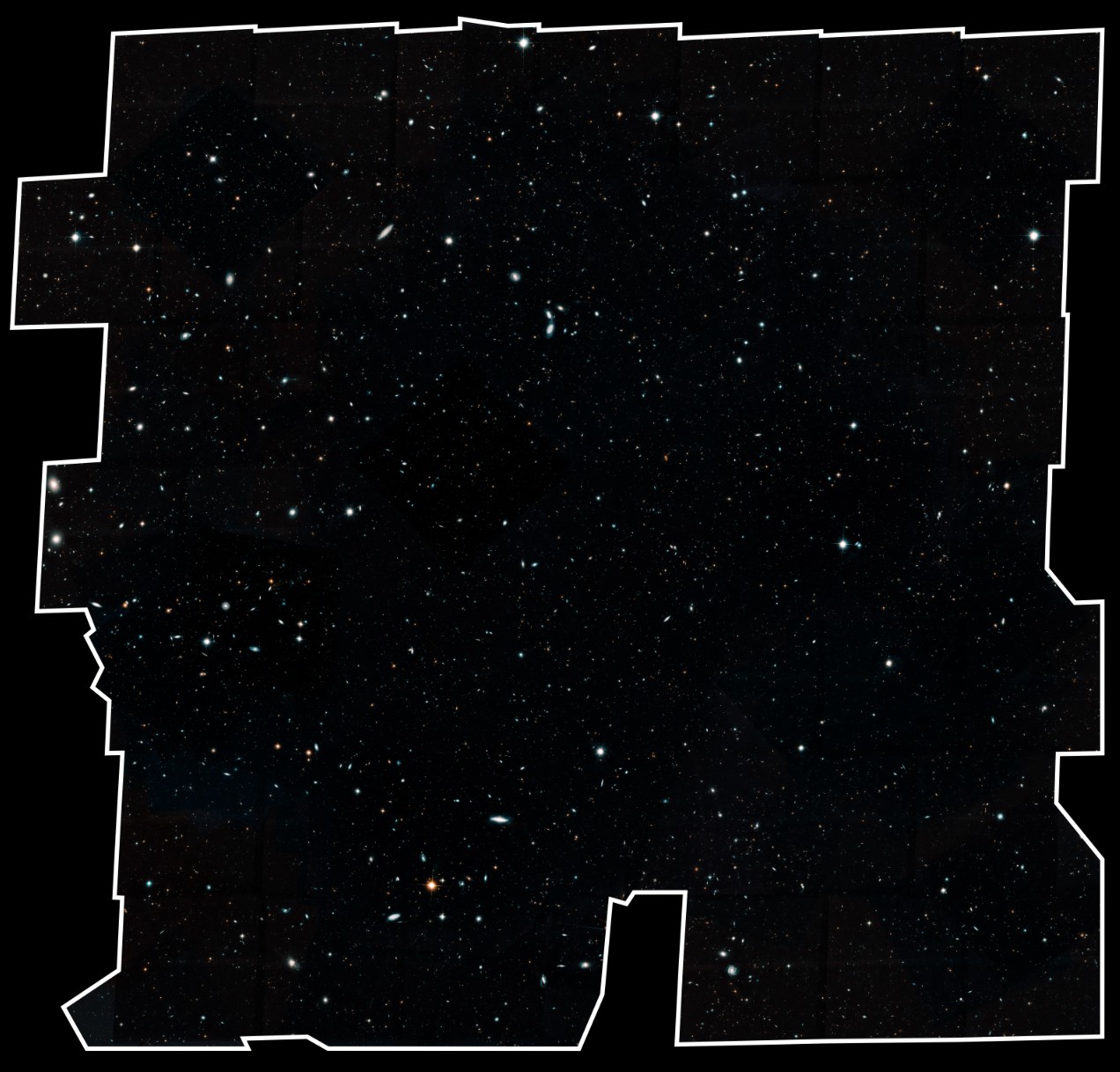
Recently, the Hubble team released the absolutely mind-bogglingly-massive Hubble Legacy Field image

The snapshot, a combination of nearly 7,500 separate Hubble exposures, represents 16 years' worth of observations. The ambitious endeavor is called the Hubble Legacy Field. The new view contains about 30 times as many galaxies as in the HUDF. The wavelength range stretches from ultraviolet to near-infrared light, capturing all the features of galaxy assembly over time.

The image mosaic presents a wide portrait of the distant universe and contains roughly 265,000 galaxies. They stretch back through 13.3 billion years of time to just 500 million years after the universe's birth in the big bang.

Despite those staggering figures, this image still represents only a tiny portion of the sky, covering roughly the area taken up by the Moon in the night sky.

I downloaded the 700MB 25,500x25,500 PNG version of the image, and set to work making some new 5120x2880 desktop images. You can read more about the process in an upcoming post, but for now, here are the resulting images…

[continue reading…]


2019 iMac vs Late 2014 iMac—Ripping addendum

In Part 1 of my 2014 vs 2019 iMac comparison articles, I provided an overview and a number of comparison benchmark results. In Part 2, I looked at changes in gaming performance between the two machines.

But there was one more thing I wanted to do: Compare Blu-ray ripping speeds. At the time, though, I didn't have any new movies to rip, and I really didn't want to spend the time re-ripping an existing movie. Now, though, I do have a few new movies to rip, as I'm trying to finish our collection of all the films in the first three phases (now called the Infinity Saga) of the Marvel Cinematic Universe.

That meant buying the films I'd liked the least—The Incredible Hulk and the first two Thor movies. With that came the chance to compare the Blu-ray ripping speed of the two iMacs. I use the method described in my article Revisiting ripping Blu-ray discs, which is this:

  1. Use MakeMKV to create an MKV file on the hard drive that contains the video and audio tracks.
  2. Use Don Melton's Video Transcoding tools to create the final movie from the MKV file.

Using The Incredible Hulk, I timed how long it took to create the MKV file and how long it took to create the finished movie. Without further ado, the results (times are in hh:mm:ss format)…

[continue reading…]


Review: Logitech MX Master 2S mouse

Shortly after I bought my 2014 iMac, my third-party mouse died. So I started using the Magic Mouse that came with the iMac, and added "get new third-party mouse" to my to do list. Although I never found the Magic Mouse all that comfortable, I kept putting off replacing it.

Finally, when I ordered the new iMac—yes, that task sat on my to do list for nearly five years—I decided to go back to an ergonomic button-laden third-party mouse. After some searching and hand-fit tests, I bought a Logitech MX Master 2S ($70 at Amazon) mouse1Note that this is definitely a right-hand-only mouse, and Logitech doesn't appear to offer a left-handed version. Sorry, lefties..

Note: I really dislike reviews that are so short they read more like press releases (and sometimes actually are reprinted press releases). I don't do a ton of reviews here, but when I do, they tend to be long, because I like to use a product first, then review it in depth.

So what follows are many words (and images) about a computer mouse. If you'd like the tl;dr version instead, here it is: I love the MX Master 2S due to its great ergonomics, customizability, and easy multi-computer support. Keep reading for the much longer version.

[continue reading…]