Skip to content

Technology

Entries related to techology in general…

I asked Tim Cook for tech support…and you should, too!

Those following me on Twitter this weekend will have noticed that my (lovely, stunning, amazing, I am keeping it) iPhone 6 is not playing nicely with iTunes. I've invested over 10 hours—in one day—just trying to get music and movies onto my iPhone.

Frustrated as hell, I decided ask Tim Cook for some tech help, not that I have much hope of any sort of reply. Emails to his address, however, are apparently all read by someone. For those having similar issues, I think it may be useful to also send your feedback in Tim's direction; his email address (not a secret, published in many places) is tcook at Apple's domain. Perhaps if there are enough voices providing feedback in high places (not that Tim reads these himself), we might see some action.

Further update: I have now done two full system restores. I did the second just before bed last night, and let the iPhone sync overnight. On wake, everything worked! So then I added in a few more movies, and—of course—they failed to sync. So now I'm back where I started, oh so many hours ago.

Anyway, For the curious, here's the tech support request I sent to Tim yesterday.

[continue reading…]


My iPhone 6 case of choice…or choice of case?

With my recent iPhone 6 purchase, at first I was contemplating no case at all. I was thinking I'd just put on a set of Bodyguardz clear skins and call it good.

But (to me, at least) the iPhone 6 is quite slippery—much more so than my iPhone 5. And given my history of dropping my iPhone 5 in some really bad spots, I decided a case was a good idea.

At the Apple Store, they had Apple's own leather and silicon cases, and some cases from an unknown (to me) company, Tech21. The Apple cases are nice, but they completely cover the gorgeous phone. So I tried one of the Tech21 cases, and came away impressed enough to buy one.

The cases in the Apple Store—the Evo Mesh for iPhone 6 and 6 Plus—aren't even on the Tech21 site yet. However, it's the same design as the Evo Mesh for iPhone 5s, just upsized. You can find the case listed on the Apple Store, though not the color I purchased (smoke with the protective edge bits in orange).

I like that the case is really thin and light, that I can still see the back of the iPhone, and that the important bits are all protected. I'm not sure about the effectiveness of Impactology, and I hope I never have to find out.

Even in the case, my iPhone 6 is slimmer than my iPhone 5 in its also-very-thin case, as seen in the image above—the iPhone 5 is the blue case in the background.

The Evo Mesh case is grippy soft plastic, making the phone easy to hold. It's not, however, so grippy that it won't slide in and out of pockets, which is good. The cover slips on easily, fully covers the volume and power buttons, and leaves the important ports uncovered. The top protrudes just slightly above the height of the phone, so I can set the phone face down without worry. The case is also just thick enough that the protruding camera lens no longer protrudes, which I love.

Overall, I'm impressed with this case. We'll see how it holds up over the next few months, but initial impressions are good.


A [possibly dangerous] fix for the bash security exposure

In case you missed the news, there’s a big security hole in the bash shell. If you’re using an OS X machine and it’s not exposed to the internet (and even then, not running a publicly-facing service that communicates with bash), you shouldn’t have much of anything to worry about. In theory, anyway.

In practice, because I like to live dangerously, I decided I wanted to make my machine safe. Or at least try. What follows is the how-to for how I did it.


Note: Please exercise extreme caution if you're going to follow my how-to! I am replacing a couple of key system-level files with a new, untested-by-Apple version. It's quite possible this may break my system in ways I haven't yet discovered. Also, given that there's probably not any exposure for a typical user not running web-facing apps that interface with bash, this really isn't worth doing for most users.


With that disclaimer out of the way, read on for my how-to…

[continue reading…]


Cutting the land line (sort of)

Being old school—and just old in general—our family has always had a land line (i.e. Plain Old Telephone Service or POTS). We've also had the same POTS phone number for well over a decade, so it's the number that everyone uses to call us at home. Add in the fact that (at least until very recently) AT&T cell service at our home was marginal to poor, and there really wasn't much desire to cut our land line for all-cellular.

Until I looked at our bill, that is, and discovered that our POTS line was costing us over $30 a month. Even at that amount, we paid extra for caller ID, and still had to pay for long distance calls. So once AT&T upgraded the cell towers near our home, we started using our cell phones for all long distance calls. But still, our POTS number was well known to friends and family, so we didn't want to just kiss it goodbye. But that $30+ a month was basically a complete waste of money, so I started looking for other solutions.

Enter VOIP, or Voice Over IP. This technology has been around a long time, but I never really felt ready to make the move. Then I started looking into it, and found that I could save about 90% of the monthly cost of my POTS line, keep my phone number, and gain a number of useful features. That made the "go" decision quite easy to make; read on if you're curious about replacing a land line with a VOIP service.

[continue reading…]


Fixing a lawn mower, then and now…

On Sunday afternoon, I went to pull our mower from the garage to attack the jungle growing in our yard. Apparently while pulling a car into the garage at some point, I had managed to snag the mower's grass catcher between the car's wheel and a garage support post. The end result was a mangled piece of metal that more resembled avant-garde sculpture than it did a grass catcher. I borrowed the neighbor's mower for the day, which solved the problem in the short term. But long term, I was in need of a new frame and grass catching bag.

With the power of a time machine, here's how that task would have gone 30 years ago, and how it went on Sunday…

[continue reading…]


My most-useful and least-used shell script

I have a large number of small shell scripts I've either written or collected over the years. Today I had the opportunity to use my favorite one—which is rare, as I only need it a couple times a year. But when I do need it, it's a wonderful little script.

It's also a very simple-minded script, as it does just one thing: it copies my public IP address to the clipboard and shows it in a pop-up message, as seen at right. OK, so that's two things, but they're very closely related.

Clearly this isn't something I need to do often, but when I do, the script changes this…

Switch to browser, open new tab, load the DynDNS check IP page, drag mouse to select IP address, press Command-C to copy, switch back to destination app, press Command-V to paste

…into this…

Press a key combo, wait about a second, then press Command-V

This is a big timesaver, obviously, and it makes the process about as easy as it could be.

I originally wrote this up for Mac OS X Hints a few years back, but thought I'd post it here (given the changes at Macworld, I'm not sure how long the hints site may be around). I've also modified it a bit, as I no longer use growlnotify for the onscreen display of the copied IP address.

You can read the original how-to at hints, or below, where I've posted the updated version that no longer uses growlnotify.

[continue reading…]


A few tidbits about the AT&T Next plans…

Having studied the AT&T Next plans in great detail, and with the help of some great comments to this post, I feel that I have a very good (though not perfect) understanding of the AT&T Next plan.

Based on what I've learned, here are some bullet points about the Next plans to keep in mind as you decide how to pay for your next phone.

Please keep in mind these are my thoughts based on what I've been told and/or read about—so some of them may be quite wrong! (If you see anything that seems wrong, please let me know. Or if you think of other things to add, let me know that, too.)


Next 12 vs Next 18
The Next 12 and Next 18 plans vary only in the number of payments (20 for Next 12; 24 for Next 18) and when you can upgrade (12 months and 18 months, respectively. See the Upgrades section for more details on the upgrade options.

Using AT&T's money
The Next plans let you borrow AT&T's money—at 0% interest, no less!. That's a good thing. Assuming you have the cash to pay off the phone at some point in the future (see Upgrades), you'll want to use AT&T's money as long as possible. So go for Next 18, not Next 12.

How to switch from Next 12 to Next 18
If you signed up for Next 12 due to late-night-itis (umm, that might be me), you can switch to Next 18. Here's how: You have to wait for your phone to arrive, then—before you activate it—take it to an AT&T store. They'll be able to switch the plan—at least, that's what the AT&T rep told me after she consulted with her supervisor.

How to cancel a Next 12/18 purchase
You can apparently cancel an AT&T iPhone 6 order—just call them (1-877-782-8870). I was told I could cancel and reorder as another method to switch to Next 18; I politely declined. But if you want to cancel, apparently this is how you can do it (untested).

[continue reading…]


An AT&T Family Share Plan/iPhone 6 cost calculator

In my article on the (possible) vanishing monthly discount for AT&T Family Share Plan users, I included a table with some cost estimates for a given phone and service.

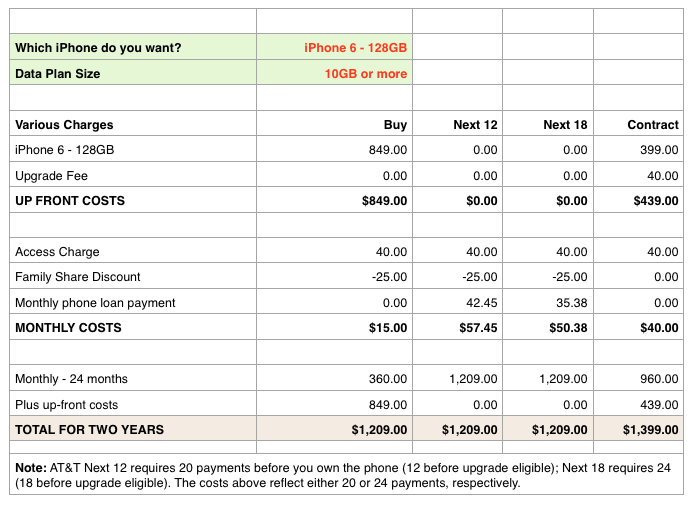
Given the popularity of that article, I've done a bit of work to clean up my spreadsheet to make it usable by anyone. You choose which phone, and the size of your shared data plan, and the calculator spits out the results (click the image at right for a large version). As you can see, I've added a column for the Next 18 plan, too.

Download the calculators here. The zip archive includes versions for Excel and Numbers. Usage is pretty simple: Click the two red-text cells to set the desired iPhone and your data plan size, and that's that.

To summarize what I saw in building the worksheet:

  • If you're on a shared plan with under 10GB of data, going contract will save you a bit of money over two years. You'll give up flexibility over buying or Next, though.
  • If you're on a 10GB or more shared data plan, then going Next or buying outright is definitely the way to go. More flexibility, and you save money—assuming you do not upgrade at 12 or 18 months under Next by just sending in the old phone!

Note: I do not vouch for the accuracy of this thing, beyond its role as a "what if" tool. I took the values from AT&T and Apple sites, but those figures could change. Feel free to modify as you wish; it's a quick and dirty spreadsheet with minimal formatting.


It’s the iPhone 6 Plus for me…I think

After a few chats with AT&T and Apple online reps, some spreadsheet work to examine the costs, and much thinking, I've believe I've figured out how I'm going to order my iPhone 6 at 12:00am Pacific time tomorrow morning. Here's what I'm going to do…

I'm going to order the "contract free" 64GB iPhone 6 Plus directly from Apple. The phone is listed as "T-Mobile," but after chatting with Apple and AT&T reps, and hearing from people in the Twitterverse, it seems this will be usable on AT&T with a simple SIM card swap at the local AT&T store. And buying it off contract means I can keep my AT&T discount, as discussed in the above-linked article.


Update: Based on some comments on this article, I've changed my mind: I'm going to try AT&T Next 12. It can be paid off early without penalty, the total cost over two years is the same as buying up front, you still get the $25 monthly discount, and you save the up-front cost.

Why buy directly from Apple, and why choose the monstrous 6 Plus?

The Apple bit is simple: it's due to their friendly 14 day return policy. (I've also confirmed they'll take back an activated phone without any issues.) AT&T offers a return program, too, but there's a potential restocking fee for opened devices.

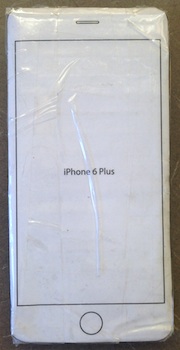
Buying from Apple gives me the chance to test the monster phone in my hands for a week or so before deciding if it's right for me. I've been "testing" this week with the cardboard-and-coin monstrosity seen at right. Somehow, it's not quite the same—though I think the call quality is a touch better than on my real iPhone badda-bing. I really need to have the beast with me for a week to see how it goes.

Why did I choose to start with the monster phone? First, because I'm really interested in the optical image stabilization feature, and want to see how it works in real life. Second, because I tend to think the Plus might be the rarer of the two phones, therefore harder to get if I do decide to do an exchange in a couple weeks. Finally, it's the most-different device from my current phone—if I'm going to make a change to something bigger, I might as well start with the really big one.

Of course, I may change my mind at 11:59pm tonight, and start with the smaller Six, with the option to return and replace for the Plus. I figure I've got about eight hours left with my two cardboard stand-ins (yes, I made one for the regular Six, too) before I have to make up my mind!



The AT&T Family Share Plan’s vanishing discount—don’t get burned

The popularity of this article led me to write two followups:

Please give these a read if you'd like to know even more about AT&T Next.

Tomorrow (starting at 12:01am Pacific time, apparently) you can order a new iPhone 6/6 Plus. But you probably already knew that. What you may not know is that if you're on AT&T's Family Share Plan, and you enrolled in that plan with phones on a two-year contract, you'll see a large increase in your bill if you upgrade to a new on-contract iPhone 6—even if your current contract has expired and you're now contract-free.

Why would your bill go up, simply moving from an older to a newer iPhone? That's never happened in the past. But we've not had the Family Share Plan in the past. And when AT&T rolled out this plan, they gave folks an incentive to move to it: they offered a discount for on-contract phones, from a $40 per month per device cost to either $25 (for under 10GB of shared data) or $15 (10GB or more) per month per device. So if you look at your bill, you'll see something like this:

That discount was applied to the under-contract (at the time) iPhone 5 I moved to the Family Share Plan; the other two lines we have in the plan show the same discount. But if I buy a new iPhone 6 under contract, the discount will go away. If we upgrade all three phones with contract iPhone 6's, that'd be another $75 per month!

[continue reading…]