Skip to content

Technology

Entries related to techology in general…

Behind the scenes: plug-ins revisited

The last time I redid these pages' appearance, back in 2007, I wrote about the WordPress Plugins and Widgets that I was using to run the site.

After seven years, quite a lot has changed. I've gotten rid of all but one of the items on the original list, and found some very useful new additions that help both me and visitors

From that original list, the one leftover Plugin is Ajax Comment Preview, which implements a true click-to-view comment preview function. The others went away either because I wasn't using them any more (weather in the sidebar, how quaint), or because WordPress' built-in features made them redundant.

Keep reading to see what's keeping the site ticking now…

[continue reading…]


Wallpapers: iPhone 5, 5s, 5c

I created these wallpapers a while ago, but never loaded them to the site. They're all modified versions of photos I used for the wallpapers for the iPad & iPad 2, iPad 3 and newer, and iPhone 4 and 4S. (There's even a small collection of wallpapers for the iPhone 3, 3G, and 3GS, for the nostalgically inclined.)

These wallpapers are 640x1136 pixels in size, and designed for use on the iPhone 5, 5S, and 5C. Note that the images shown in the image sliders below (hover and click to cycle) are low-quality 160x284 JPEG representations of the actual photos; to get the high-quality images, download the entire bundle [37MB] and install only those you wish to use.

Home Screens (5)Lock Screens (23)

License: All photographs in these wallpapers are © Rob Griffiths, and are freely provided for personal use only. You may not include these wallpapers on other sites, nor in any commercial product, without my prior permission. (I hate having to put this here, but prior experience has shown it to be necessary.)


A look at the Office 365 subscription decision tree

Macworld logoHand in hand with my review of Excel for the iPad, I took a look at the $100 per year subscription plan required to actually use it, and just who might want (or need) to subscribe:

Unless you spent the past week offline, there’s really no way you could have missed the news that Microsoft released iPad versions of Word, Excel, and PowerPoint. There’s also no way you could have missed the uproar over the pricing for the three apps.

But just in case you did miss the pricing uproar, here’s a bit of background on the issue. The apps are free to download and can be used to view Word, Excel, and PowerPoint files (though installing a 400MB app to view a file seems like overkill). However, you can’t use the apps to edit existing files or to create new files without buying a subscription to Office 365, Microsoft’s online Office-everywhere service. And that subscription will cost you (assuming “you” are a typical home user, and not a business or college student) $100 per year. Suddenly those free apps don’t look so free any more.

Read the rest over at Macworld.


Out with the (very) old, in with the new…

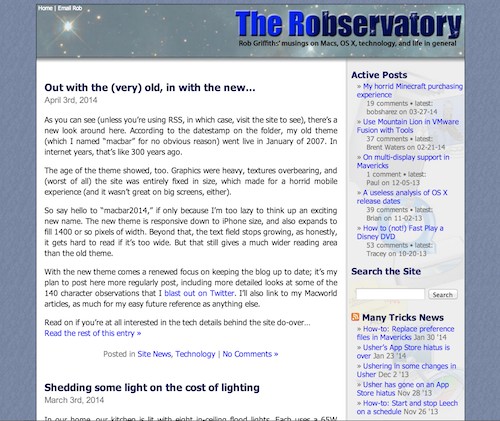
As you can see (unless you're using RSS, in which case, visit the site to see), there's a new look around here. According to the datestamp on the folder, my old theme (which I named "macbar" for no obvious reason) went live in January of 2007. In internet years, that's like 300 years ago.

The age of the theme showed, too. Graphics were heavy, textures overbearing, and (worst of all) the site was entirely fixed in size, which made for a horrid mobile experience (and it wasn't great on big screens, either). As a reminder of the "good old times," click the image at right for a flashback.

So say hello to "macbar2014," if only because I'm too lazy to think up an exciting new name. The new theme is responsive down to iPhone size, and also expands to fill 1400 or so pixels of width. Beyond that, the text field stops growing, as honestly, it gets hard to read if it's too wide. But that still gives a much wider reading area than the old theme.

With the new theme comes a renewed focus on keeping the blog up to date; it's my plan to post here more regularly post, including more detailed looks at some of the 140 character observations that I blast out on Twitter. I'll also link to my Macworld articles, as much for my easy future reference as anything else.

Read on if you're at all interested in the tech details behind the site do-over…
[continue reading…]


Review of Excel for iPad

Macworld logoI spent some time (a lot of time, actually) with Excel for the iPad, and reviewed it for Macworld:

There are any number of spreadsheet apps available for the iPad, but recently the market changed dramatically when Microsoft released the full Office suite for iPad, including a version of Excel. While you can argue that Excel is many years late to the iPad party (and I wouldn’t disagree), the iPad version of Excel is a solid entrant, and instantly changes the landscape for competitive apps.

Read the rest over at Macworld.


Shedding some light on the cost of lighting

In our home, our kitchen is lit with eight in-ceiling flood lights. Each uses a 65W incandescent bulb, and it seems to me that at least one of them is burned out at any given point in time.

Frustrated by the never-ending replacement cycle, and aware that there were longer-lived and more-efficeint options out there, I decided to look into replacing the incandescent bulbs with either CFL (fluorescent) or LED lights.

I was curious as to whether CFL or LED would be the better option for us, and how much it would cost to switch, in both the short and long term.

tl;dr summary: If you can afford the up-front costs, switch your lights to CFL or LED now. You will save a lot of money, and spend less time replacing bulbs. Read on for a full cost analysis of my kitchen light replacement project.

[continue reading…]


Demonstrating iMovie’s stabilization feature

On our flight home from Denver last week, our 10-year-old daughter had the window seat. So I asked her to record the takeoff (using a Canon pocket cam with 1920x1080 video). I gave her no tips (she'd never tried this before), other than to minimize any reflections off the window and to try to keep the camera steady.

The results weren't bad, given her lack of experience at such things, but they weren't really usable. So as with my early-morning Portland take-off, I fed the raw video to iMovie's stabilization routine. The end result is nothing short of amazing, with some caveats as noted after the video:


(Also available on my YouTube channel.)

At first glance, the changes are nothing short of extraordinary. The raw video is almost unwatchable in spots, due to the extreme camera movement. The stabilized video, while jumpy in those same spots, is infinitely more watchable. There are some tradeoffs, of course, to get this stability.
[continue reading…]


Aviation geekery: Rainy early morning PDX departure

Earlier this fall, the FAA decided to allow use of electronics below 10,000 feet on flights. As an aviation geek, this was great news; not because I could now use my iPod or whatever all the time, but because I could use my camera to record takeoffs and landings.

In particular, I think takeoffs are amazing events, wherein a huge multi-ton semi-controllable beast of a machine on the ground transforms itself into a powerful and graceful master of the skies, seemingly weighing nothing and covering vast distances at over 500 miles an hour. But I wax off-topic…

I don't fly all that often any more, and yesterday was my first flight since the rule changes went into effect. It was also a very early departure (5:40am takeoff), so it was pitch black outside. Plus it was overcast and a bit rainy.

Nonetheless, I couldn't let the opportunity pass me by, so I recorded the takeoff and initial climb out of Portland. There's even a bit of commentary, for the sake of my daughter sitting next to me.

(For the best visual experience, click the gear icon to choose 1080p, and then zoom to full screen.)

Despite the darkness and rain (or perhaps because of it), I find the resulting video to be mesmerizing…but that's mostly because I am an aviation geek, and love this stuff. If you'd like the technical details behind the video, keep reading.

[continue reading…]


The wild world of WordPress plug-ins

A couple weeks ago, our family visited the Evergreen Air and Space Museum. Being an aviation geek, I took a ton of pictures, and wanted to post about 150 of them here on my WordPress-powered blog.

Years ago, I used to make such albums using an app on my Mac, which I'd then upload to my server, reference in a blog entry, and that was that. It's been a while since I've done this, and I know that WordPress' gallery had improved, and that there were tons of extensions that would also create and manage galleries.

So I set off looking for a plug-in to handle my gallery needs. I thought I had a pretty simple list of requirements:

  • Ability to batch add images at once via WordPress' built-in Media tools.
  • A grid view to easily sort and caption large numbers of images.
  • Control over title, caption, and metadata—both customizing those fields, and whether or not they appeared.
  • Support for more than one gallery per post or per page.
  • The creation of a thumbnail index page must be optional.
  • An understandable user interface that didn't have a steep learning curve.
  • No reliance on Flash, but with some flashy features via jQuery or similar.
  • Ideally, the plug-in would create slideshows that scaled nicely based on screen size/resolution.

So I went to the plug-ins section of the WordPress interface, and ran a search for slideshow.

overload

Yikes, 432 plug-ins?! Problem number one: an overabundance of choice. As I started digging, though, I found numerous duplicates as well as entries for plug-ins that hadn't been updated in years. Problem number two: cruft in the search results reduces their usefulness. I scanned the results, focusing on those with high numbers of positive user ratings.

[continue reading…]


Why didn’t Apple reveal iPad mini sales figures?

First, only Apple knows why they didn't share iPad mini sales figures, so what follows are just my thoughts. Instead of splitting the mini from the fourth-generation iPad, they reported a combined three million units for the iPad mini and fourth generation iPad. So why didn't they split it out? At the highest level, I think (again, only my thoughts) it's as simple as this:

Apple hasn't ever historically split out products by type within a family. In their annual report, they tell you how many Macs, iPods, iPhone, and iPads were sold, and that's it. Reporting a combined "total iPads sold" figure is perfectly in line with past behavior.

Beyond that simple explanation though, I believe that reporting a sales mix would be a lose-lose proposition for Apple. By way of example, here are some theoretical press headlines, based on a few mini/full-size iPad sales splits.

mini: 500,000; iPad: 2,500,000

  • "Apple's new mini a flop; sells only 500K units"
  • "Apple's lost the magic touch post-Jobs; new mini tanks"
  • "New fourth-generation iPad underwhelms; doesn't reach 3mil units mark"

mini: 1,500,000; iPad: 1,500,000

  • "Customers confused by iPad options; pick both equally"
  • "iPad mini cannibalizes iPad sales"
  • "Full size iPad sales impacted by release of mini; margins likely to dip"

mini: 2,500,000; iPad: 500,000

  • "New mini succeeds, at huge cost to full-size iPad"
  • "Margin impact of iPad mini sales success will harm profitability"
  • "iPad mini roars to life; is the full-size iPad dead?"
  • "Full-size iPad on life support after horrid opening weekend"

Clearly there's some (OK, a ton of) exaggeration in these fake headlines, but the summary level is certainly true:

  • If iPad mini sales exceeded iPad sales, then that's a margin hit, and a warning sign on full-size iPad's future.
  • If the sales were equally split, that's still a margin hit, and possibly a sign of customer confusion.
  • If iPad mini sales were substantially under iPad sales, then the new product's a flop, and Apple's lost their touch.

So even ignoring Apple's track record of reporting sales by family, it seems there's no upside to splitting the sales figures. Given the lack of a good interpretation for any split, as a shareholder I'm happy they're reporting a lump sum figure.

Note that this does not make the iPad the equivalent of Amazon's Kindle: Amazon has never, to my recollection, reported any exact Kindle sales figures.