Skip to content

Just the iPod facts, ma’am

Macworld logoLast Friday, a relatively huge article in the Living section of The Oregonian caught my eye. As you can see in the picture at right (hover and click for a larger version), it was hard to miss this article.

Paper imageExpecting to find a shocking exposé on the hidden faults of the iPod, I started reading...and started getting angry. The article was nothing more than a writeup on one user's connectivity issues between her iPod nano and a Toshiba laptop. That alone would have been fine. But the article attempts to bring in other "evidence" of iPod nano flaws, and that's where I feel it overstepped the bounds of reasonable journalism (even for something in Living).

So I wrote up my thoughts for Macworld's site, as I felt it was unfair to let something like this sit without some form of response. I have also sent the paper a copy of my writeup, though I'm not expecting much in the way of follow up.


We’re sorry, but…

Online banking screen

...but at least my identity is secured by VeriSign while I don't use the online banking system!

OK, not terribly broken, but I found it moderatly humorous today when I tried to logon to do some online banking.


Music Store search struggles

Macworld logoAfter a particularly infuriating search effort for the Curious George soundtrack at the iTunes Music Store, I wrote this editorial about the store's messed up search functions. Oddly enough, the very day we ran the editorial, Apple updated the store's search functions, and the new functionality addressed every single issue I had raised. Talk about bad timing!
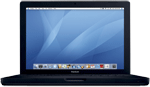


It’s so … black!

MacBook pictureA new MacBook has joined the stable here at macosxhints' HQ--this one's all mine, though, not a Macworld asset like the mini! And yes, I chose to pay the $150 color tax, and bought the black one (five bonus points to the first reader to identify the source of the title of this post). I chose to upgrade because, with two kids in the house, I'm doing more work from my laptop in various rooms of the house, and the 12" PowerBook G4's 1024x768 resolution can be quite limiting. I was tempted by the 15" MacBook Pro, but the one I would want was well over $2500. When the MacBook came out at $1,500, I decided it was time...
I had two major concerns prior to purchasing--the keyboard and the glossy screen. It took but a couple seconds of typing in the store to allay the keyboard issue. The keys, though they look decidely non-standard, have very standard spacing. I had no troubles at all with touch typing, and I loved the amazingly solid feel of the keyboard.

[continue reading…]


Hide iDVD? I think not!

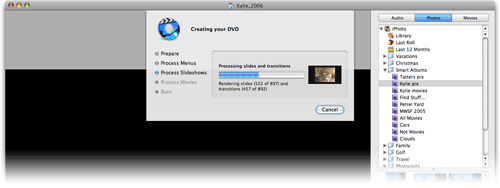
Last week, for the first time since installing iLife '06, I had an excuse to use the newest version of iDVD. In general, I love it. But someone at Apple made one seemingly insanely poor decision involving the "burn progress" screen:

DVD burn image

That's the screen that appears when you start the encode (if not yet done) and burn of a final DVD. In prior versions of iDVD, this area was a separate tab within the main iDVD interface. Now it's been attached to a drop-down sheet, as seen above. Within that sheet is a progress bar and a ticker that counts off how many items have been processed.

So far so good, though a progress dialog in a sheet is a somewhat unique concept. But the other change that came with this new sheet is incredibly unwelcomed--you can no longer hide iDVD in any traditional manner. If you try Comamnd-H with iDVD in the foreground, it just beeps at you. If you switch it to the background and then do "Hide Others" from some other app, everything except iDVD hides, and you'll hear the beep again. I even tried AppleScripting it, with no success.

OK, fine, I thought, I'll just minimize it to the Dock. Nope. That doesn't work either. Argh!

Since the sheet is dynamic, my screensaver won't kick in if it's visible. So it seems you're just plain stuck with the iDVD box onscreen, which is an amazingly poor decision on Apple's part. I finally managed to at least make it non-visible by using Backdrop, a utility that lets you drop a desktop picture (or solid color) down as a layer. So I ran Backdrop, set it to display a nice picture, then switched Backdrop in front of iDVD. iDVD was now hiding behind Backdrop, and since Backdrop takes up the whole screen, I couldn't accidentally activate iDVD by clicking its window. I could still switch to it with Command-Tab, or by clicking its icon in the Dock, of course. But at least it was out of sight, allowing me to more easily work on other things while it rendered away in the background.

Why oh why can't we just have Command-H work again, as it did before?!


Why isn’t macosxhints.com a wiki?

A couple mornings back, while browsing my collection of feeds in NetNewsWire, I came across this entry about macosxhints.com in Chris Clark's excellent blog, decaffeinated. Chris writes:

MacOSXHints is a community-driven site operated by Mac Publishing LLC (of Macworld and Playlist renown) whose sole purpose is to collect and archive--wait for it--hints pertaining to Mac OS X...little tidbits you probably won’t find in the help files or product pages.

... ... ...

What we have is a thriving community site that houses a great number of hints, some percentage of them broken or redundant, most of which could be improved upon (and are, if you bother to read the comments) with the aid of a few dozen eyes.

This isn’t what blogs are for. This is what wikis are for.

So why isn’t MacOSXHints a wiki?

An interesting question to read, especially just after waking up. And it would have been interesting to reply in a comment on Chris' site, but...it seems there's no ability to do so. (Perhaps I should post a story about why decaffeinated should really be a blog that takes comments? :) ). So I'm posting my reply here, in case anyone's interested in the answer to the question.

The question about macosxhints.com is a valid one, and one that's potentially even more interesting when asked at a higher level...

Important note: The following thoughts are my opinions (and historical knowledge) only. They are in no way associated with any official MacPublishing, LLC company policies or plans. Anything I write about what I'd like to see on macosxhints.com is just that--what I'd personally like to see happen to the site going forward. They are not statements of official plans by MacPublishing for the macosxhints.com site (but we are discussing many of these same things internally).

[continue reading…]


We all make mistakes…

And Macworld (the printed version) had one in its June issue. For a challenge, see if you can find it--hint, it's somewhere between pages 50 and 60, but if you find it on your own, I'd be quite impressed. I didn't spot it myself; it was noted in a thread on a forum site.

If you don't have the magazine, or you can't find it, or you just want to see exactly what it was we did wrong, I wrote about the mistake on Macworld's new MacUser site. Suffice it to say we'll probably never see another product with a similar result!

The MacUser site is long gone, of course…but archive.org captured the writeup. Basically, a Canon camera was rated 5.5 out of 5 mice.

In the above article, I also cover what I consider to be the most amazing typo I ever saw--right on the cover of PC Magazine. To save you the read, this was it...one year, the cover of PC Magazine's annual Technical Excellence awards issue consisted of an image of a large gold medallion. On that medallion, in large print, were the words "Tehcnical Excellence." Whoops!


Good riddance, haunted house!

We've lived in our present home for a bit more than two years, and we're generally quite happy with it. However, the floor has always been very squeaky, especially in the carpeted areas. When someone was walking around, it really did sound like a haunted house at times, what with all the eery squeaking from the floor.

Although the noise annoyed me, it never did so enough to merit moving all the furniture, pulling up the carpeting, and fixing the problem with some nails. Nor was I much interested in trying to solve it from below, in our roughly 18" tall crawl space. So I just put up with it. Until this week.

A while back, someone told me about this ingenious device that would help you fix squeaky floors without pulling carpet or entering the crawlspace. I was doubtful, and just never seemed to have enough time to investigate further. But with some time off the last couple weeks for the new child (and family in town to help babysit), I finally tracked down the device at Home Depot. It's called (I am not making this up) Squeeeeek No More, and it looks like this (click for a larger version):

Squeek tool

[continue reading…]


Trust me, they won’t even notice…

So let's assume you're a big, powerful, corporation, generally viewed as "customer centric" with very cool and useful products. Sometimes, though, you have the occasional 'what we're they thinking?' moment with a product. Let's further assume your name is, oh, I don't know, how about...Apple? Here's yet another of those moments they seem to have with some regularity:

iPhoto icon

That, in case you're not familiar with it, is the button in iPhoto toolbar that lets you publish a selection of images to your .Mac homepage. Click it, and a wizard comes up that helps you select the theme, layout options, and other features for your photo page. You then click Publish, and presto, your images are published on your .Mac homepage, complete with a very nice slideshow feature. Presto, bango, simple!

So what's the problem? Well, that button (and the wizard it launched) has simply vanished in iPhoto6. There's no discussion about it in the manual, nor in Help, nor in the Read Me, nor in the Knowledge Base. It has simply disappeared into the ether.

Instead of using the handy wizard, you're now supposed to send all your images through iWeb, which will then force you to create an actual site, just to contain what should be a simple slideshow page. Yech. There is a workaround, which I'll write up in detail for macosxhints next week. (Short version: export and resize to 800x600, upload the folder to your iDisk, then use the .Mac homepage to create the photo page.) But the workaround is a far cry from the ease of use of the old wizard.

Now personally, I never used this feature, as I don't use .Mac for my photo pages. However, after recommending the iLife upgrade to my mother, I definitely got an earful about this "new and improved" iPhoto when she found her single most used feature missing in action! Since I feel responsible for the problem she now faces, it's the least I can do to try to help spread the word about this, and hope Apple can see fit to return a basic feature to the application.

I'll probably be writing about why this is a Really Bad Thing on macworld.com next week, but I wanted to get something up about it now, while it was fresh on my mind. Of course, based on Apple's treatment of the discussion I linked to above, I don't have a positive feeling about the chances of this feature's return...

Locked!

Perhaps, though, if enough people make enough noise about it, they can bring back what was a powerful and easy-to-use feature.