Skip to content

The Tesla Motors Model S is one incredible machine

Last night, thanks to a friend (let's call him Jake, since that's his name) with a position in the buying queue, I was able to get some extended (passenger only) time in a Tesla Motors Model S—more specifically, the Model S Peformance, loaded to the gills with pretty much every option available.

Jake was concerned about the car's clearance into and out of his somewhat steep driveway, so the dealer agreed to let him (with an onboard sales rep, of course) take the car home to test it out. I rode out as a back seat passenger, and got to ride back to the dealership in the passenger seat. So what was it like? In short, it's an amazing technological tour de force that elicits grins with every punch of the accelerator.

[continue reading…]


Siri, why is Google voice search better than you?

In case you missed it, a month or so ago, Google added voice search capabilities to its free Google Search app for iOS devices. If you haven't tried this out yet, I highly recommend you do: I find it so useful I've given Google Search a spot in my Dock.

What's so good about Google's voice search, especially on a device that comes with Siri already? To demonstrate the answer to that question, I made a little video, wherein I used my iPad mini to ask both Siri and Google four questions:

How do you spell exuberant? Who won the Trailblazers basketball game last night?
How do you make vanilla ice cream? How high is Mount Kilimanjaro?

So how'd it work out? See for yourself…

Watch the full-size version
[mp4 only • 1024x768 • 11MB]

(Production aside: Yes, I realize you can use Siri from anywhere. I toggled back to the home screen each time simply to give different backgrounds to Siri and Google.)

Read on for my thoughts on how these two tools compare.

[continue reading…]


Why didn’t Apple reveal iPad mini sales figures?

First, only Apple knows why they didn't share iPad mini sales figures, so what follows are just my thoughts. Instead of splitting the mini from the fourth-generation iPad, they reported a combined three million units for the iPad mini and fourth generation iPad. So why didn't they split it out? At the highest level, I think (again, only my thoughts) it's as simple as this:

Apple hasn't ever historically split out products by type within a family. In their annual report, they tell you how many Macs, iPods, iPhone, and iPads were sold, and that's it. Reporting a combined "total iPads sold" figure is perfectly in line with past behavior.

Beyond that simple explanation though, I believe that reporting a sales mix would be a lose-lose proposition for Apple. By way of example, here are some theoretical press headlines, based on a few mini/full-size iPad sales splits.

mini: 500,000; iPad: 2,500,000

  • "Apple's new mini a flop; sells only 500K units"
  • "Apple's lost the magic touch post-Jobs; new mini tanks"
  • "New fourth-generation iPad underwhelms; doesn't reach 3mil units mark"

mini: 1,500,000; iPad: 1,500,000

  • "Customers confused by iPad options; pick both equally"
  • "iPad mini cannibalizes iPad sales"
  • "Full size iPad sales impacted by release of mini; margins likely to dip"

mini: 2,500,000; iPad: 500,000

  • "New mini succeeds, at huge cost to full-size iPad"
  • "Margin impact of iPad mini sales success will harm profitability"
  • "iPad mini roars to life; is the full-size iPad dead?"
  • "Full-size iPad on life support after horrid opening weekend"

Clearly there's some (OK, a ton of) exaggeration in these fake headlines, but the summary level is certainly true:

  • If iPad mini sales exceeded iPad sales, then that's a margin hit, and a warning sign on full-size iPad's future.
  • If the sales were equally split, that's still a margin hit, and possibly a sign of customer confusion.
  • If iPad mini sales were substantially under iPad sales, then the new product's a flop, and Apple's lost their touch.

So even ignoring Apple's track record of reporting sales by family, it seems there's no upside to splitting the sales figures. Given the lack of a good interpretation for any split, as a shareholder I'm happy they're reporting a lump sum figure.

Note that this does not make the iPad the equivalent of Amazon's Kindle: Amazon has never, to my recollection, reported any exact Kindle sales figures.


Does the Tooth Fairy exist?

This morning, when I woke Kylie, our nine year old daughter, she hit me with some Tooth Fairy questions: "Do you believe in the Tooth Fairy?" "How can she be real, she'd be busy all the time with millions of kids losing their teeth every day!" "If she's real, she'd never forget a kid, right?"

Odd, but with Kylie, you're never sure what you'll get in the morning. So we went through the morning's tasks, getting ready for school, and then she hits me with: "Dad, there's no way the Tooth Fairy is real, and I've got proof…right here!" And she pulls out her Tooth Fairy pillow, where you place teeth for the Tooth Fairy to collect and replace with coins.

She then pulls a tooth out of the pocket of the pillow, and says "This is my tooth; it fell out yesterday, and I didn't tell you or Mom. Then I put it under my pillow last night, and the Tooth Fairy didn't take it!"

Ummmm…errrr…ahhhhhm…

At that point, I took her into the other room, so our younger daughter wouldn't hear, and explained that yes, the Tooth Fairy was really Mom and Dad, and we did it to help our kids through what can sometimes be a bit of a traumatic experience. I asked her to keep this secret from her sister, and she merrily agreed.

This one's got a future in science, I think! (I also realized that had I noticed the missing tooth, and managed not to say anything to her, she would've woken up today absolutely convinced that the Tooth Fairy really exists!)


Wireless routers vs. wireless charging

I recently made a snarky tweet about wireless charging:

If you're going to advertise "wireless charging," shouldn't you really offer wireless charging, not "wires to another device charging?"

I've had a few responses along the lines of "well, wireless networking still needs wires, and nobody complains about that!" While this is true, there's a key difference at work here.
[continue reading…]


My horrid Minecraft purchasing experience

Summary version: I bought the Mac version of Minecraft via credit card. This led to my card being put on a fraud hold, and the company that handled the charge asking me to provide personal and private information via email. Ergo, my recommendation: do not use a credit card to purchase Minecraft.

Updated on Sept 5: Skip to the end to see Skrill's response to my refusal to provide identity theft documents.

Detailed version: Recently, my daughter started playing Minecraft with a friend of hers. At first, the iOS version was all she wanted to use, and she played that for quite a while. But then her friend upgraded to the desktop version, and after some discussion with her and figuring out how she could help pay for it, we agreed to buy the Mac version.

So I went to the Minecraft site, and followed the steps to pay by credit card. When you do so, your payment is handled by a company named Skrill (previously Moneybookers). Googling on either of these will provide some interesting tidbits, such as default opting-in customers to casino partners and their blocking the WikiLeaks donation site. I only wish I had Googled before I purchased. In my defense, it's only noted in a small line at the bottom of the payment screen:

If I had gone my homework ahead of time, I would've switched to PayPal, but I didn't.
[continue reading…]


How to use Safari to track The Masters leaderboard

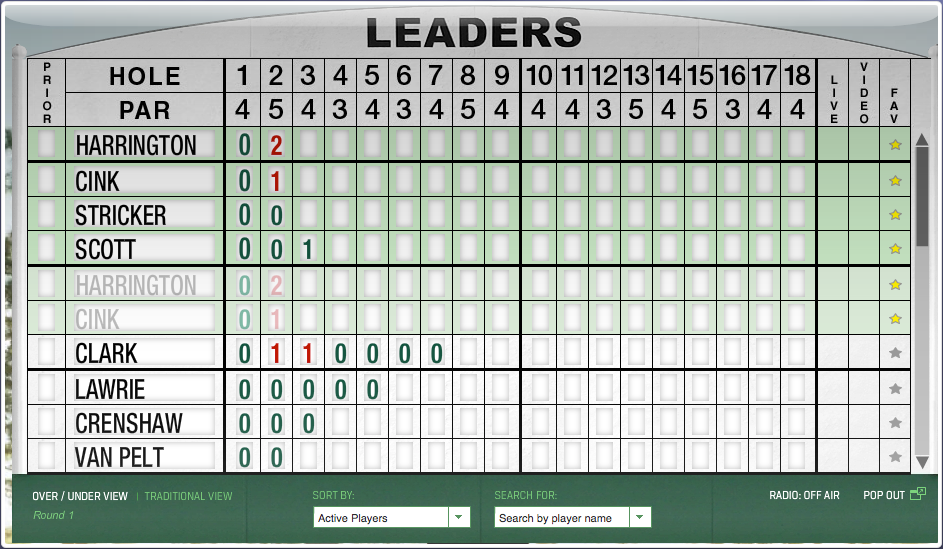
In general, I don't use Safari—mainly because I'm addicted to the add-ons I get with Chrome and Firefox. (Yes, I know Safari has extensions…but they're underpowered and feature limited compared to what you can get in the other browsers.) However, during Masters week, Safari has a key role in my following the tournament, thanks to one key feature: web clip, i.e. Open in Dashboard.

While The Masters has an excellent iPad app, I don't like having the iPad locked into one app for hours at a time. So, to follow the leaderboard, I turn to Safari's Open in Dashboard feature, along with a favorite old Mac OS X Hints hint that allows me to drag widgets out of the Dashboard. Using these two things together, I can view the full Masters leaderboard, floating in a window all its own.

Best of all, the interactivity of the leaderboard is preserved, so I can re-sort the list, expand a player's scores, and do all the other things I can do on the actual leaderboard page.

Note that you'll need some spare monitor space for this trick: the dragged Widget floats over every other window, so it will get in the way if you're using, for instance, an 11" MacBook Air.

If you'd like to do the same, here's how…
[continue reading…]


Wallpapers: iPad 3 and newer

The following wallpapers are 2048x2048 pixels in size, and designed for use on third-generation iPads ("the new iPad"). Note that the images shown in the image sliders below (hover and click to cycle) are low-quality 256×256 JPEG representations of the actual photos; to get the high-quality images, download the entire bundle [29MB] and install only those you wish to use.

Home Screens (5)Lock Screens (24)

License: All photographs in these wallpapers are © Rob Griffiths, and are freely provided for personal use only. You may not include these wallpapers on other sites, nor in any commercial product, without my prior permission. (I hate having to put this here, but prior experience has shown it to be necessary.)


Wallpapers: iPad and iPad 2

The following wallpapers are 1024x1024 pixels in size, and designed for use on the first and second generation iPads. Note that the images shown in the image sliders below (hover and click to cycle) are low-quality 256x256 JPEG representations of the actual photos; to get the high-quality images, download the entire bundle [9MB] and install only those you wish to use.

Home Screens (8)Lock Screens (30)

License: All photographs in these wallpapers are © Rob Griffiths, and are freely provided for personal use only. You may not include these wallpapers on other sites, nor in any commercial product, without my prior permission. (I hate having to put this here, but prior experience has shown it to be necessary.)


Wallpapers: iPhone 4 and iPhone 4S

The following wallpapers are 640x960 pixels in size, and designed for use on the iPhone 4/4S. Home screen images feature a slightly darkened navigation bar (where the paging dots appear), along with a fade-to-darker gradient in the Dock area below the navigation bar.
Note that the images shown in the image sliders below (hover and click to cycle) are low-quality 256×256 JPEG representations of the actual photos; to get the high-quality images, download the entire bundle [6MB] and install only those you wish to use.

Home Screens (9)Lock Screens (32)

License: All photographs in these wallpapers are © Rob Griffiths, and are freely provided for personal use only. You may not include these wallpapers on other sites, nor in any commercial product, without my prior permission. (I hate having to put this here, but prior experience has shown it to be necessary.)