Skip to content

General

Stuff that doesn’t fit in any other category

Does the Tooth Fairy exist?

This morning, when I woke Kylie, our nine year old daughter, she hit me with some Tooth Fairy questions: "Do you believe in the Tooth Fairy?" "How can she be real, she'd be busy all the time with millions of kids losing their teeth every day!" "If she's real, she'd never forget a kid, right?"

Odd, but with Kylie, you're never sure what you'll get in the morning. So we went through the morning's tasks, getting ready for school, and then she hits me with: "Dad, there's no way the Tooth Fairy is real, and I've got proof…right here!" And she pulls out her Tooth Fairy pillow, where you place teeth for the Tooth Fairy to collect and replace with coins.

She then pulls a tooth out of the pocket of the pillow, and says "This is my tooth; it fell out yesterday, and I didn't tell you or Mom. Then I put it under my pillow last night, and the Tooth Fairy didn't take it!"

Ummmm…errrr…ahhhhhm…

At that point, I took her into the other room, so our younger daughter wouldn't hear, and explained that yes, the Tooth Fairy was really Mom and Dad, and we did it to help our kids through what can sometimes be a bit of a traumatic experience. I asked her to keep this secret from her sister, and she merrily agreed.

This one's got a future in science, I think! (I also realized that had I noticed the missing tooth, and managed not to say anything to her, she would've woken up today absolutely convinced that the Tooth Fairy really exists!)
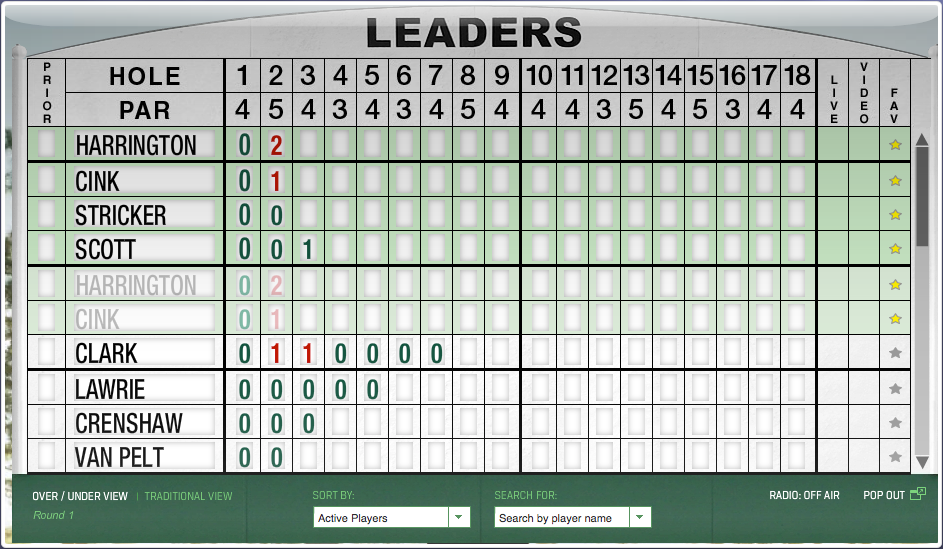



How to use Safari to track The Masters leaderboard

In general, I don't use Safari—mainly because I'm addicted to the add-ons I get with Chrome and Firefox. (Yes, I know Safari has extensions…but they're underpowered and feature limited compared to what you can get in the other browsers.) However, during Masters week, Safari has a key role in my following the tournament, thanks to one key feature: web clip, i.e. Open in Dashboard.

While The Masters has an excellent iPad app, I don't like having the iPad locked into one app for hours at a time. So, to follow the leaderboard, I turn to Safari's Open in Dashboard feature, along with a favorite old Mac OS X Hints hint that allows me to drag widgets out of the Dashboard. Using these two things together, I can view the full Masters leaderboard, floating in a window all its own.

Best of all, the interactivity of the leaderboard is preserved, so I can re-sort the list, expand a player's scores, and do all the other things I can do on the actual leaderboard page.

Note that you'll need some spare monitor space for this trick: the dragged Widget floats over every other window, so it will get in the way if you're using, for instance, an 11" MacBook Air.

If you'd like to do the same, here's how…
[continue reading…]


Wallpapers: iPad 3 and newer

The following wallpapers are 2048x2048 pixels in size, and designed for use on third-generation iPads ("the new iPad"). Note that the images shown in the image sliders below (hover and click to cycle) are low-quality 256×256 JPEG representations of the actual photos; to get the high-quality images, download the entire bundle [29MB] and install only those you wish to use.

Home Screens (5)Lock Screens (24)

License: All photographs in these wallpapers are © Rob Griffiths, and are freely provided for personal use only. You may not include these wallpapers on other sites, nor in any commercial product, without my prior permission. (I hate having to put this here, but prior experience has shown it to be necessary.)


Wallpapers: iPad and iPad 2

The following wallpapers are 1024x1024 pixels in size, and designed for use on the first and second generation iPads. Note that the images shown in the image sliders below (hover and click to cycle) are low-quality 256x256 JPEG representations of the actual photos; to get the high-quality images, download the entire bundle [9MB] and install only those you wish to use.

Home Screens (8)Lock Screens (30)

License: All photographs in these wallpapers are © Rob Griffiths, and are freely provided for personal use only. You may not include these wallpapers on other sites, nor in any commercial product, without my prior permission. (I hate having to put this here, but prior experience has shown it to be necessary.)


Wallpapers: iPhone 4 and iPhone 4S

The following wallpapers are 640x960 pixels in size, and designed for use on the iPhone 4/4S. Home screen images feature a slightly darkened navigation bar (where the paging dots appear), along with a fade-to-darker gradient in the Dock area below the navigation bar.

Note that the images shown in the image sliders below (hover and click to cycle) are low-quality 256×256 JPEG representations of the actual photos; to get the high-quality images, download the entire bundle [6MB] and install only those you wish to use.

Home Screens (9)Lock Screens (32)

License: All photographs in these wallpapers are © Rob Griffiths, and are freely provided for personal use only. You may not include these wallpapers on other sites, nor in any commercial product, without my prior permission. (I hate having to put this here, but prior experience has shown it to be necessary.)


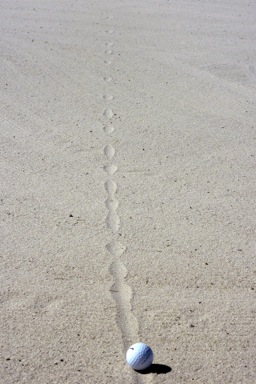
A Rube Goldberg-inspired garage parking assistant

We recently started parking our truck in the shorter of our garage bays—it's short due to shelves at the front that can't be moved any further forward (as they'd then block access to another portion of the garage).

The amount of wiggle room available is quite small—about two inches of leeway, at the most. So parking in the same spot every time is quite important. (The frontmost item on the truck is the bracket that holds the license plate, so that's the part that needs to be watched.)

While there are many ways to solve this issue, here's how I chose to do it:

Sure, I could have hung a tennis ball from the ceiling (I did that first, actually), or put a block on the ground in front of the tire. But I had issues with both of those methods, and I like semi-geeky do-it-yourself solutions. Read on, if you wish, for the details on the project…

[continue reading…]


Thanks and goodbye, Tatters!

  • Home

I was never a cat person growing up; my family always had dogs. Once I got through college, I lived in shared housing arrangements for the first five years of my work life (the joys of living in Silicon Valley)—so that meant no pets of my own. My jobs were also such that having a pet would be difficult, as I traveled a fair bit. So I remained petless for many years.

In January of 1994, though, I purchased my first home (shortly after moving to Oregon). In all ways but one, it was a very typical starter home: 1970s three-bedroom two-bathroom ranch with too much dark wood, not enough light, horrendously outdated kitchen, and and orange-and-white marble-look-but-plastic guest bath.

The one way in which it differed is that the home came with a guilt trip, which led directly to my first-ever experience as a cat owner…
[continue reading…]


My 90-day health improvement plan

A few days ago, I Tweeted a message about how I've lost weight, dropped my blood pressure, and reduced my resting pulse rate over the last few months:

Sep 8 vs Dec 8: Blood pressure, 140/95 -> 115/75; resting pulse, 73 -> 48; Weight, 218 -> 185. Amazing what's possible in three months.

I had a few people ask (on Twitter) me how I made these changes. My response required more than 140 characters, so I thought I'd expand on it in a blog posting here.

Warning, this is a long blog entry, mainly because I've not written this down anywhere before, and I wanted to get it all in text. The executive summary version is simply that cutting sodium, watching calories, and running every single day possible are the three main factors behind the changes in my weight and blood pressure.

Read on for the highly-detailed version of the above...

[continue reading…]


Photos from our summer tour

After posting about my favorite roads from our summer tour around the west, a few people asked to see some pictures. Here's an album showing some of the interesting sites and landscapes:

Summer Tour 2010

It really was an amazing journey—4,000 miles in about 18 driving days, plus another 700 miles during a one-week stay in Colorado to visit friends and relatives. More about the trip, in particular spending that much time in a car with two young children, in a future post.


These are a few of my favorite roads…

Last summer, we took our two girls on a 30-day, 4,000-mile trek around the western United States (here's the full route). The trip was made possible by my wife's employer, where everyone is given a multi-week sabattical after 10 years of service.

Our kids are relatively young for such a journey--just four and seven at the time of the trip. To make it bearable for them (and us!), we drove relatively short distances each day, and spent a mostly-driving-free week in Colorado in the middle of the trip. (More on the lessons we learned traveling for 30 days straight with two young kids in a future blog post...)

What was great about the trip, for the adults in the car at least, was that relatively little time was spent on interstate highways--only 1,200 of the 4,000 miles, and of those 1,200 miles, 900 of them were on the first three days and the last day of the trip. So most of the time, we were on state highways or even smaller backroads. These are the roads where you can really see the country, and get away from the crowds--many times we had the road completely to ourselves.

Given how much we enjoyed these roads, I thought I'd take a few minutes and share some of my favorites from the journey. (Click the small map image for the full Google Maps view (in a new window) of each road.)
[continue reading…]