Skip to content

Apple Universe

Top-level category for all Apple, Mac, and OS X related topics.

Smoothing things over

Macworld logoEver wondered about the various settings in the Font smoothing style pop-up of the Appearance System Preferences panel? Thanks to a recent crash, I was forced to revisit the font smoothing settings, which I literally hadn't looked at in years.

I found the results of my tests somehwat interesting, so I wrote them up for macworld.com.


This is going to take a while…

Expander box

2,023,406,814 hours! Wow! By my calculations, that's roughly 84,308,617 days, or 230,824 years, give or take a half-year or so. I hope the dual dual-core Intel-based Pro desktops are released soon; it seems I really need a faster Mac!

In all seriousness, this archive actually expanded relatively rapidly. However, I think the structure of the archive really messed up StuffIt's estimating abilities. The archive was a 220MB file containing Italian scenery files for the X-Plane flight sim. After expansion, it contains about 1,350 files, spread across 74 folders. While that doesn't seem overly excessive to me, apparently it's enough to greatly confuse StuffIt!


More on Leap-A/Oompa Loompa

I was frustrated after writing my Leap-A Q&A for Macworld yesterday, as I couldn't get Oompa Loompa to do what it was supposed to do--it wasn't infecting my files, and it wasn't sending itself out over iChat. So today, my friend and coworker Kirk McElhearn and I spent the better part of the day testing Oompa Loompa on a couple of controlled Macs. We wanted to figure out exactly what it did, or did not, do, and what to do about it if you found it on your machine.

You can read the results of our efforts in the article titled Digging deeper into the Leap-A malware. It took quite a while, but we think we finally figured out exactly how it works (and doesn't work), and offer some advice on removal. Among the more surprising findings was that it will not attempt to send itself out over Internet iChat, only Bonjour iChat. It also won't affect applications that are system-owned, only those that have been installed by a user (and are therefore user-owned). Both of these are why I wasn't seeing the behavior I expected to see yesterday. My test machine had only Apple's stock Tiger applications on it, and Kirk and I were testing with an Internet iChat.

I am now officially very sick of Leap-A, having spent probably 18 hours on it over the last two days. The short summary is that it's a bad piece of malware that could have been worse...but it's far from the self-propagating internet-spreading virus/worm that's been described on other sites. At the end of the day, it's really just a good reminder to be very careful about what you download and install on your Mac.

Have a nice weekend everyone!

-rob.


I’m local, and I’m malicious!

[Note: The following isn't a slam on Apple's security policies, nor am I chiding them for fixing a security hole. I merely found the description of one particular hole and its related fix somewhat funny, so I thought I'd have a bit of fun with it. Read the following as nothing more than a poor attempt at humor after a long day spent writing about security issues...]
Given the relative seriousness of the Leap-A malware/trojan (I put together a pretty straightforward Q&A page for Macworld, too), I thought the following look at the lighter side of security was worth sharing today!

One of the things included in the recent 10.4.5 update (and yes, I've already updated the OS X release dates chart) was a security update for the kernel. Specifically, this update fixed the following exploit:

A malicious local user may trigger a system crash by invoking an undocumented system call. This update addresses the issue by removing the system call from the kernel.

Now don't get me wrong, I think patching security holes is a Very Good Thing. However, in this case, I have to question both the danger of the hole as well as the quality of the related fix. Let's look at the 'hole' and 'fix' in more detail. First, consider malicious, which derives from the word malice. According to Merriam-Webster, malice is the "intent to commit an unlawful act or cause harm without legal justification or excuse." So whomever this person is, they're not around to help you out.

Next, local user. This means the person is directly connected to your Mac. They may be seated directly in front of it, or perhaps they have connected remotely via ssh or telnet. Either way, they've successfully logged into your Mac. This means that they're either someone you trust (you need better friends!) who has an account on your machine, or they're a hacker who has figured out a valid username and password and used that info to log in. So now we have a malicious local user, with some level of access to your Mac.

So just what is this malicious local user going to do now? According to the security notice, they're going to trigger a system crash. That's right. They've gone through all this trouble to gain access to your machine, and now they're going to invoke an undocumented system call and bring the machine down. (If they're physically local, pulling the power cord would do the same thing, and probably cause more damage in the process.) Granted, a crash is never a good thing, but consider this malicious individual again. They're here to cause harm. Probably as much harm as they possibly can. And given that they're logged into your machine, they can probably cause a lot more harm than a simple reboot. File deletion, creating evil symbolic links, installing a keystroke logger, etc. There are a lot of things they could do that are much farther up the 'cause harm' scale than a simple crash.

But nonetheless, we don't need to worry about this particular security issue any longer. Why not? Because Apple fixed it! Yes indeed, they sure did. They fixed it by removing the system call from the kernel. "Hey Doc, my arm hurts!" 'No problem, I'll have that arm off of there in a jiffy!' I'll certainly sleep more soundly tonight, knowing that some malicious local user won't be able to use an undocumented system call to crash my machine!

Security issues are important. They really are; I think today's dialog about Leap-A was good for the Mac community. And I think closing security holes quickly and effectively is also a Very Good Thing, as I stated above. But still, I couldn't resist having a bit of fun with the nature of this particular hole and the related fix.


Give Camino a test browse…

Macworld logoAs noted on numerous sites yesterday, the Camino browser has officially reached version 1.0. This is great news, as Camino has long been one of the fastest, best looking browsers available for OS X. I've used it off and on over the years, but now, with 1.0 out, I'm giving it a test run as my main browser for a week. Why? I'm a bit tired of Firefox's non-Mac-like interface, and Safari seems to get slower each day I use it. Plus I like some of the features it offers.

Over on macworld.com, you can read my Editor's Notes entry to learn why I'm giving Camino a test run. While it's not a full review (or even a preview), it does cover some of the features you'll find in Camino, as well as a couple of essential plug-ins.

If you're presently not entirely satisfied with your browser of choice, give Camino a shot. It's lacking in a few areas, but overall, it's a very capable browser with a very standard OS X interface and a great feature set. I must admit, I love the 'browser wars'--they're clearly giving us not only more choices, but more better choices than we've ever had before...


An annoying Address Book glitch

Tiger boxGiven my background with it, and its role in leading to an unexpected but welcomed career change, I'm clearly a fan of OS X. But sometimes, I really question the quality assurance (QA) testing that goes into the OS and its associated applications. Consider the following glitch I ran into yesterday with Address Book.
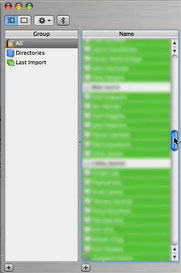
Address Book screenshotNow granted, I don't run Address Book directly all that often--I usually just use it via Mail and the other programs to which its connected. But yesterday, I was trying to do something with my nearly my full contact list when I ran into a problem (not fatal to the task, but highly annoying). Here's the problem: Address Book fails to save the scroll thumb location when unselecting entries from the Names list--but only when you're unselecting entries from anywhere other than the first or last screenful of the list.

That actually sounds quite confusing, so I thought I'd demonstrate with a short movie. Click the image at left for a small version (182x174, 188KB) of the problem demonstration, or you can view the full-size version (364x548, 976KB) if you prefer. The clip first shows how unselects should work, by positioning the thumb at the top and the bottom of the list of names. It then shows what happens when the thumb is elsewhere.

To recreate the problem on your Mac, just follow these simple steps:

  1. Launch Address Book, click on any entry in the Names column, then hit Command-A to select all the names.
  2. Move the scroll thumb somewhere towards the middle of the list.
  3. Hold down Command and click any one name. Watch the scroll thumb leap back to the top of the list.
  4. Repeat ad infinitum.

As I noted, this isn't a fatal bug--it just makes it much tougher to deselect a number of names after selecting all. The bug also doesn't occur if you're simply selecting names from the middle of the list; it's only when you're deselecting (though it doesn't have to be from a Select All).

The bigger question is why do we see these types of glitches in many OS X programs? I probably launch Address Book about once a month, and yet it took only one relatively simple task to reveal a fairly obvious problem--how come a QA team didn't spot it long before the program ever left the development lab?


How I back up my websites

I’ll start off with an admission: I’m a relatively clueluess user of the command line in OS X. Sure, I know my way around the basics such as ls, cp, mv, and I have a working knowledge of vi, and a basic understanding of some of the more advanced programs. But that’s about it—minimal shell scriping skills, no knowledge of regular expressions, and only the most basic understanding of pipes, redirection, combining commands, etc. So I find myself regularly amazed by the power of what (for a Unix wizard) would be an amazingly simple task.

Such was the case yesterday. Earlier in the day, I’d had a bit of a scare with our family blog site (like robservatory, it runs on WordPress). Due to a mix-up on the administrative end, the WordPress database for the site was deleted. Historically, I’ve been very paranoid about backing up the macosxhints’ sites. But for whatever, reason, that same paranoia didn’t extend to my two personal sites. Hence, I had no backup to help with the problem. Thankfully, the ISP did, and the family blog was soon back online without any loss of data. But I resolved to not let this happen again without a local backup of my own.

[continue reading…]


On the strangeness of electrons…

Happy Holidays!

As you may know, I'm in Colorado for the holidays this year, visiting with the family. If you've never been here, the air is extremely dry, especially in the winter. And dry air makes a great breeding ground for static electricity. Coming from humid Oregon, I'd pretty much forgotten about that fact. Until this morning, when I touched the trackpad on my 12" PowerBook G4 and watched a very large, very bright spark travel between my finger and the pad. Zotttt!

Immediately, the trackpad was rendered next to useless. The cursor was generally restricted to a square area of about 200 pixels in the top left corner of the screen--though I could occasionally coerce it into other locations. Knowing what little I know about electricity (stay away from it!), I thought for sure I'd fried some key electronic part that controlled the track pad.

Nonetheless, I tried my usual first troubleshooting step--a restart. While things changed a bit, the trackpad was still basically unusable. I could drag it all over the screen, but only in huge jumps. When I lifted my finger, the cursor would jump to some other spot on the screen. I was now pretty convinced I had a hardware issue.

Then I remembered that I had SideTrack, the replacement trackpad driver, installed. SideTrack is such an essential piece of software for me that I had totally forgotten I had it installed. In the 'why not try' category, I downloaded the newest version and installed it. One restart later, and...presto...I once again had a fully-functional trackpad.

So the question of the day for any of you technical types is: How could a jolt of static electricity permanently affect a software application? It seems very odd to me, especially given that SideTrack isn't the kind of thing (I wouldn't think) that would be writing anything permanent to disk (which might get scrambled by a shock). Any ideas?


10.4 + 0.3 = 311.6??

megabytes to upgrade

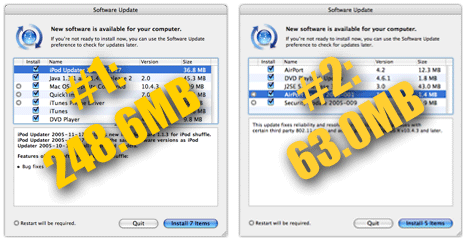
Well, it does when you're talking about installing 10.4 from the retail DVD, and then upgrading it to 10.4.3. I re-partitioned a portable FireWire drive tonight, so that I could put both 10.3 and 10.4 on it for testing purposes. I haven't clean installed 10.4 since the release back in April, and I hadn't really noticed just how many megabytes of updates there have been. Suffice it to say, there've been a lot! Seven packages the first time around, then five more after that.

To Apple's credit, I guess?, it only took two restarts to get the system up to date. But I shudder to think about those who lack broadband access to the net; even a moderately-speedy DSL connection would groan under the weight of these updates. Approximate download times for 311.6MB:

Connection SpeedDownload Time (Hrs:Mins)
28.8Kbps25:12
33.3Kbps21:36
56.6Kbps12:50
128Kbps (ISDN)5:40
512Kbps (DSL)1:25
1.5Mbps (Cable)0:29
6Mpbs (Fast Cable)0:07

So what does one do if you only have modem access? From my memories of my 56Kbps days, the modem more routinely connected at about 44Kbps, meaning probably something like 15 hours of download time. And I don't believe Apple allows user groups to distribute update CDs any more (do they?). Anyone out there still on a modem connection? If so, how do you stay current with 100MB+ updates becoming routine nowadays? (Note that this doesn't just apply to Apple's updates; even updates for things like Quicken, Acrobat, etc. are swelling into the multi-megabyte size).