Skip to content

Apple Universe

Top-level category for all Apple, Mac, and OS X related topics.

Music Store search struggles

Macworld logoAfter a particularly infuriating search effort for the Curious George soundtrack at the iTunes Music Store, I wrote this editorial about the store's messed up search functions. Oddly enough, the very day we ran the editorial, Apple updated the store's search functions, and the new functionality addressed every single issue I had raised. Talk about bad timing!


Hide iDVD? I think not!

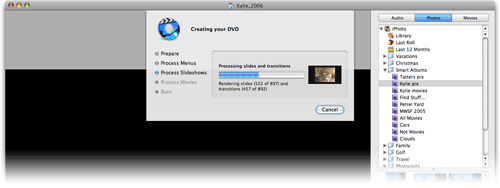
Last week, for the first time since installing iLife '06, I had an excuse to use the newest version of iDVD. In general, I love it. But someone at Apple made one seemingly insanely poor decision involving the "burn progress" screen:

DVD burn image

That's the screen that appears when you start the encode (if not yet done) and burn of a final DVD. In prior versions of iDVD, this area was a separate tab within the main iDVD interface. Now it's been attached to a drop-down sheet, as seen above. Within that sheet is a progress bar and a ticker that counts off how many items have been processed.

So far so good, though a progress dialog in a sheet is a somewhat unique concept. But the other change that came with this new sheet is incredibly unwelcomed--you can no longer hide iDVD in any traditional manner. If you try Comamnd-H with iDVD in the foreground, it just beeps at you. If you switch it to the background and then do "Hide Others" from some other app, everything except iDVD hides, and you'll hear the beep again. I even tried AppleScripting it, with no success.

OK, fine, I thought, I'll just minimize it to the Dock. Nope. That doesn't work either. Argh!

Since the sheet is dynamic, my screensaver won't kick in if it's visible. So it seems you're just plain stuck with the iDVD box onscreen, which is an amazingly poor decision on Apple's part. I finally managed to at least make it non-visible by using Backdrop, a utility that lets you drop a desktop picture (or solid color) down as a layer. So I ran Backdrop, set it to display a nice picture, then switched Backdrop in front of iDVD. iDVD was now hiding behind Backdrop, and since Backdrop takes up the whole screen, I couldn't accidentally activate iDVD by clicking its window. I could still switch to it with Command-Tab, or by clicking its icon in the Dock, of course. But at least it was out of sight, allowing me to more easily work on other things while it rendered away in the background.

Why oh why can't we just have Command-H work again, as it did before?!


Trust me, they won’t even notice…

So let's assume you're a big, powerful, corporation, generally viewed as "customer centric" with very cool and useful products. Sometimes, though, you have the occasional 'what we're they thinking?' moment with a product. Let's further assume your name is, oh, I don't know, how about...Apple? Here's yet another of those moments they seem to have with some regularity:

iPhoto icon

That, in case you're not familiar with it, is the button in iPhoto toolbar that lets you publish a selection of images to your .Mac homepage. Click it, and a wizard comes up that helps you select the theme, layout options, and other features for your photo page. You then click Publish, and presto, your images are published on your .Mac homepage, complete with a very nice slideshow feature. Presto, bango, simple!

So what's the problem? Well, that button (and the wizard it launched) has simply vanished in iPhoto6. There's no discussion about it in the manual, nor in Help, nor in the Read Me, nor in the Knowledge Base. It has simply disappeared into the ether.

Instead of using the handy wizard, you're now supposed to send all your images through iWeb, which will then force you to create an actual site, just to contain what should be a simple slideshow page. Yech. There is a workaround, which I'll write up in detail for macosxhints next week. (Short version: export and resize to 800x600, upload the folder to your iDisk, then use the .Mac homepage to create the photo page.) But the workaround is a far cry from the ease of use of the old wizard.

Now personally, I never used this feature, as I don't use .Mac for my photo pages. However, after recommending the iLife upgrade to my mother, I definitely got an earful about this "new and improved" iPhoto when she found her single most used feature missing in action! Since I feel responsible for the problem she now faces, it's the least I can do to try to help spread the word about this, and hope Apple can see fit to return a basic feature to the application.

I'll probably be writing about why this is a Really Bad Thing on macworld.com next week, but I wanted to get something up about it now, while it was fresh on my mind. Of course, based on Apple's treatment of the discussion I linked to above, I don't have a positive feeling about the chances of this feature's return...

Locked!

Perhaps, though, if enough people make enough noise about it, they can bring back what was a powerful and easy-to-use feature.


Don’t try this at home…or do!

tiger imageI'm working on an article for Macworld that requires installing and removing a number of programs on my Mac--programs that include kernel extensions, frameworks, etc. Since I prefer to keep my core OS X install relatively clean, I created a new 10.4.6 installation on a FireWire drive, and I've been using that for all the software testing.

To make things even easier on myself, I did this all on the PowerBook, so I could continue working on the G5 while the PowerBook was involved in the testing process. When I put the PowerBook to sleep, the FireWire drive stays powered up--since the FirewWire port gets power even when the PowerBook is sleeping. Since the drive makes a bit of noise, and leaving it powered up bothers me, I've taken to unplugging it when the PowerBook is sleeping.

This morning, I woke the PowerBook as usual...but completely forgot it was booted off the FireWire drive, which was peacefully resting next to the PowerBook, unplugged. Uh oh. As soon as I realized what I'd done, I was ready for instant death in OS X. But no such thing happened. Of course, nothing much else happened, either--mouse clicks seemed to be ignored, Command-Tab didn't work, etc. In short, the machine was effectively locked up, though I could move the cursor. This makes sense, given that the system was sitting there without any way to access its operating system.

Since I was sure I was in deep trouble at this point already, I did the only logical thing--I plugged in the FireWire drive and crossed my fingers. Amazingly, it just worked--even the mouse clicks I'd made were 'remembered' and all activated as soon as the drive came back online, and everything was fine from then on.

This may be old news to many of you, but I was pretty impressed that I didn't immediately kill my PowerBook when I woke it up without a boot drive attached.


A maximum look at a mini Mac

Macworld logoAfter receiving my first-ever Intel-powered Mac, a new Core Duo mini, I spent the better part of a week testing out the machine in nearly every aspect of performance I could think up. This started as a three-part series, but based on feedback from the first three parts, we added two additional sections. Here's how the entire series came out:

  1. Setup, configuration and application tests
  2. General observations, audio & video, gaming
  3. Testing methods, Intel transition and conclusions
  4. More RAM, more tests
  5. HD issues and final thoughts

While not at the technical level of an Ars Technica report (I won't even pretend to have the skills to go there), this is a very detailed look at the machine from a somewhat typical user's perspective.


Sometimes I’m SO-DIMM!

Macworld logoEver wondered how to tell if you've bought the wrong brand of RAM for your mini Mac? Thanks to a recent misadventure, I can now tell you exactly how you'll know. Ugh.

Yes, I really did purchase standard-size RAM for the mini, and (even worse than buying it) not even notice that it was way to large to fit inside that small case until I got it home.