Skip to content

Apple Universe

Top-level category for all Apple, Mac, and OS X related topics.


Why didn’t Apple reveal iPad mini sales figures?

First, only Apple knows why they didn't share iPad mini sales figures, so what follows are just my thoughts. Instead of splitting the mini from the fourth-generation iPad, they reported a combined three million units for the iPad mini and fourth generation iPad. So why didn't they split it out? At the highest level, I think (again, only my thoughts) it's as simple as this:

Apple hasn't ever historically split out products by type within a family. In their annual report, they tell you how many Macs, iPods, iPhone, and iPads were sold, and that's it. Reporting a combined "total iPads sold" figure is perfectly in line with past behavior.

Beyond that simple explanation though, I believe that reporting a sales mix would be a lose-lose proposition for Apple. By way of example, here are some theoretical press headlines, based on a few mini/full-size iPad sales splits.

mini: 500,000; iPad: 2,500,000

  • "Apple's new mini a flop; sells only 500K units"
  • "Apple's lost the magic touch post-Jobs; new mini tanks"
  • "New fourth-generation iPad underwhelms; doesn't reach 3mil units mark"

mini: 1,500,000; iPad: 1,500,000

  • "Customers confused by iPad options; pick both equally"
  • "iPad mini cannibalizes iPad sales"
  • "Full size iPad sales impacted by release of mini; margins likely to dip"

mini: 2,500,000; iPad: 500,000

  • "New mini succeeds, at huge cost to full-size iPad"
  • "Margin impact of iPad mini sales success will harm profitability"
  • "iPad mini roars to life; is the full-size iPad dead?"
  • "Full-size iPad on life support after horrid opening weekend"

Clearly there's some (OK, a ton of) exaggeration in these fake headlines, but the summary level is certainly true:

  • If iPad mini sales exceeded iPad sales, then that's a margin hit, and a warning sign on full-size iPad's future.
  • If the sales were equally split, that's still a margin hit, and possibly a sign of customer confusion.
  • If iPad mini sales were substantially under iPad sales, then the new product's a flop, and Apple's lost their touch.

So even ignoring Apple's track record of reporting sales by family, it seems there's no upside to splitting the sales figures. Given the lack of a good interpretation for any split, as a shareholder I'm happy they're reporting a lump sum figure.

Note that this does not make the iPad the equivalent of Amazon's Kindle: Amazon has never, to my recollection, reported any exact Kindle sales figures.



Wireless routers vs. wireless charging

I recently made a snarky tweet about wireless charging:

If you're going to advertise "wireless charging," shouldn't you really offer wireless charging, not "wires to another device charging?"

I've had a few responses along the lines of "well, wireless networking still needs wires, and nobody complains about that!" While this is true, there's a key difference at work here.
[continue reading…]


My horrid Minecraft purchasing experience

Summary version: I bought the Mac version of Minecraft via credit card. This led to my card being put on a fraud hold, and the company that handled the charge asking me to provide personal and private information via email. Ergo, my recommendation: do not use a credit card to purchase Minecraft.


Updated on Sept 5: Skip to the end to see Skrill's response to my refusal to provide identity theft documents.

Detailed version: Recently, my daughter started playing Minecraft with a friend of hers. At first, the iOS version was all she wanted to use, and she played that for quite a while. But then her friend upgraded to the desktop version, and after some discussion with her and figuring out how she could help pay for it, we agreed to buy the Mac version.

So I went to the Minecraft site, and followed the steps to pay by credit card. When you do so, your payment is handled by a company named Skrill (previously Moneybookers). Googling on either of these will provide some interesting tidbits, such as default opting-in customers to casino partners and their blocking the WikiLeaks donation site. I only wish I had Googled before I purchased. In my defense, it's only noted in a small line at the bottom of the payment screen:


If I had gone my homework ahead of time, I would've switched to PayPal, but I didn't.
[continue reading…]


How to use Safari to track The Masters leaderboard

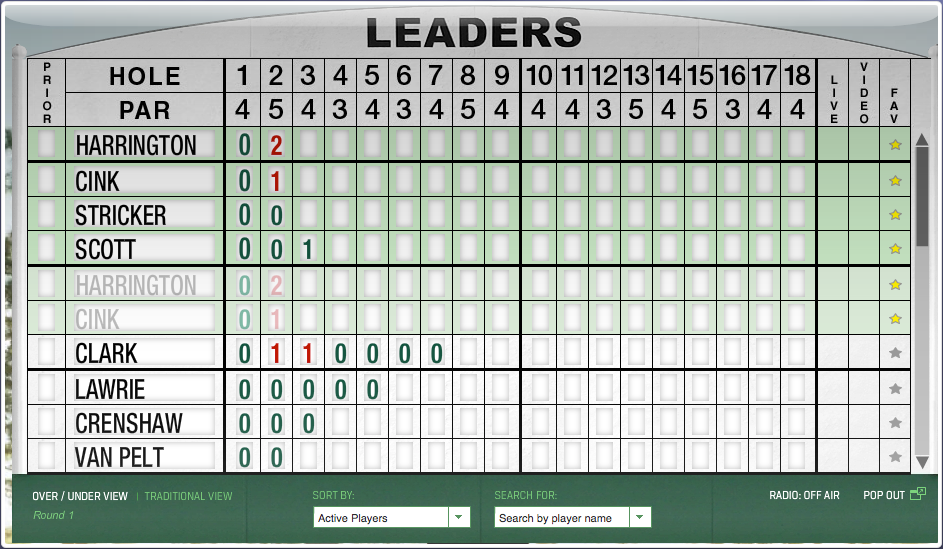
In general, I don't use Safari—mainly because I'm addicted to the add-ons I get with Chrome and Firefox. (Yes, I know Safari has extensions…but they're underpowered and feature limited compared to what you can get in the other browsers.) However, during Masters week, Safari has a key role in my following the tournament, thanks to one key feature: web clip, i.e. Open in Dashboard.

While The Masters has an excellent iPad app, I don't like having the iPad locked into one app for hours at a time. So, to follow the leaderboard, I turn to Safari's Open in Dashboard feature, along with a favorite old Mac OS X Hints hint that allows me to drag widgets out of the Dashboard. Using these two things together, I can view the full Masters leaderboard, floating in a window all its own.

Best of all, the interactivity of the leaderboard is preserved, so I can re-sort the list, expand a player's scores, and do all the other things I can do on the actual leaderboard page.

Note that you'll need some spare monitor space for this trick: the dragged Widget floats over every other window, so it will get in the way if you're using, for instance, an 11" MacBook Air.

If you'd like to do the same, here's how…
[continue reading…]


Wallpapers: iPad 3 and newer

The following wallpapers are 2048x2048 pixels in size, and designed for use on third-generation iPads ("the new iPad"). Note that the images shown in the image sliders below (hover and click to cycle) are low-quality 256×256 JPEG representations of the actual photos; to get the high-quality images, download the entire bundle [29MB] and install only those you wish to use.

Home Screens (5)Lock Screens (24)

License: All photographs in these wallpapers are © Rob Griffiths, and are freely provided for personal use only. You may not include these wallpapers on other sites, nor in any commercial product, without my prior permission. (I hate having to put this here, but prior experience has shown it to be necessary.)


Wallpapers: iPad and iPad 2

The following wallpapers are 1024x1024 pixels in size, and designed for use on the first and second generation iPads. Note that the images shown in the image sliders below (hover and click to cycle) are low-quality 256x256 JPEG representations of the actual photos; to get the high-quality images, download the entire bundle [9MB] and install only those you wish to use.

Home Screens (8)Lock Screens (30)

License: All photographs in these wallpapers are © Rob Griffiths, and are freely provided for personal use only. You may not include these wallpapers on other sites, nor in any commercial product, without my prior permission. (I hate having to put this here, but prior experience has shown it to be necessary.)


Wallpapers: iPhone 4 and iPhone 4S

The following wallpapers are 640x960 pixels in size, and designed for use on the iPhone 4/4S. Home screen images feature a slightly darkened navigation bar (where the paging dots appear), along with a fade-to-darker gradient in the Dock area below the navigation bar.

Note that the images shown in the image sliders below (hover and click to cycle) are low-quality 256×256 JPEG representations of the actual photos; to get the high-quality images, download the entire bundle [6MB] and install only those you wish to use.

Home Screens (9)Lock Screens (32)

License: All photographs in these wallpapers are © Rob Griffiths, and are freely provided for personal use only. You may not include these wallpapers on other sites, nor in any commercial product, without my prior permission. (I hate having to put this here, but prior experience has shown it to be necessary.)


Use Mountain Lion in VMware Fusion with Tools

Note: As of VMWare Fusion 4.1.2, this hack is no longer necessary. I've left it here mainly for those using older versions of Fusion (though you may not be able to install newer Mountain Lion previews on those older versions of Fusion).

If you're a Mac developer with access to OS X Mountain Lion, you might want to use it in a virtual machine. This is simple in VMware Fusion, but if you try to install VMWare Tools, Mountain Lion will kernel panic. Unfortunately, using virtual OS X without VMware Tools installed is painful—no screen resize, captured and laggy mouse, etc. So here's a workaround to get Mountain Lion working with VMware Tools (this assumes you have Mountain Lion already running in a virtual machine):

  1. Make a snapshot of your current setup!
  2. Run the VMWare Tools installer, but do not reboot when it's done. Just leave the installer running onscreen.
  3. Navigate to /Library > Application Support > VMware Tools.
  4. Delete vmmemctl.kext and vmmemctl
  5. Edit (you'll need root power) services.sh in that same directory.
  6. Comment out these two lines (they're shown commented out, via the # in front of each):

  7. Save the edited file, quit the editor, and now (via the still-running Installer) reboot the virtual machine.

The initial reboot may take a long time, but it should work. If it doesn't, you're on your own, as I've now exhausted all my knowledge on the topic.


A workaround for an iPhoto/set desktop picture bug

On both my Mac Pro and my iMac, I've run into a problem where the iPhoto library simply doesn't show up in the Desktop & Screen Saver System Preferences panel (in Mac OS X 10.6.x). Well, sometimes it shows up, but simply as a line reading iPhoto, but without any actual content.

When this happened the first time, I looked in Console and found the following entry for each time I'd tried to load the Desktop tab of the Desktop & Screen Saver panel (reformatted for easier reading):

1/12/12 9:09:36 AM      System Preferences[4134]
**** DesktopPref error: DSKiPhotoRootSource -loadData TIME OUT!!! There something wrong with iLife Media Browser

Googling on that error led to a number of pages, including iLife: Cannot See iPhoto Files in Other iLife Applications on Apple's support site. But after trying everything in that article, I still couldn't see my iPhoto images when trying to set the Desktop picture.
[continue reading…]