Skip to content

Possible new rules for the 2008 Tour de France

The Tour has a drug problem. First it was Patrik Sinkewitz. Then Alexandre Vinokourov. And now, Christian Moreni. Not to mention all those who "retired" or were otherwise dealt with prior to the start of this year's Tour. At the start of this year's event, hopes were high that the doping scandals were behind us. Alas, that's turned out not to be the case. Given that it seems the doping is impossible to control, I have some proposed changes for next year's Tour--changes that will handle the doping issue, as well as make the race more exciting for fans everywhere.

Update: Holy cow, Rasmussen's gone too!

  1. No more drug tests: Clearly they're not working to dissuade anyone from cheating, so let's just open things up. Anything goes--whatever drug you think will help your performance, you're free to give it a shot. The Tour will save millions in expenses, and spare themselves any further embarrassment when yet another big name rider fails a drug test. The other upside is that the tour will go much quicker, as I expect the average pace of the drug-enhanced athletes will be notably quicker than that of previous tours. Lose the rest days, too, as there won't be any need.
  2. Allow physical contact during the race: Think of the best of wrestling, roller derby, NASCAR, and demolition derby combined into one action-packed multi-week event. "And there goes Smithson, over the edge of the Col d'Aubisque, courtesy of a great body check from Peltiere!" 'Yes, Todd, that really was a great check, and the 1,500' vertical drop will really slow Smithson's return to today's route!' Think of all the new fans this will bring to the sport.
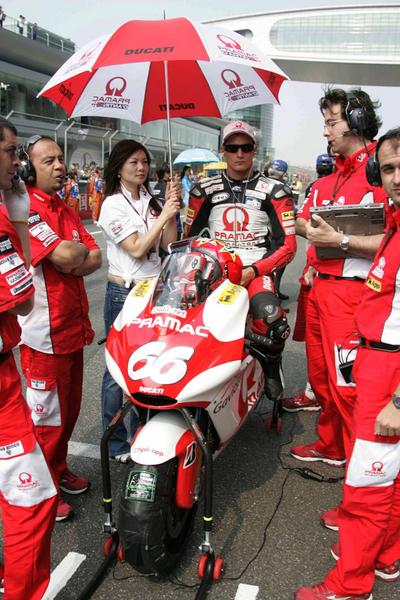
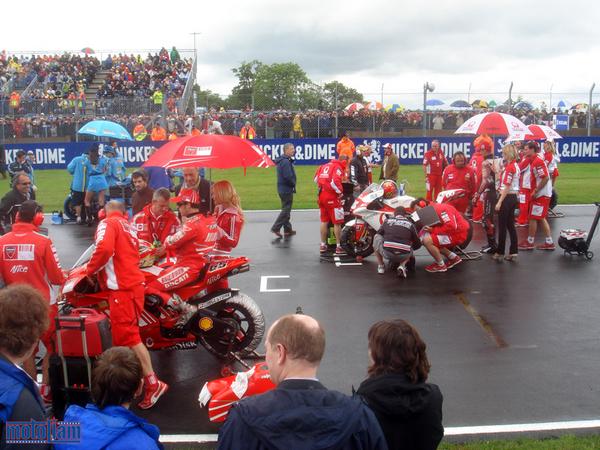
  3. Umbrella girls: Hey, if it works for Moto GP, it can work for the Tour, too. After all, it can get toasty sitting there on the saddle, waiting for the race to start. Each day, anyone in the top 10 in the general classification will be protected from the sun (or the rain) by an umbrella girl.

OK, so the above is in jest. I do enjoy watching the Tour; it's simply an amazing display of endurance, strategy, and outright speed. However, if something isn't done about the doping and drug issues, the sport is in danger of losing what little reputation it has left. It's bad when you begin to doubt any result, not knowing whether you just saw a heroic performance or merely the results of chemistry at work (i.e. Landis and Vinokourov's "great" mountain stages in 2006 and 2007).

I don't have any good suggestions on just how to further clean up cycling, though--perhaps changing the current two-year ban into a lifetime ban? Bigger financial penalties? Disqualification of an entire team if anyone fails a drug test during a race? Whatever it is, it's clear that more changes are needed if the sport is to cleanse itself.


Hasta la vista, hornets!

  • Home

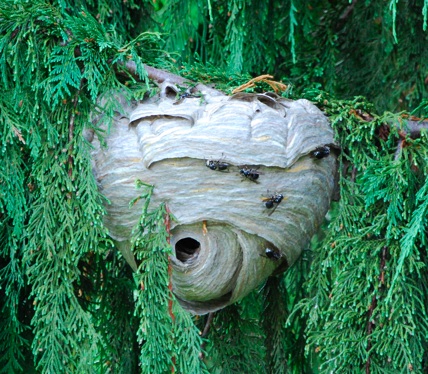
As you may know, we had a not-so-small hornet's nest in a tree in our backyard. On Sunday I called a couple of the national pest control chains, thinking they'd be best equipped to respond quickly. I left messages with both to call me, but as of Monday morning, none had done so. So I did a bit of searching, and found a local company, Pioneer Pest Management (based in Vancouver, Washington). I spoke to someone for about five minutes, and they called back an hour or so later and set up the removal for Tuesday. I never did hear back from one of the national chains, and the other actually called me back about 30 minutes ago. Too bad!

On Tuesday afternoon, Don from Pioneer arrived to deal with the hornet's nest. I cowered behind our patio door, opening it just enough to take some pictures of the process. I put them together in a small album that shows each step in the nest's removal--just click the first image and then use the slideshow controls to step through the rest. The captions on the larger image explain what's happening at each step.

He was here for about 40 minutes overall, and it cost $99--a bargain in my book when I saw everything he did to remove the nest. They also include a 30 day warranty, so if we have another nest crop up in that immediate area (meaning they somehow didn't get the queen), they'll come back and remove it for free. Sure, I probably could've done this myself...but there are some jobs I'm quite happy to leave to the experts!


Things you’d rather not see in the backyard

wasp image

We were out in the yard about four days ago, and if this thing was there, I sure didn't see it--and it's hard to miss, hanging out in the open about 10' from our kids' play structure. And no, I have no dreams of YouTube infamy, so I won't be attempting any creative destruction methods tonight. Instead, I'll call the experts tomorrow and let them take care of it. The nest is at least a foot across, if not closer to two.

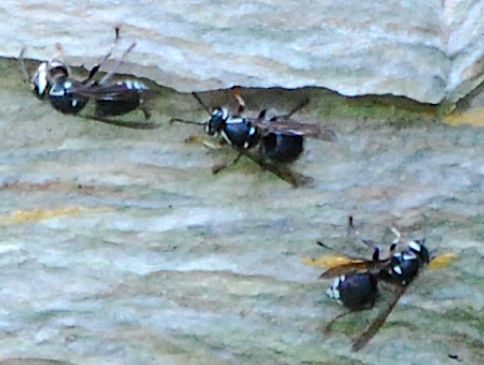
I'm really not sure what they are, though I think they're members of the wasp family. If anyone wants to hazard a guess, here's a closeup of the critters.

Ugh. Bees and wasps. Two of my least favorite things, at least in mass concentrations in my own backyard!


Ten of my favorite iPhone things

Macworld logoEver since the first time I saw (but couldn't touch) the iPhone, I've sort of become Macworld's resident iPhone curmudgeon. Long before it was ever released, I came up with a list of shortcomings. Then, at the Worldwide Developers Conference last month, I was unhappy with the announced support for third-party web pages, er, apps. And finally, once the iPhone was out and I'd had the chance to use it, I put together a list of 10 iPhone apps—real apps—that I would find most useful on my iPhone.
If you were to simply look at my body of iPhone work, you might conclude I hate the iPhone, and would rather be dropped in the midst of a swarm of Africanized honey bees than be forced to use the thing. Surprisingly, perhaps as much to me as to you, that's not the case. For all the things it's lacking, the iPhone really does get quite a few things right—and it's the things it does oh so well that keep me coming back to it, despite its shortcomings.

Read my Macworld blog entry, Ten of my favorite iPhone things, for the rest of the story...


This enhancement is not so transparent

Macworld logoWhen Steve Jobs demoed Leopard at the Worldwide Developers Conference in June, one of the new features included in the revised Desktop is a semi-transparent menu bar. It's clearly visible in the streaming video of the keynote, and in many of the screenshots on Apple's Leopard pages.

Now, I'm all for fancy effects, at least where it makes sense and might actually help the user. But in this case, I don't think it makes sense—look at many of Apple's own screenshots, and you'll see that certain entries in the menu bar are quite hard to read, owing to the bad mix of black text, a semi-transparent background, and a dark background image. Instead of being useful, it seems to me that—based on what's been shown, at least—the semi-transparent menu bar will do nothing but annoy me when I try to find a menu item against a non-cooperative background image. Of course, I won't know for sure until October when Leopard ships and I can test (and discuss) how well it does or doesn't work.

Read my Macworld blog entry, This enhancement is not so transparent, for the rest of the story...


More bad pictures

It was my birthday last Sunday, and my wife gave me a free pass to go out and about for a good chunk of the day while she watched the girls. So I packed up my new camera, and headed out to the Columbia River Gorge via the back roads. I drove a really big loop--about 250 miles total--up the Washington side of the Gorge on highway 14, then up highway 141 to Trout Lake. I followed 141 until the pavement turned into gravel, then turned around--my little MR2 is quite fun to drive, but "good ground clearance" is not on its list of attributes. Along the way, I stopped occasionally to snap some landscape photos.

Route 141 ends pretty much directly across from Hood River, and just down the road a touch is one of the more popular launching spots for Gorge windsurfers--as you can see by the number of vehicles in this Google Maps overhead view. So I took my camera and went and sat near the water's edge for a while, taking pictures of the action with the 300mm zoom. The Gorge is one of the most popular windsurfing spots in the country, and the wind was howling on Sunday morning--there must've been close to 100 windsurfers out on the water. I was hoping to see more freestyle wave jumpers, but alas, I only caught one shot of anyone in the air.

As you can tell by the images, I'm still pretty bad at this DSLR stuff. I'm having fun learning, but I just haven't had enough time to get out and shoot pictures while experimenting with the many modes the camera offers. At least we have some wonderful scenery around here that prevents the pictures from being completely terrible. (And next time, I'll remember to set the camera in RAW mode, so I can do more post-shot image correction when I get home!)


What computer should I buy?

Macworld logoJoe: I'm in the market for a new computer. Any suggestions?

Jane: Buy a Mac.

Joe: But wait; I haven't told you anything about my requirements!

Jane: Ah, yes, you're right. Sorry about that. Are you a hard-core gamer who needs the absolute latest in system and video card hardware?

Joe: No, not at all.

Jane: OK. Do you enjoy building your own computers, taking them apart, putting them together, replacing parts, and that kind of thing?

Joe: No, not at all.

Jane: OK, do you use any software or hardware has any sort of strange hardware requirements, like an ancient serial port security dongle, for instance?

Joe: No, not at all.

Jane: OK. Buy a Mac.

Read my Macworld blog entry, What computer should I buy?, for the rest of the story...


How to upgrade the Apple TV’s hard drive

Back in March, I purchased one of the original 40GB Apple TV units, and put it to use in our living room on the big screen TV. It worked fine, but 40GB was just too confining--between music and photos, I had over 40GB of data, not even counting movies or other video stuff. As a result, if I wanted access to everything from the Apple TV, I had to make sure the Mac Pro was awake to stream more content to the Apple TV. This got old fast, so I finally forced myself to upgrade the hard drive in the Apple TV today.

Overall, the process was relatively simple. I'm going to document the steps here, just in case the article I relied upon vanishes in the future. If you're going to undertake this project yourself, you'll need the following:

  • Towel: to place the top side of the Apple TV onto after you've opened it.
  • Torx screwdrivers: sizes 8 and 10, needed to open the case and release the hard drive.
  • 2.5" ATA laptop hard drive: Make sure it's not a SATA drive; I went with this 120GB Fujitsu, though I bought mine at Fry's.
  • 2.5" external drive enclosure: I bought this unit at the local PC Club store. I wanted a FireWire case, not just USB2, as I've never been impressed with USB2 speeds on OS X. Now that I'm done with the project, the Apple TV's old 40GB drive is living in the enclosure.

The rest of the process is documented below; read on and modify at your own risk!
[continue reading…]


iPhone, therefore iTap and tap and…

Macworld logoAh, morning—time to check the overnight e-mail that came in over the iPhone. Let's get to work!

Press the iPhone's power button. Tap the screen (that's screen tap #1) and drag the unlock slider. Press the Home button to get back to the main screen from whatever app I was using last on the iPhone. Tap (#2) the Mail icon. Oops, I left the iPhone reading a message the last time I was in Mail. Tap three times (#3, #4, #5) to get back to the list of accounts.

It's on this screen where you'll notice a big change from OS X's Mail program. In OS X's Mail application, the top-level folder is the global Inbox, and then within that folder, each of your accounts is listed separately, letting you easily view all of your new e-mail at once by just selecting the top level Inbox folder. On the iPhone, however, there is no global Inbox. Instead, the main Mail screen just shows a list of your accounts. You have to open each account to see the Inbox (and Trash and any other folders associated with that account).

Read my Macworld blog entry, iPhone, therefore iTap and tap and..., for the rest of the story...


Ten future iPhone apps

Macworld logoI've lamented on the lack of third-party access to the iPhone, and now, with quite a few actual usage hours on my belt, my lament has become a plea: please, Apple, if you're not going to do some of these things yourself, let third parties provide real solutions! Exactly what am I talking about? Well, here's a list I've been building of the Top 10 Missing iPhone Apps. I think third parties could do a great job at providing some or all of these solutions. (If Apple wants to do it, that'd be great, too, but I'd really like someone to make them available, and sooner rather than later.)

So here, in increasing order of importance, are the 10 applications that I think would be a perfect fit with the iPhone and its current application suite.

Read my Macworld blog entry, Ten future iPhone apps, for the rest of the story...