Skip to content

Technology

Entries related to techology in general…

Why context matters

I receive a lot of junk mail, most of which is captured by various levels of filters. But sometimes, some messages make it through the traps, such as this one which came in last night:

I would like to buy advertising on your web page:

http://forums.macosxhints.com/showthread.php?t=2051.

The ad would be for an airport parking web site and consist of a couple of lines of text with links to the parking site. I can pay $35 for the ad via PayPal, or send you a check. Would you be interested?

Yes, that's right -- this person would love to run an advert for his airport parking lot website right in the middle of our forum thread titled "Stranded at the Airport," which opens this way:

I am having no luck setting up my original Airport and WaveLAN silver card on my W.Steet 266. I am using the drivers I got with the card on the OWC site...

It seems this particular spambot's context parser is incredibly basic (if (site or post) contains word 'airport,' then send advert request message). But really, I'm not complainaing about the parser at all: it gave me a little chuckle before I pressed the Junk button!


When updates overlap

On Thursday of this week, we had two interesting software update announcements:

  1. Microsoft released an update to Vista that fixes a problem with Apple's iPod corrupting when ejected.
  2. Apple released the Boot Camp 1.2 beta, which adds support for Microsoft Vista (among other new improvements).

So on the same day, Microsoft patched their OS to prevent Apple's iPods from corrupting on disconnect, and Apple released an update to enable its customers to use Microsoft's Vista on Intel-powered Macs.

I just found it somewhat humorous that both Microsoft and Apple released patches to fix issues with the other's products on the same day...and I'm thrilled that it happened, as it shows that companies realize how important it is for our hardware and software to play well with others. (My own Vista upgrade is in the mail, so I'll see how well the updated Boot Camp works in the near future.)


Random header images for WordPress

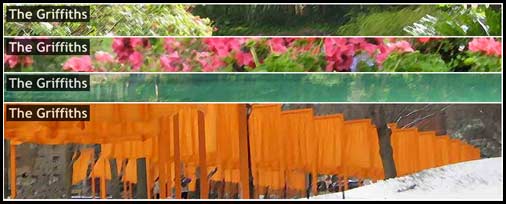
I've finally migrated my family's site over to the latest version of WordPress, and installed pretty much the same batch of plug-ins and widgets as I use here. However, I wanted something else, too--a randomly-selected image for the header of the site that changes each time the page is loaded, as seen in these four sample pictures:

montage

(The header images are just sections I've snipped out of photos we've taken, with an artsy Photoshop filter of some sort applied.)

I searched the web, and there are a few plug-ins that offer this ability, but they came either too feature-rich, or required some additional JavaScript to work properly. I wanted the most simple, basic, and functional header image rotation solution I could find...so I wrote my own, which required all of two lines of code. I'm posting it here so that (a) I remember how I did it, and (b) in case anyone else wants a simple solution, they'll be able to find it with some help from Google (our family's site is access restricted, so posting it there wouldn't do much good...and it would confuse my relatives, who are used to only seeing pictures of our kids there!)
[continue reading…]


My first WordPress plug-in: custom registration

Over the last couple of evenings, I created my first-ever WordPress plug-in, which I wrote to make it easier to customize the WordPress registration (and login) screen. As distributed, the stock version of WordPress uses a really not-very-nice registration screen--it features the WordPress logo (embedded in a background image), and links back to the WordPress site. If you wish to modify the login screen, you have to change some files in the WordPress core--and that means that every time you update, you have to remember to redo those customizations. Far from ideal...

So I took some time to read about creating WordPress plug-ins, then studied up on the available hooks to see if what I wanted to do was possible. The good news is that, as of WordPress 2.1, it was possible--and quite simple (even for my very-limited PHP skills).

After a few error-filled attempts, I wound up with a working plug-in that creates a nicely-customized registration screen, all without changing any core WordPress code--you can see the results on the registration page. (This is roughly what it looked like under WordPress 2.0, but I created that page by modifying the core WordPress files.)

If anyone wants this plug-in, feel free to grab it (36KB download)--there are some basic instructions in the customreg.php file, but I wouldn't describe it as heavily documented. Also, I'm not sure how well it works with the default login screen, as I use the King Login sidebar widget for login in the sidebar. What I'd really like to do is figure out how to display the registration form with the header, sidebar, and footer--but after some basic investigation, I think that project is beyond my skills. So for now, this is officially good enough.


Technology purchasing: A 10 year retrospective

I've been playing around with technology for longer than I care to remember--I blame my father for bringing home that first Commodore PET way back in 1979. Ever since then, it seems, I've had this unhealthy fascination for pretty much everything on the bleeding edge of technology. I clearly wouldn't have my current job without this interest in technology, so I guess I'm quite thankful that things worked out the way they did.

However, such a hobby does have its costs--literally. I was cleaning out our cabinets the other day, and came across my binder of technology receipts. This is where I keep the receipts for any "substantial" hardware or software purchases, and it tends to be something of a roach motel for receipts: they check in, but they never check out.

So I thought I'd take some time and cull the receipts for things I no longer own. Going through the binder is quite the revelation--both on how much I spent on technology (hey, I was young, single, and careless...now I'm just careless!), but on how much the technology itself actually cost. I scanned a few bits from some of the more interesting receipts (click any receipt for a larger version).

Read on for a walk down memory lane...followed by a look at what those items would cost in today's dollars, as well as what you could get for that some money today!

[continue reading…]


For Sale: Bill Gates’ signature, $40

Vista imageDid you know that you can buy a version of Vista signed by the one and only Bill Gates? That's right; the Microsoft Windows Vista Ultimate UPGRADE Limited Numbered Signature Edition is signed by Bill himself. As seen at the above Amazon link, it's $289.99 (but currently out of stock; I guess Bill must sign slowly!). On that same page, however, they direct you to the Microsoft Windows Vista Ultimate UPGRADE, which is in stock, for $249.99.

Ergo, having Bill's signature on your Vista box will cost you $40. Yikes. The guy's already worth something north of $40 billion, and he wants $40 more from those who desire his signature?! Wonder if those paying the $40 will see their investments pay off on eBay in 20 years or so? Sad to say, they probably will...

As much as I like Apple and OS X, and admire Steve Jobs, there's no way I'd pay any amount extra to have an OS X 10.5 Leopard box signed by Steve himself -- and in this case, I think sending $249.99 to Microsoft is already way more than sufficient, especially given that I expect Leopard will be roughly half that cost!

Thanks to Kirk for pointing me to this silly signed edition of Vista...


Question for a CSS wizard…

In writing this post, I wanted to include a centered image with four lines of text off to the side, like this:

centered block image

As someone who is struggling to move away from table-based layouts, I did my best to create that structure using only CSS. But after 30 minutes of fighting with divs, floats, clears, aligns, and google searches, I gave up and whipped out the table code. Two minutes later, the table was done and published. Yes, I gave up--I didn't want to spend my entire lunch hour on five lines of text!

My question is this: can someone point me to a site that explains exactly how to create the above look using CSS? All pointers appreciated.


A little (simulated) flying fun…

If you've been reading here much, or have ever seen me speak, you know that I'm somewhat of an aviation fan. I'm an instrument-rated private pilot (though not current, thanks to family, money, and Oregon weather!), and X-Plane is one of my favorite diversions. I love being able to pilot aircraft I'll never have the chance to fly here in reality, and to fly in weather conditions that I wouldn't dare to go near in a real airplane. X-Plane also features real-world weather, so I can fly around the Portland area in conditions that closely match what I see out the office window.

Yesterday, it was foggy here. Really foggy. Almost all day. So during lunch, I took the Nike LearJet (OK, the X-Plane version thereof) out from Portland International for a little spin. Take-off in foggy conditions is relatively straightforward--full thrust, max rate of climb, maintain runway heading (instrument departure procedure? Nah!), and I broke out into the blue skies above at about 3,500 feet above the ground. I flew off to a clearer airport for a couple touch-and-goes, then headed back to Portland. Given the fog, an instrument approach was definitely required. I chose the ILS for runway 28R, and maneuvered the plane towards the final approach course.

Then I got lazy, something I couldn't ever do when flying instruments in the Piper Warrior I trained in: I set up a fully-coupled autopilot approach, including auto-throttles. As pilot, my job was now reduced to system monitor--I only had to choose the desired airspeed on the autopilot panel, remember to drop the flaps and gear, monitor the system's progress, and then the autopilot would take care of the rest. Just for fun, I used SnapzPro to record the approach, from the ILS intercept to touchdown, and uploaded them in case anyone wants to see X-Plane, or what a really foggy approach might look like.
[continue reading…]


Timing is everything!

It figures; just days after getting everything together and uploading the first major revision to Robservatory, WordPress goes off and releases version 2.1! Sigh.

I intsalled version 2.1 on my local copy of the site, then ran the upgrader. That portion of the process went quite well. However, in trying to re-enable my collection of plug-ins and widgets, I found that many of them don't seem to get along with WordPress 2.1 at all--enabling certain plug-ins completely breaks the site's display, for instance.

So, for now, I'll be keeping the site on the 2.0.7 release until more of the plug-ins are updated.


Behind the scenes: plug-ins and widgets

A couple of people emailed me, asking about the collection of widgets and plug-ins I'm using on the site. I've also found that the links in the Plugins page of WordPress' management screen are often incorrect, so documenting the updated URLs seems like a smart thing to do.

So without further ado, you'll find the list just below the (now expanding-in-place!) jump...
[continue reading…]